.svg)

Most popular



Subscribe to our blog
Most recent

Teaching yearbook: digital escape room
Unlock the mysteries of yearbooking with this classroom-ready lesson plan. We designed this yearbook escape room to kick off the school year or to serve as an informal assessment. With yearbook vocabulary at the core of this activity, students progress through a task to “unlock” another. When all four keys are complete and correct, they unscramble the final code. Cue crowd cheering noise.
Escape room activities
Students progress through the following four activities to stretch their knowledge and application of yearbook terms.
Task 1: Yearbook lexicon
Find words related to yearbook terms within the jumbled letters horizontally, vertically, and diagonally. After finding all 21 words, the unused letters in the grid will spell out a hidden message which will unlock the next stage of the escape room.
Task 2: Emoji combinations
Analyze the emojis' meaning in the context of yearbook-related activities and concepts. After entering all the words, students will find a three-digit code used to unlock the next task.
Task 3: Yearbook riddles
Solve six riddles based on the who, what, and when of yearbook creation. Once solved, a hidden word will reveal the next clue.
Task 4: Identification station
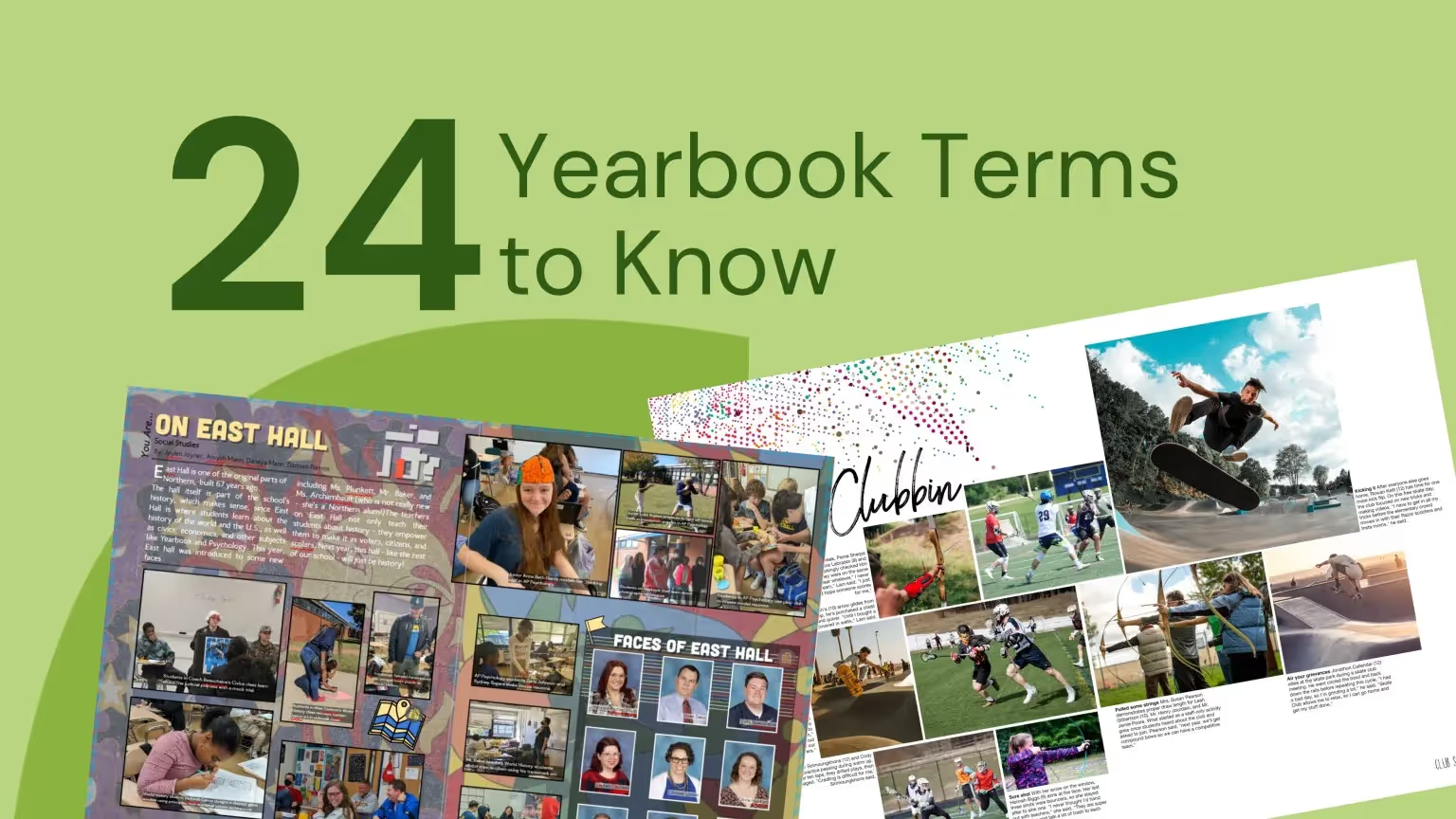
Examine two yearbook spreads and identify the elements of design and yearbook hierarchy. Students’ answers will produce the last three letters needed to unlock the final puzzle.

Teacher instructions
This electronic escape room works best in student pairs. Students enter their responses on a self-checking Google Form to advance through the activity while collecting letters to unscramble for the final code. (This also works well if you have a sub covering your class and want to leave a low-prep, meaningful activity.)
Because you know your class best, you can hand out tasks one-by-one or distribute them in a packet. Both require the trifecta of teamwork, collaboration, and content knowledge to be successful.
To use the yearbook escape room,
- Download the task cards; print one copy per group of 2-3 students
- Share this Google Form with your students via Google Classroom or email.
The Google Form is how answers are vetted, and is a necessary component. If you would like to manually verify answers, please contact marketing@treering.com for the teacher key.

When the escape room is finished
Determine the goal: completion and material mastery or friendly competition? Based on the desired outcome, you may want to have directions ready for one of the following activities.
By extending this yearbook-related activity, students can further develop and demonstrate their skills in communication, utilizing technology tools, and applying visual arts principles. Extension ideas include creating layouts, capturing and editing photos, and using digital tools for design and presentation.
Another consideration is how, and if, you will grade the escape room activity. Some teachers award points for completion and bonus points for the first, second, and third-place teams.
Educational standards for this escape room activity
The yearbook-related activity can meet several national standards. We’ve listed some below; please note specific standards may vary depending on the framework or guidelines followed by your educational institution or state. Your district curriculum or CTE coordinator might help you align your usage of the yearbook escape room with the appropriate standards and objectives in your specific context.
Common Core State Standards (CCSS) for English Language Arts
- CCSS.ELA-Literacy.RI.7.4: Determine the meaning of words and phrases as they are used in a text, including figurative, connotative, and technical meanings; analyze the impact of specific word choices on meaning and tone.
- CCSS.ELA-Literacy.SL.9-10.1: Initiate and participate effectively in a range of collaborative discussions (one-on-one, in groups, and teacher-led) with diverse partners on grades 9-10 topics, texts, and issues, building on others' ideas and expressing their own clearly and persuasively.
National Association of State Directors of Career Technical Education Consortium (NASDCTEc) - Communication:
- Standard: Apply verbal, nonverbal, written, and visual communication techniques to create, express, and interpret information and ideas.
International Society for Technology in Education (ISTE) - Technology Operations and Concepts:
- Standard: Use digital tools to gather, evaluate, and use information.
- Standard: Use technology tools to enhance learning, increase productivity, and promote creativity.
National Core Arts Standards - Visual Arts:
- Standard: Generate and conceptualize artistic ideas and work.
- Standard: Organize and develop artistic ideas and work.
- Standard: Reflect on and evaluate artistic work.
Remember, our primary goal in creating this escape room is to foster collaboration, critical thinking, and problem-solving skills within your yearbook students. Collaborate, listen, enjoy the adventure, and be sure to tag @treering on Facebook and @treeringcorp on Instagram.

How flexible is your yearbook?
As the student rising to the call of leadership, the teacher who is a champion of her students, or the parent hero stepping in, you should have a say in your schedule. You can work out on-demand, watch TV on-demand, why not publish on-demand? Adhering to multiple deadlines while committing to book sales and page counts is impossible when you don't even know how many events will take place this year. At Treering, we believe that schools, parents, and students should be given the flexibility and freedom to build a yearbook without the stress of ANY commitments.
Flexible deadlines: finish your book when you're Ready
With Treering there's only one deadline: the day you want to finish your book. Three weeks from that day, your books will arrive to your students. Period. Want to change that date, no problem. The date can be moved at any time, to any date you need. The choice is yours.
Flexible distribution: ship your yearbooks to your school or directly to each student's home
We offer free sorting (alphabetical, by grade, by classroom) and free bulk shipping to the school. If you want more time to capture prom or graduation, you can have the books shipped directly to each student's home for a flat-rate shipping fee. It's your choice!

Flexible details: decrease (or increase) your pages
Should something change and you need to decrease your page count, we will let you do that anytime before you hit print ready! Need to cancel your school's book altogether (we hope not), you can do that without worrying about incurring any fees. Your school never pays us anything, and your parents only pay if they decide to buy a book.
No contracts and no minimums mean no worries and no stress.
Flexible collaboration: collect content from your school community
For the sake of inclusivity and to capture all aspects of school, it's important to get photos and help from your community. (Repeat after us: "I can't do it all!") Our shared folders and mobile app make it extremely easy to collect content from your school. By making it simple for everyone to submit photos, you're guaranteed to have everything you need to build a unique book this and every year.
Flexible Designing: thousands of innovative page ideas at your fingertips
Complete book looks, including layouts, fonts, graphics, and color palettes, are free for all Treering customers. Don't worry, they are flexible enough that you can make them even more to your liking. You can even upload your own spreads.
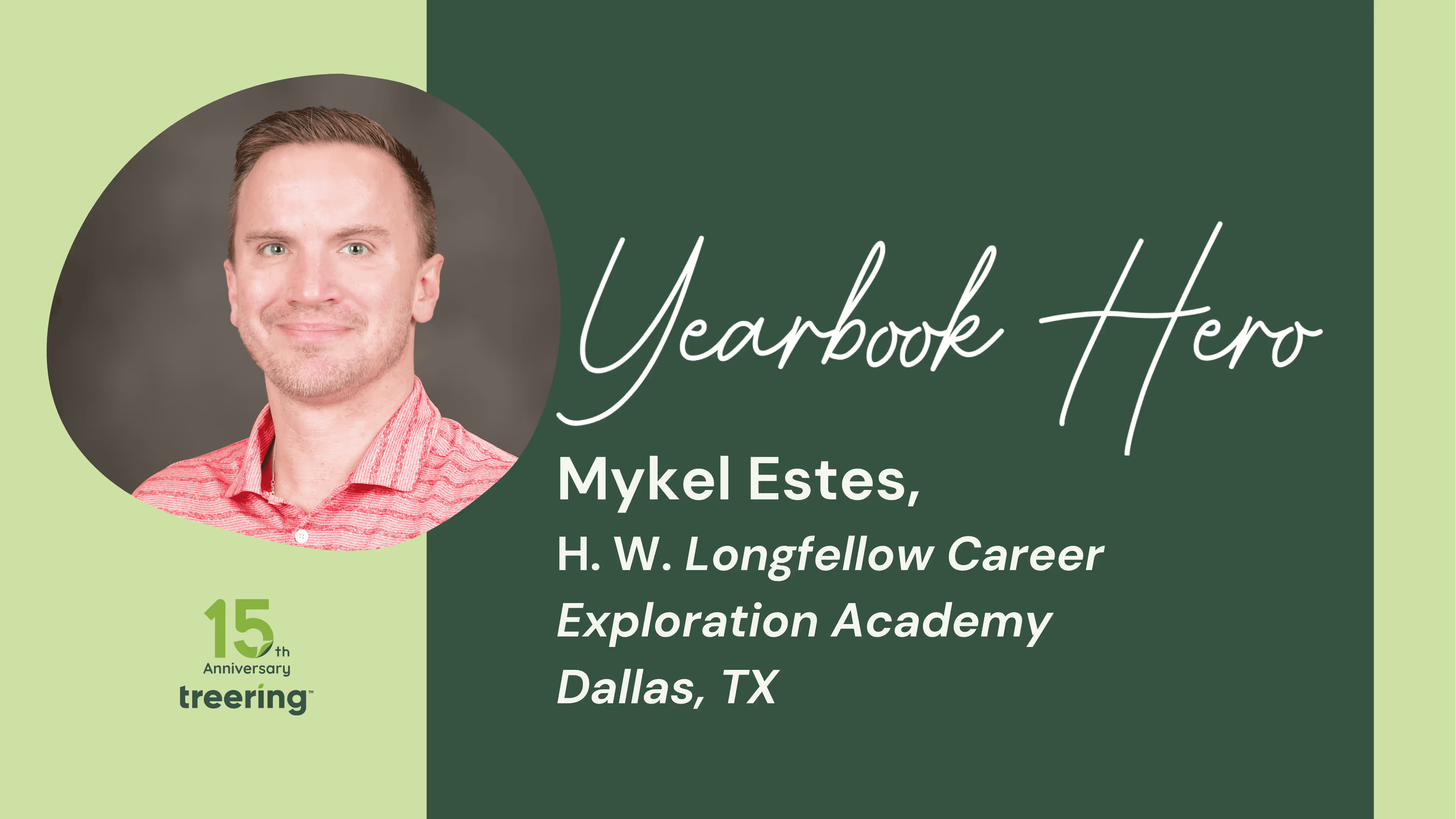
Yearbook Hero Mykel Estes modernizes memories
Treering Yearbook Heroes is a monthly feature focusing on yearbook tips and tricks.
For months, Mykel Estes was just a cool teacher we followed on X. Known in Dallas ISD for innovation and student engagement, the former Teacher of the Year (2023-2024) created a bracket so students could vote on their favorite yearbook theme. Estes revealed the theme at Longfellow Career Exploration Academy's first yearbook signing party in a decade.
A reading and language arts teacher, Estes became the yearbook adviser after a staffing change. Instead of taking the proverbial reins, he rewrote the book.
How was your first yearbook a reboot for the school?
There are some things that they've always done, and this is a new iteration of the yearbook. We switched to Treering and even changed photography teams. Everything was new. And since I did take it on solo, I needed that. I needed that ability to streamline.
The previous books felt like a faculty and staff heirloom, when really, this is for students.
How do you keep the yearbook student-centric when you’re a solo adviser?
I started with a bunch of y'all's resources: the ladder, dos and don’ts, and Camp Yearbook. And I gave the sample package I received to the outgoing eighth-graders and told them, "Look through here."
It reminded me of those old school toy catalogs. They marked it up. I told them nothing was off the table.
Their suggestions became the collective basis for how I started the book. It was all over the place. The themes constantly changed, and that's when I had the “This isn't my yearbook” moment.
The March Madness-style "Theme Throwdown" bracket was how I ensured the theme would resonate with current students. What I like, and what older students liked, may not resonate with our current students. This was one way to get buy-in.
What happened when the students at Longfellow received the yearbook before school was out?
The yearbook's a really exciting kind of moment in a student's academic year, and from the pandemic on, the yearbook never arrived before the students left. There was a palpable disappointment in the students not being able to have that shared experience of looking for themselves in the yearbook and signing one another’s.
We do a big eighth-grade celebration week to commemorate the last time the cohort is together. (We feed into roughly 20 different high schools as a magnet school.) I really leaned into that nostalgia.
The eighth graders got them first. Again, leaning hard into that's their last time here. They get it first. Then we subsequently rolled it out to the lower grade levels.
What’s next for the yearbook?
We are a career academy. We have a journalism class coming up. We have a photojournalism class coming up. Those two classes will eventually marry in a year's time or so and be the production team for the yearbook.
Until then, I want to add student voices through quotes and make sure every kid is in the book. Every kid should at least be in the portraits. I want to expand that to a classroom and activity photo.
Treering’s glow up
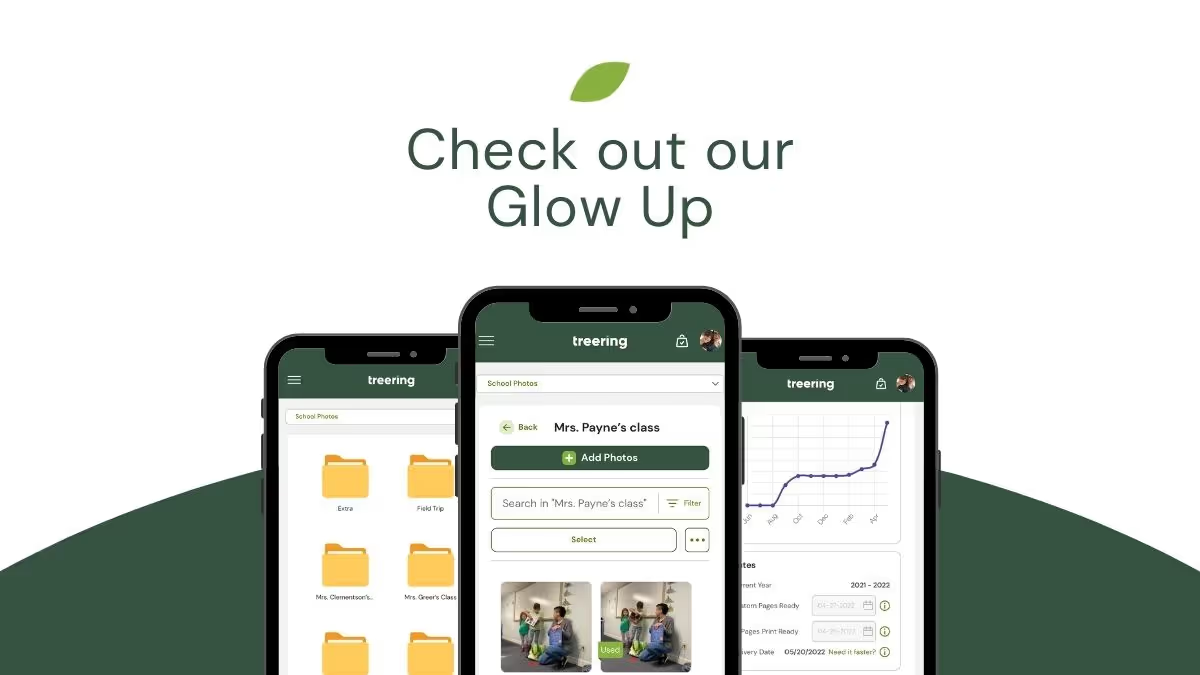
Things are changing at Treering: you may have noticed the new look of the help center, blog, and website. This visual polish includes sleeker graphics, universal icons, and a more tranquil and optimistic green. Really: it’s the digital equivalent of getting our braces removed.
What hasn’t changed is who we are: your partners for a flexible, stress-free yearbook publishing experience. You are still in control of deadlines, page count, book content, yearbook quantities, editing permissions, and how your yearbooks are sorted in your shipment.
Not just cosmetic
Yearbook editors, advisers, and coordinators told us they wanted
- To enter the spread designer with fewer clicks
- More space to edit
- Time to prepare yearbook details before selling the book
- A way to donate books
Menus
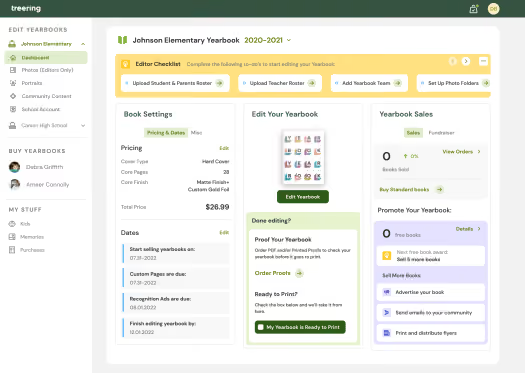
Instead of a deep navigation (think: click, a new page, click, a new page, click, do your thing, save), we’ve kept chief editor controls centralized on the Dashboard. And while you're in the editor, you can now focus 100% on layout and design.
While adding photos to a template, do you have an idea for an additional spread? With the paginal navigation up top, you can preview thumbnails of your book and navigate throughout. Using the top navigation, you can also make changes to styles, move pages, and access help articles.
Yearbook editor
The good news is all your favorites— templates, auto layout, and alignment tools—still exist.
The better news: since the left and right menus have merged, you have more space to edit. The zoom tool is faster and smoother making precision edits easier.
More time, more control
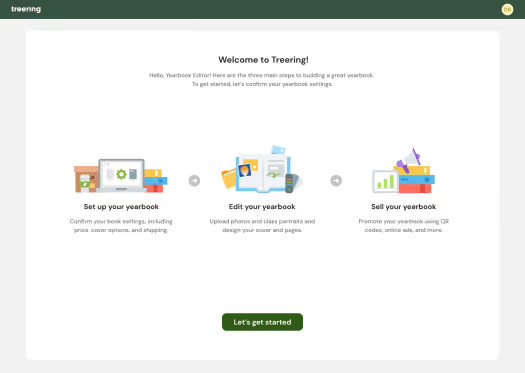
Now you can begin selling yearbooks on your school's schedule by setting the date of the sale. We had many editors ask for more time to determine their ladder, page count, and fundraiser. When you’re ready, or on our universal go-live date of October 15, 2022, you can launch the online sales platform.
We recommend taking advantage of the early yearbook sales incentives and discounts.
Book donation
This option launched in the spring for a trial and the positive feedback made it a keeper. When editors enable this option, parents can purchase an additional book to donate to the school. Some advisers gift them to teachers, and others distribute them to students in need.
We know change can be scary. When Treering entered the yearbook space toting a print-on-demand, no contract yearbook solution, schools were wary of this too-good-to-be-true proposition. We're glad you're on this journey with us.

Teaching yearbook: 60 bell ringers
How different would your yearbook class or club be if you had ten minutes at the start to focus your team on the day's objectives and transition them from hallway to classroom mode? Working with middle and high school yearbook advisers, we created 60 Bell Ringers to do just this. Use the prompts below to teach and strengthen skills by dropping them in Google Classroom, displaying them in a slide deck, or writing them on the board.
- Why Do You Need Bell Ringers for Yearbook?
- Teambuilding
- Bell Ringers to Teach Writing
- What’s Happening Here?
- Brainstorming Bell Ringers
- Use These Bell Ringers to Model a Yearbook Critique
- Writing Prompts for Reflection
Why do you need bell ringers for yearbook?
While we often pump the intro to design and copywriting lessons the first few weeks of the school year, the overwhelming nature of organizing photo shoots, liaising with club sponsors or athletic coaches and scheduling picture day take precedence. (Validation: those things are vital for the success of your yearbook–keep doing them!)

If you’re submitting documentation for WASC or your admin, bell ringers activate learning by giving students a quick thought-provoking question, problem-solving exercise, or yearbook critique activity. Some bell ringers encourage critical thinking, and others serve as an anticipatory activity because they stimulate students’ curiosity.
TLDR? Use bell ringers to set the tone.
Teambuilding
Yes, you’ll have your group games, yearbook weddings, and human knots. And no, that’s not all you’ll need to forge connections and build trust. These prompts help students share and learn about each other’s interests, preferences, and experiences and teach empathy for those they’ll interview in the weeks ahead.
- “Emoji Introduction”: Share three emojis that represent different aspects of your life. (Afterward, students share their emojis with the class and explain their choices, providing insights into their personalities and experiences.)
- “Time Capsule”: Describe five things you would put in a time capsule for yearbook students 10 years from now.
- “Do-Over”: What is one thing you wish you had done differently this year and why?
- “Influencer”: Share a book, movie, or song that profoundly impacted you and explain why it resonated with you. (If appropriate, you may want to create a yearbook team playlist for motivation, or when it’s time to celebrate good times… come on!)
- “Self-Promotion”: What role does the yearbook play in fostering a sense of community and collective identity within the school? How are you contributing?
- “Dear Younger Me”: Reflect on your overall personal growth and development throughout your time on the yearbook staff and how it has shaped you as an individual. What did you wish you knew at the start of the year?
- “Mind Shift”: Describe a class or subject that you initially didn’t enjoy but ended up loving and why your perspective changed.
- “Second Life”: What is something you are proud of accomplishing outside of academics this year?

Bell ringers to teach writing
Quick math lesson: one five-minute writing bell ringer debrief a week will give your students an additional 200 minutes of writing practice. With these short writing tasks, advisers can also provide more immediate feedback to students when they share their work. Don’t think of it as an informal assessment that requires a line item in the grade book, but rather as facilitating continuous growth.
Ledes and captions
- What is the importance of a compelling lede in a piece of writing? Share an example of a lead that successfully captures your attention and explain why it stands out to you.
- Think about a memorable article or story you’ve read recently. Analyze the lede and discuss how it effectively hooks the reader and sets the tone for the rest of the piece.
- Choose a recent photo from your phone and write three possible ledes: one pun, one using your theme, and one three-word attention-grabber.
- Reflect on a nearly finished spread and revise at least one lede. Share how it improved the overall impact of your writing.
Feature stories
- Think about a significant moment or event from your school year that you believe would make a great yearbook story. Outline the key elements of the story, including the people involved, the emotions experienced, and the impact it had on the school community.
- List potential angles, interview questions, and storytelling techniques you would employ for a personality profile for a student you do not know.
- Interview another yearbook student about a personal experience or accomplishment from this school year. Write a brief summary of the story, including the central theme, key moments, and the message or lesson it conveys.
- Brainstorm ideas for a yearbook story that celebrates the diversity and inclusivity of your school community. Share potential story angles or interview questions that would help capture the richness of your school’s diversity.
- Have students gather in small groups and share one memorable experience or event from the school year. Each group should choose one story to develop further as a potential yearbook feature. Encourage them to discuss the key moments, people (directly and indirectly involved), emotions, and impact of the story.
- Provide students with a collection of unused photographs from a specific school activity. In pairs or individually, students should select one photo that catches their attention and write a brief story idea based on the image. Encourage them to consider the context, characters, and potential narrative elements.
- Organize a “Story Pitch” session where students can present their yearbook story ideas to the class. Each student should prepare a short pitch, explaining the central theme, key moments, and the significance of their chosen story. Encourage constructive feedback and discussion among the students.
What’s happening here?
These yearbook caption bell ringers work best when paired with a photo of a prominent event on campus or one from history or pop culture. The goal is to unpack the action and the story within the image. For consistent practice, make a weekly event, such as “Photo Friday,” to cycle through these prompts.
- List the who, what, when, where, why, and how of this photo.
- List 10 or more verbs to describe the subject’s action or state of being in this photo.
- List 10 or more emotions to describe the subject’s action or state of being in this photo.
- Create a caption using only emojis.
- Caption this in five words.
Do you need photo inspiration? We love the New York Times.
Brainstorming bell ringers
Sometimes a five-minute brain dump is all you need to break out of a slump.
- Looking at the school events calendar for the week, list different approaches you could take to cover each event in a table labeled before, during, and after.
- Design a unique “map” page showcasing the school campus and highlighting key locations, such as classrooms, the cafeteria, and outdoor spaces.
- Create a visual timeline of major school events throughout the year, using icons or symbols to represent each event.
- List 10 “hacks” that make school easier for you.
- Create a mini infographic showcasing interesting statistics or facts about an aspect of the school year.
- Design a series of icons or symbols to represent different academic subjects, extracurricular activities, clubs and organizations, and sports teams in the yearbook.
- Sketch a “Behind the Scenes” spread showcasing the yearbook team’s work so far.
- List teachers, labs, projects, field trips, and assignments that challenged you to think creatively or outside the box.
- [Display unused yearbook photos of note in a “Yearbook Story Idea” station.] Consider uncovered aspects of the school year and brainstorm three ways to get them in the yearbook.

Use these bell ringers to model a yearbook critique
Every student (and adviser) who helps produce the yearbook puts their work on display. No other group of students’ homework is hanging around 10, 20, or 50 years later like a yearbook. Boom. That said, use these critique prompts to reinforce positive comments.
- [Display a spread] Sketch the layout and identify each component (e.g. gutter and caption).
- List the elements we used to create a sense of unity and flow throughout the yearbook. What are there recurring visual motifs or elements that tie the pages together?
- [Display three spreads from your yearbook] Give five specific examples of how these spreads carry out our theme.
- Using an in-progress spread, give five examples of how your design connects to the remainder of the yearbook.
- [Display a spread] Sketch the layout. Identify the primary and secondary design elements and explain whether the hierarchy of information is clear.
- Reflect on a memorable moment from a previous yearbook. Analyze the elements that made the module, spread, or story engaging.
Two things:
- Start with examples of strong design from your students to highlight the wins.
- Keep it technical. When students use terms like eyeline, dominance, and alignment, there is a specific element to which we can attend versus “I don’t like it.”
Writing prompts for reflection
Sometimes, students need time and space to be introspective. These bell ringers are less about the how of yearbook and more about the why. After answering them in class, try using them for interview topics for other students to use in personality profiles or sidebars.
- If you could give one piece of advice to future students, what would it be and why?
- What is one thing you learned about yourself this year that you didn’t know before?
- Describe a moment when you felt proud of yourself and explain why it was significant to you.
- If you could choose one word to summarize your overall experience in this school, what would it be and why?
- Share a story about a time when you overcame a challenge or obstacle and what you learned from it.
- Describe a teacher or staff member with action words and explain how they influenced you.
- Share a funny or embarrassing moment that happened to you during the school year.
- Share a piece of advice you received from someone that changed your mind.
- If you could create a new school tradition, what would it be and why?
- Describe a time when you felt like you made a positive difference in someone else’s life.
- What is one thing you wish you had known as a freshman/sophomore/junior that you know now as a senior?
- Describe a moment when you felt like you truly belonged and were part of a community.
- If you could interview any historical figure, who would it be, and what five questions would you ask them?
- Share a piece of advice you would give to incoming freshmen and explain why you think it’s important.
- Reflect on a moment when you felt inspired or motivated by someone else’s actions or achievements.
- Share a quote or motto that has guided you throughout this school year and explain its significance to you.
- If you could go back and change one decision you made this year, what would it be and why?
- Describe a meaningful friendship.
- Reflect on a time when you had to step out of your comfort zone and how it contributed to your personal growth.
- What would you want to ask or know about your future self?
- Describe a memorable moment from a school event or celebration and why it was special to you.
By choosing to incorporate bell ringers, you’re optimizing instructional time by utilizing the initial minutes of class effectively. By engaging students immediately, you’ll minimize transitional periods and idle time, ensuring that yearbooking (and learning) begin promptly.
Free yearbook syllabus template & course description tips
It doesn’t matter if you’re teaching World Literature, AP Chemistry, or (you guessed it) a yearbook course, creating a syllabus can be a bit of a time suck.
There’s a fine line between including enough information to answer students’ questions and providing the kids in your class with an intimidating tome they’ll never glance at again. This presents a special sort of problem for yearbook courses, since the endgame isn’t a term paper or oral presentation or lab but, rather, a physical product.
If you’re a veteran yearbook teacher, you’ve probably got your syllabus ready to rock; a few tweaks here and there to reflect date changes and updated requirements and you’re all set. If you’re new to the game, though, where on Earth do you begin?
Why, right here. (Of course…)
Inside this post, we’ll share a free yearbook syllabus template with you and walk you through the most important components to include. That way, you’ll know exactly what your students need for a semester (or year) of success.
Use the information we’ve laid out in this post to fill in the particulars and your students will be ready to get to work on the best book your school’s ever seen.
Yearbook syllabus component #1: course description
We’ll start out with something simple: The course description, simply put, exists to explain to students exactly why they’ve stumbled into your classroom.
In your yearbook syllabus, that description should provide a quick snapshot of your course. Students should have already seen the course description when they decided to sign up during course selection, but including it here gives both participants and their parent/guardian an idea of what to expect without having to dig through your syllabus.
In the philosophy and goals sections that come after the course description, you’ll elaborate on the why and how of your yearbook class. Here, however, your goals is to simply impart what the course is.
If you structure your class in such a way that all students try their hand at everything, mention that here; if your class tends to run like a newspaper or publishing house, in which students identify a specialty and work towards their individual craft, that’s important to note, too.
Yearbook syllabus component #2: course philosophy
Your course philosophy is another important piece of your yearbook syllabus. While you may have included an instructional philosophy on syllabi for other classes you’ve taught, your approach towards creating one for this class in particular requires an additional layer of thought.
Why, you might ask?
Because you and your students are creating something that their peers will fawn over for days and then cherish for decades.
Your yearbook course philosophy should provide answers to the following questions:
- Why are students here?
- How will they accomplish the monumental task set before them?
- What will learning look like in this course?
The key here is brevity. While you could ramble across a dozen pages explaining the intricacies that underpin every assignment the majority of your students would either ignore them or flee at the very sight. Keep it simple.
Yearbook syllabus component #3: course objectives
The final introductory component of your syllabus, before we get into the technical stuff, is your list of course objectives.
The trick here is formatting: Think back to your own educational experiences, the path you took to becoming a teacher. Remember those pedagogy classes you had to take before standing in front of a classroom? We sure do. (Yup; some of us here at Treering were education majors.) And the thing that’s stuck with us best is the scientific-sounding SWBAT, or “Students will be able to” format in which our professors insisted we frame course goals.
By creating between five and ten goals, laid out in a numbered or bulleted list, you make it clear exactly what your students will walk away with. You know, other than a yearbook.
Since yearbook classes have such potential for variance on a student-by-student basis (a graphic designer, a journalist, and a copy editor will have vastly different, albeit equally important, semesters) there are a couple of ways to approach goal creation. You might choose to make your goals broad enough to capture the experiences all members of your course will have. You could use each goal to highlight what you expect from photographers, writers, designers, and so forth.
Spend some time thinking about which method will work best in the context of your course, and don’t be afraid to modify goals (using student feedback) once your yearbook is published.
Yearbook syllabus component #4: resources
While it’s highly unlikely that you’ll be leaning on a clunky textbook to impart yearbook wisdom on your students, there will undoubtedly be a set of materials and resources that are necessary for both student success and yearbook creation.
Again, there will be variance here based on the roles each student assumes on your yearbook staff. It might be helpful to divide your “Resources” section up into sections based on these roles (for example, a journalist isn’t going to need a camera, but they will need a notebook and pen and perhaps a voice recorder to ensure accurate quotes and a record of useful details that will bring the retelling of a school event to life).
If your school provides students with laptops—or if you’ll be using a computer lab—be sure to spell out exactly which pieces of software they’ll be required to use in order to perform within their given role. If your school doesn’t possess some of the fancier, more expensive resources, like professional design software or professional-model cameras, get creative by discovering free browser-based tools and leveraging the power of the smartphones nearly every kid has in their pockets to create great content.
(Note: don’t forget to include a note on lost or damaged school property!
Yearbook syllabus component #5: student evaluation
Ah, grades… every student’s favorite subject.
Spelling out exactly how your students will be assessed is a really important part of establishing expectations for the upcoming semester. While you might not want to come right out and say “to get an A, you need to do…”, it is important to break down the factors that contribute to student evaluation. If participation and attendance account for 20% of a student’s grade, mention that; if attending out-of-class events for the purposes of content creation is necessary in order to earn an A, make that clear, too.
You’ll notice in the syllabus template that the “Student Evaluation” section has been left blank; that’s because every school uses a different set of standards by which to measure student success. If your school uses a rubric-based grading system, include an example, detailing the various levels at which students are to be evaluated (and what success should look like for each one).
Yearbook syllabus component #6: course rules & requirements
Laying out exactly what’s expected of students in terms of behavior is foundational to their academic progress and your yearbook’s success.
If you tend to run an open classroom, spell that out; if students can come and go as they please, which may very well be the case given the nature of a yearbook course, tell them. Conversely, if you’re looking to foster a more structured environment, one with more instruction than content generation, you might want to explain the role of participation and importance of active listening.
While it may seem redundant to spell out behavioral expectations, it can’t hurt to hammer home how students should act in class. A yearbook course teeters somewhere between a traditional academic environment and a publishing house; respect for ideas and the structure you establish is paramount. This goes without saying, but don’t forget to highlight the importance of academic honesty. It’s one thing to plagiarize a book report; it’s another thing entirely to steal from uncredited source material and then publish it in a yearbook.
Yearbook syllabus component #7: attendance policy
While “come to class” should seem obvious, there’s always some smart alec who will consider using “it didn’t say so in the syllabus” to weasel his or her way out of showing up.
It’s likely that your school has its own attendance policy; if this is the case, simply copy, paste, and call it a day. In the event it’s up to you to decide on an attendance policy, carefully weigh how many tardy arrivals and absences you’re willing to afford your students.
There’s one specific area in which an attendance policy for your yearbook course will differ from that of calculus or chemistry or any other subject for that matter: out of class time is necessary. Students will need to spend time at school events or working on completing your book as deadlines approach; be sure to spell this expectation out in your syllabus.
Yearbook syllabus component #8: course calendar
Your course calendar is the scaffold for the semester, the year, and your yearbook production cycle
While it may very well be subject to change based on the pace at which your students learn and subsequently complete the work, you’ll want to make sure that your course calendar includes:
- Weekly goals and subjects covered in class
- Important publishing-related suspenses
- School events that will require coverage
- Required after-school workdays
Yearbook syllabus component #9: parent/guardian acknowledgement
This final component of your yearbook course is an affirmation that both your students and the people at home are on the same page as you. While this is standard for a syllabus at the high school level, it’s extra important that parents/guardians understand the importance of the out-of-school component of your course.
Ready to create your own yearbook course syllabus? Does the thought of staring at a blinking cursor on an empty word document incite procrastination or fear (or both!)? Thankfully, you don’t need to start from scratch. Download our free template and use everything you just learned to jumpstart your yearbook course syllabus creation.

Signs you’re a yearbook coordinator
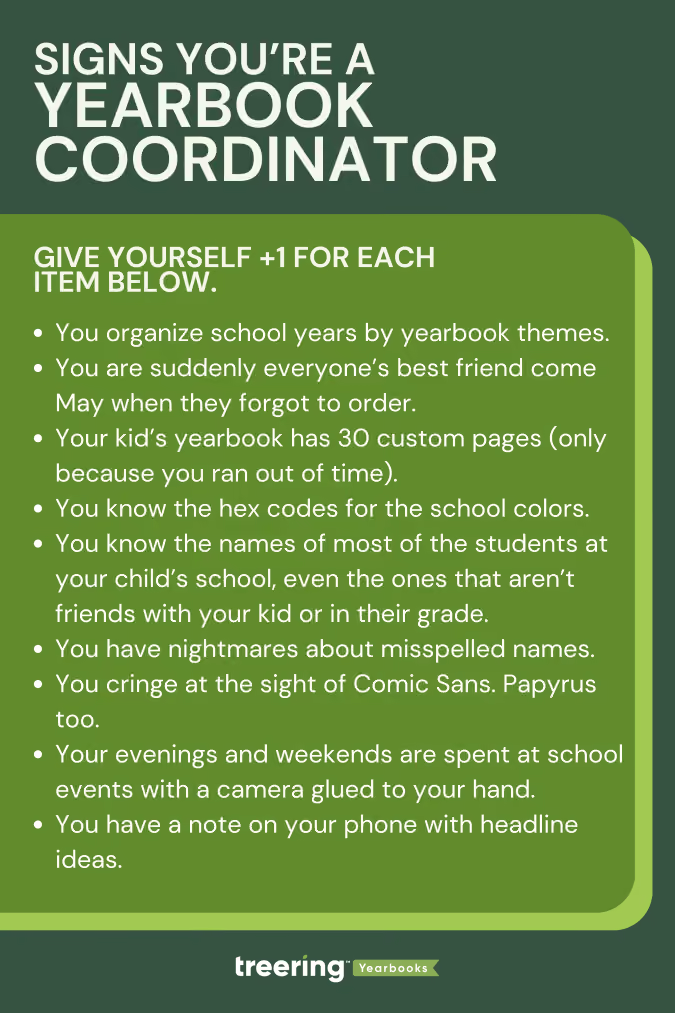
Fun fact: most Treering employees are the yearbook coordinators for their children’s schools. Our staff compiled this list to distinguish “just” a mom with a camera (TIA for all the pics you share) from an all-knowing yearbook aficionado. These first four are the yearbook coordinator starter pack for this club.
- You organize past school years by yearbook themes.
- You’ve perfected the art of bribing motivating people with pizza and Red Vines to meet deadlines.
- You are suddenly everyone’s best friend come May when they forgot to order.
- Your kid’s yearbook has 30 custom pages (only because you ran out of time).
You’re in the know
If you’re an old-school journalist, you have the scoop on all that’s happening on campus: events, field trips, games (even the rescheduled ones), and parent-teacher conferences. And chances are, you’re in the midst of the action. Couple that with your yearbooking (yes, it’s a verb) know-how, and you’re an indomitable force.
- You know the hex codes for the school colors.
- You know the difference between a point and a pica.
- You’ve memorized every student’s best angle.
- You know the names of most of the students at your child’s school, even the ones that aren’t friends with your kid or in their grade.
- You’ve attended more school dances than any student ever will.
- You know the principal’s catchphrases by heart.
- You’ve debated the perfect theme more times than you can count.
- You refresh the yearbook tracking number every five minutes.
You stress over these yearbook woes
Spoiler alert: if this is your first year as the yearbook coordinator, there will be some stress. After you laugh your way through this list (rimshots not included), check out a more serious one our team did: 10 Ways to Relieve Adviser Burnout.
- You have nightmares about misspelled names.
- You cringe at the sight of Comic Sans. Papyrus too.
- You can spot a typo from a mile away.
- You wake up in the middle of the night to question whether you added that kid who wasn't there on picture day.
Boundaries you don’t (yet) have
We are all works in progress. (Read: no judgment here.)
- You have over 3000 photos sorted into folders by school event.
- You consider caffeine a major food group.
- Your evenings and weekends are spent at school events with a camera glued to your hand.
- You have a note on your phone with headline ideas.
- You have contacted friends on social, neighbors, your bunco group, gym friends, and random parents at the grocery store to add photos and order their books.
- Your idea of a vacation is a day without a deadline. Conversely, you’ll pay for airplane wifi to finish that last spread.
- You consider the yearbook room your second home.

28 clever headlines to use in your winter sports spread
Wrestling
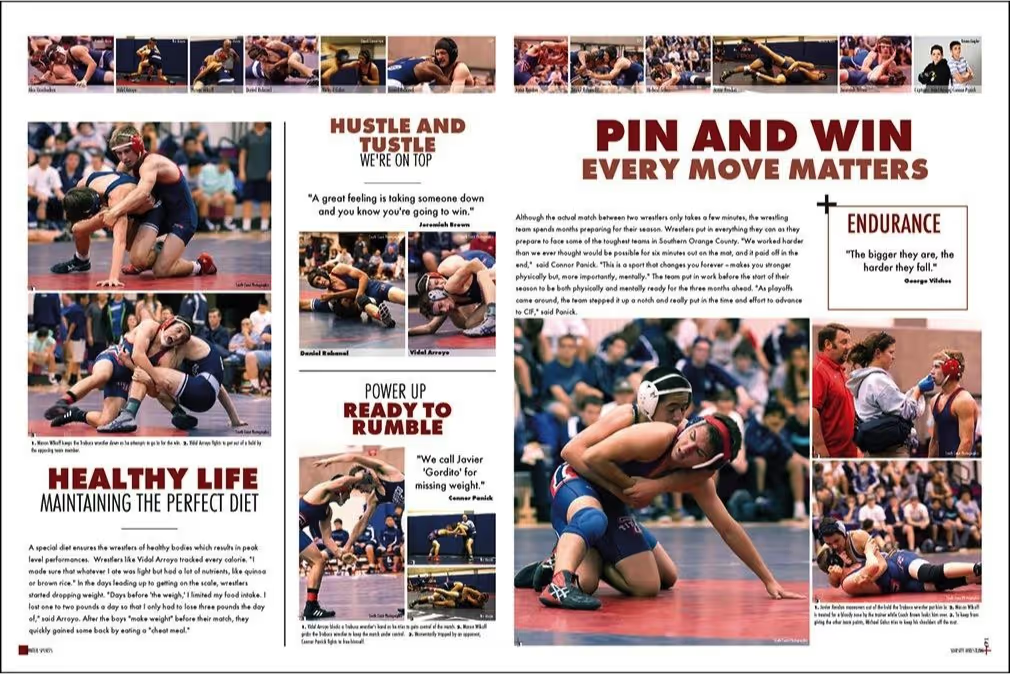
This yearbook page shows several headlines that work well for a wrestling spread. A number of bold headlines make a statement while still bringing the main headline “Pin and Win: Every Move Matters” to the reader’s immediate focus. The other titles maximize rhymes and take advantage of sports lingo: “Hustle and Tustle” and “Pin and Win” both rhyme and make references to wrestling jargon.
Here are some other fun slogans you can use for your school’s wrestling spread:
- “No Pain. No Gain”
- “Ready to Rumble”
- “Rock Solid”
- “Pin It to Win It”
- “Out on Top”
- “Toughest Six Minutes There Is”
- “Grapple Up”
Swimming
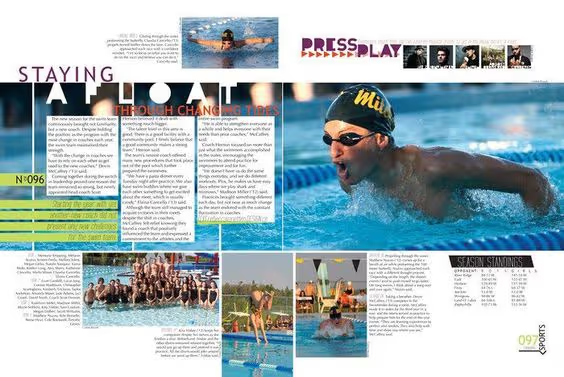
In this yearbook layout, “Staying Afloat Through Changing Times” is an engaging headline that both cleverly references swimming and makes the reader curious to know what changes have happened. The “Press Play” headline complements the film roll aesthetic of the photos next to it.
For more swimming spread-related slogans, check out some of our headline ideas:
- “Instant Athlete: Just Add Water”
- “[Your Team Name] Made Waves”
- “Sink Or Swim”
- “Life In The Fast Lane”
- “[Your Team Name] Made A Splash”
- “Dive Deeper”
- “Testing The Waters”
If you want to get your readers paying more attention to your main story, dig into your theme, your school’s culture, and sports terms to find ways to add a dose of clever to your winter sports spreads. It’ll help you steal a smile from your reader or unify your theme across multiple pages. In short, it’s worth the creative effort.

Yearbook color theory: what it is and how to use it
Color is more than decoration: it’s a communication tool. In a yearbook, color helps reinforce the mood of each section, creates visual hierarchy, and supports your theme. Understanding the basics of color theory enables you to make design choices that are intentional and effective, not just trendy. (If trendy design is your thing, head over to this blog.)

The color wheel
I can’t emphasize this enough: color is a complement to content. The right combination can make your theme feel energetic, calm, serious, or playful. Understanding how color affects emotions will affect your readers’ experiences.
Primary colors
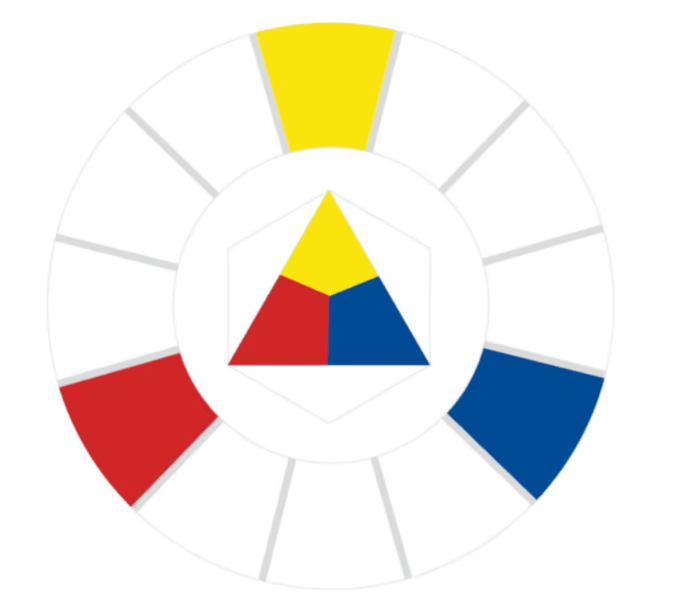
Red, yellow, and blue are the OG trio. As you learned in elementary school, you can’t make them by mixing other colors, and they can be combined to create every other hue. A section opener with a bold red or yellow background can instantly grab attention—just keep your type simple so it’s still readable.

Secondary colors
Orange, green, and purple come from mixing two primaries. Secondary colors are a safe way to add contrast to pages without them looking too loud.
Tertiary colors
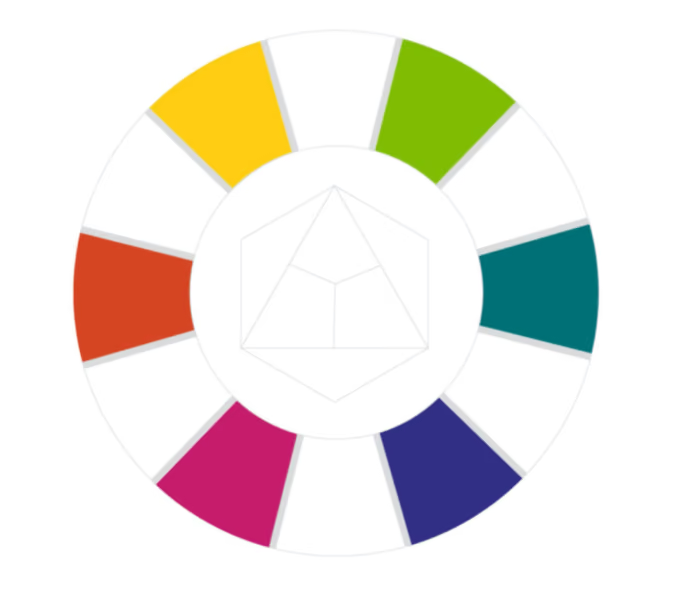
Mix a primary with a neighboring secondary and you’ll get shades like yellow-orange or blue-violet. These in-between shades are perfect for customizing your theme. For example, swap standard blue for blue-green to make a traditional palette feel more modern.
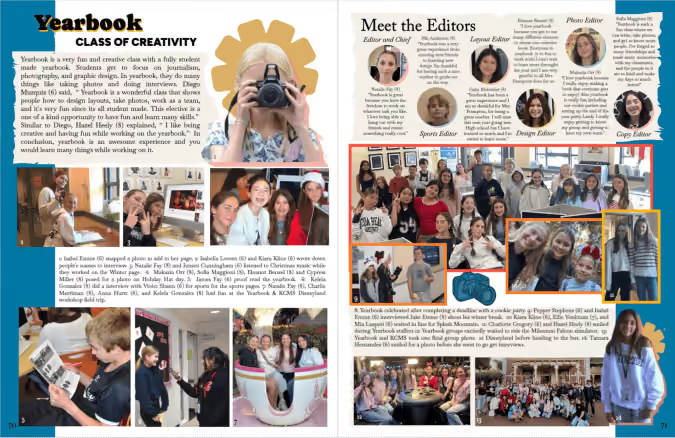
Color harmony
Color harmony is about choosing combinations that are pleasing to the eye, and useful to you, the designer. Whether you’re creating a visual flow across a spread or building a full-book palette, these harmonies keep your pages cohesive.

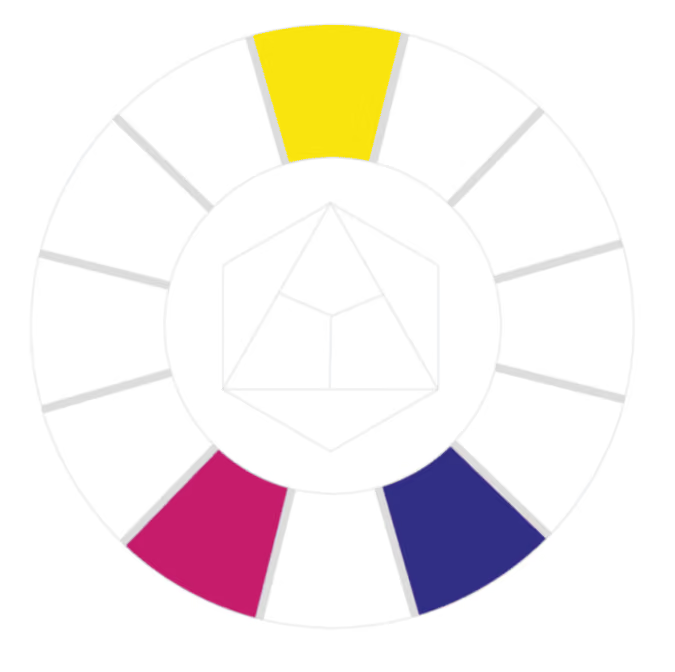
Complementary colors
These are opposites on the color wheel, like blue and orange or red and green. They create strong contrast. Use complementary color accents for headlines, callouts, or graphic elements.
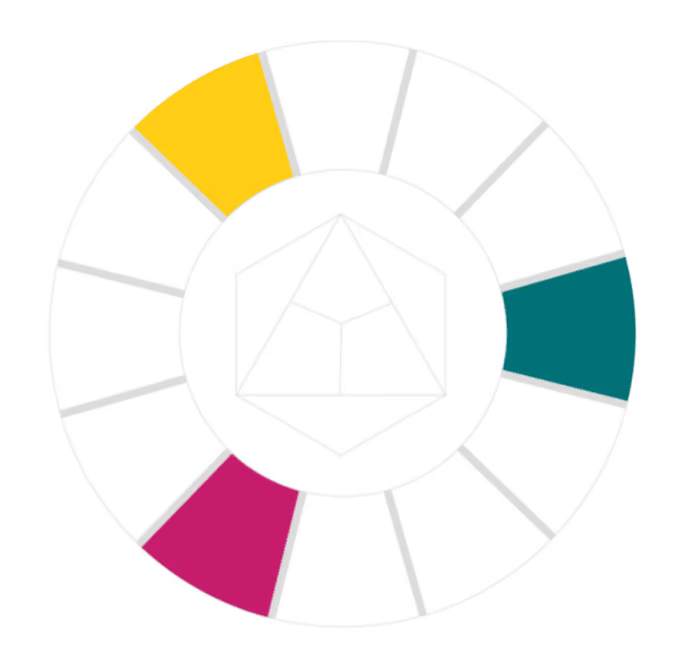
Split complementary
Choose one color (yellow) and pair it with the two colors next to its opposite (blue). This gives you contrast without tension. For example, if your school color is yellow, balance it with pops of magenta and violet.

Analogous colors
These sit next to each other on the wheel and are generally harmonious and soothing. If you’re getting started with color, use an analogous palette to determine your dominant, supporting, and accent colors.
It’s easy to look at these and think you’re limited to three. Using varying tints and shades for value contrast will expand your palette.
Triadic colors
Triadic schemes use three evenly spaced colors on the wheel. We see this with the primary colors. Now shift over, you have the ultimate retro palette.

Monochromatic and grayscale
One color, many values: Monochromatic palettes have so much potential. Purple can have varying degrees of school spirit, while black is sleek and modern. They create contrast, demonstrate intensity, and serve as a base to add accents for emphasis.
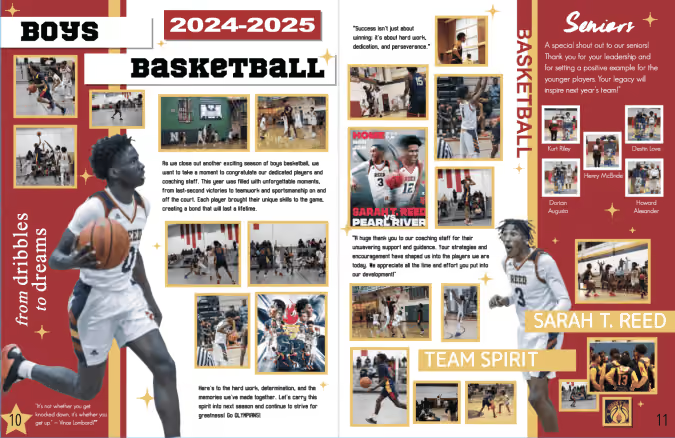
Warm vs. cool colors
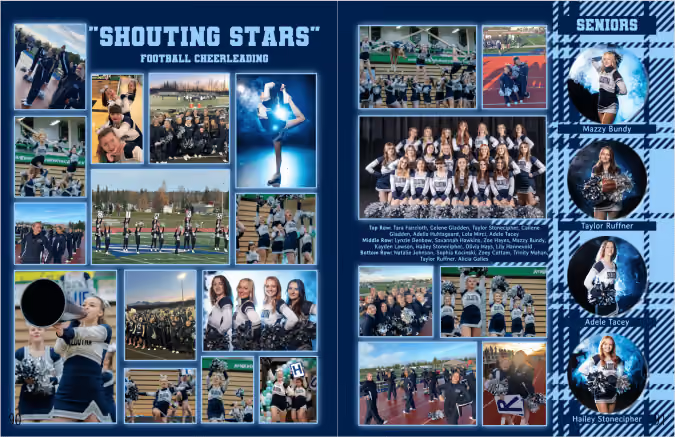
Warm and cool colors affect how your pages feel emotionally. Look at the two athletic examples above. You can feel the difference. In one, you're sweating with the team and on your feet. In the other, you're maintaining what's left of your voice, sipping cocoa under a blanket with your best friend.
Likewise, use color to determine how the student body will experience your verbal theme.
Putting it all together
Here’s how to apply color theory to your yearbook:
- Pick a palette early. Choose up to five colors that support your theme and stick with them. Put them in your style guide.
- Use color to organize. You could assign colors to sections, use colors as the backgrounds to modules or pull quotes, or with your headline font to show points of entry.
- Make color intentional. “Don’t decorate… design” is every design teacher’s go-to for a reason. Be intentional and ask, “What mood am I trying to create?” “What color harmony supports that?” “Why isn’t this working?”
- Check accessibility. Make sure the text has enough contrast from its background.
- Balance bold and neutral. Too much color can overwhelm. Whitespace will always be your friend.

How to create a personalized homeschool yearbook
Yearbooks are for every student, not just those who attend brick-and-mortar schools. In fact, parent-led home-based education may currently be the fastest-growing form of education in the United States. That makes for a lot of memories to capture!
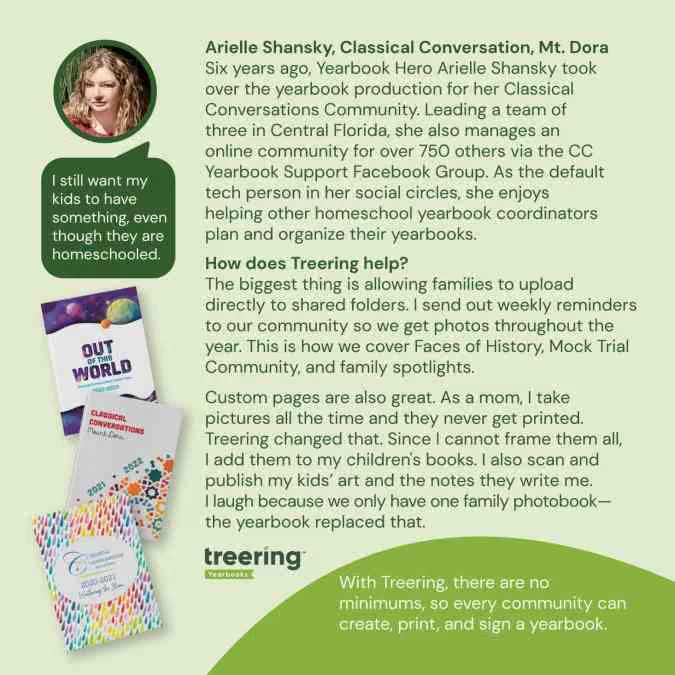
With the unparalleled flexibility of Treering Yearbooks, it’s never been easier for homeschool families and organizations to effortlessly create a personalized yearbook for each student, capturing the essence of their unique educational journey. We remove the guesswork and simplify the yearbook process for everyone involved. Here are a few yearbook perks that Treering offers to homeschools:
1. No hidden fees, no surprises. Our per-book price is all-inclusive, covering everything from easy-to-use software to friendly support and custom covers featuring your child’s artwork or family photo.
2. No minimum order requirements. Whether you only need one book or many, Treering can accommodate your needs. We’ll even provide a code so grandparents can purchase, too.
3. No contracts. You're never locked into working with us. We believe in our service, but you can walk away anytime (although we're confident you won't want to!).
4. No deadlines. Not working on a traditional timeline? Same here. Treering empowers editors with the flexibility to control and change their print-ready date at any time without incurring fees. Our three-week turnaround means you’ll receive your masterpiece in no time.
5. No set page count. Treering allows for creating a yearbook with as few as 20 pages. You can even adjust your page count as the school year - or a fun last-minute field trip - dictates.
6. Free custom pages: If you create a book for multiple students or just one, each can become a personalized keepsake. Capture milestones, family vacations, extracurricular activities, art projects, and more inside each student's unique copy.
Discover the Ease of Treering’s Software for Homeschoolers
While all of the above advantages benefit homeschool communities, Treering’s easy-to-use software is one of our most important - and most loved - features. Our intuitive, drag-and-drop yearbook builder makes it easy to craft a beautiful yearbook. Choose from hundreds of professionally-curated themes, or unleash your creativity and design your own.
.avif)
Yearbook hero Janet Yieh gives away yearbooks
Treering Yearbook Heroes is a monthly feature focusing on yearbook tips and tricks.
Long-time Treering editor Janet Yieh from San Francisco, CA started gifting yearbooks when her high schooler son was in elementary school. She added a fundraiser to the cost of the yearbook so every promoting fifth-grader received a free yearbook. Now, as the Family Partnerships Coordinator at Presidio Middle School in San Francisco, CA, she ensures every eighth-grader who wants a yearbook leaves with one.
This year you gave away over 100 books. How is that possible?
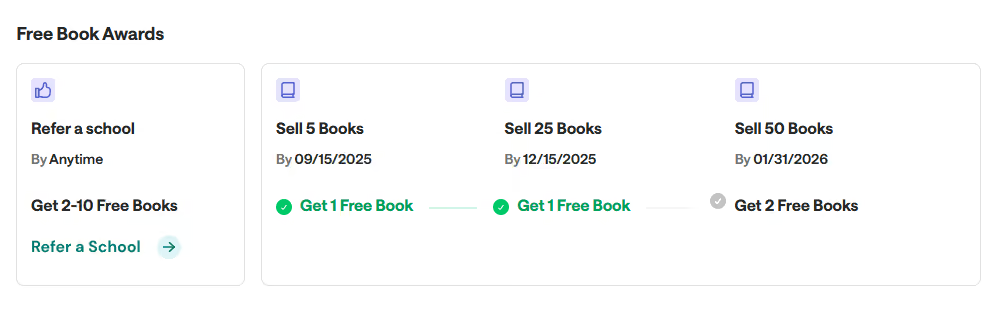
In August and September, I push for early sales so parents can get the best price and I can earn free books from Treering. On September 30, I use the fundraiser to buy as many books as possible with the 10% discount. Then, in October, I do the same thing.
Almost two-thirds of the graduating class purchases a full-price yearbook and I try to give away as many as possible by creating a contest. It susses out students who might not be able to afford a book and don’t want to ask for a free one.
How do you advertise?
I’m consistent with marketing: during the daily bulletin in homeroom, teachers show the tiny URL to register for the contest. In parent newsletters, there is an ad saying, “Hey, your kid could win a free book!” When parents hear about the book contest, some still purchase the book.
I also strategically reach out to teachers to see if they know any students who want to win a free book. It’s actually hard to get students to fill out the form.
What other tips do you have?
The students in the yearbook club received their books a day early. This created excitement and I sold out of the extra yearbooks I had on hand.

The #1 yearbook mistake to avoid this fall
Avoid the pitfall of waiting until the yearbook is complete to begin selling. Keep reading for reasons you should begin marketing the yearbook now.

Financial incentives to sell yearbooks early
Back-to-school time is when everyone is excited about the new year. Parents know there are a lot of expenses for clothes, school supplies, and yearbooks.
- Early bird discounts: Better than a worm, Treering families save 10% on the cost of their yearbooks from August to October. Schools that purchase in bulk also enjoy the extra savings.
- Start accumulating your fundraiser: Schools using the yearbook as a fundraiser will have extra time to meet their monetary goal.
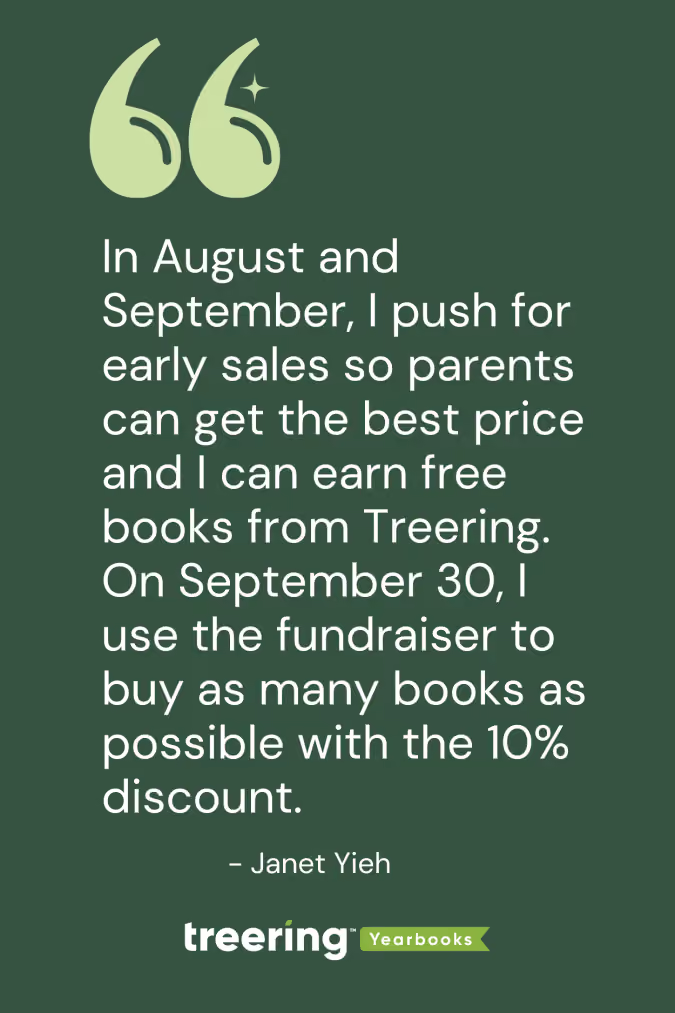
- Earn four free yearbooks: Treering customers who sell five books by September 15, earn a free yearbook. They earn a second if they sell 25 books by December 15, and two more if they sell 50 books by January 31.
Build hype
Create excitement about the yearbook on day one. When families see the yearbook team out and about, it tells them two things:
- I need to buy a yearbook.
- The yearbook team is committed to covering the whole year.
Early sales encourage students to participate in yearbook-related activities. It also offers the yearbook team extra time for teasers and keeps them accountable for progress. That said, take advantage of this added engagement for crowdsourcing opportunities. If students know they are in the yearbook, they will buy the yearbook.
Help parents
Let's face it, we need reminders too.
- Customization: Families can purchase their yearbook early and have until the purchase deadline to work on and finish their custom pages.
- Reduce stress: Let's face it, Maycember is real. And who doesn't love adding a fat checkmark to the to-do list?
How do you begin early yearbook sales?
Begin sales—like all things yearbook—with a plan. An easy win is to include a yearbook flyer in the registration packet that goes home with every child. Level up your approach with a school calendar and your team and create a yearbook presence at:
- Back-to-school events
- Parent group meetings
- A staff meeting (or three)
- Picture day
- Homecoming
- Fall festival
Sell early, sell often. Treering's order processing and tracking make for one less paper trail for advisers to chase. You won't regret the momentum.