.svg)

Most popular



Subscribe to our blog
Most recent
Happy New Year from Treering: 2025 was a record-breaking year of creativity
For sixteen years, you’ve trusted Treering to capture and print your school’s memories, and every December, we pause to reflect on what a privilege that truly is. What started as a simple idea (that yearbooks should be easier, more affordable, and more personal) has now grown into a movement powered by editors, teachers, parents, and students who care deeply about preserving their school stories.
This year, that movement reached new heights.

In 2025, Treering helped schools raise $2.9 million, printed our 10 millionth yearbook, and earned a place on the Inc. 5000 list of the fastest-growing companies. But behind every milestone is a more meaningful truth: editors and advisers across the country continue to create smarter, stronger, more student-centered yearbooks. We’re honored to support them every step of the way.
Below is a look back at the innovations, stories, and community moments that shaped Treering’s 16th year plus a peek into what’s coming next.
A creative community that keeps growing (and inspiring us)
Each year, the Treering community grows not only in size but in creativity and confidence. In 2025, our community passed 12 million members, representing schools in Australia, Canada, and the US. Behind every login is someone with a vision: the first-year adviser walking into a new school year, the senior editor rallying a team of ninth graders, the parent volunteer learning design terms for the very first time.
Helping schools raise a remarkable $2.9 million
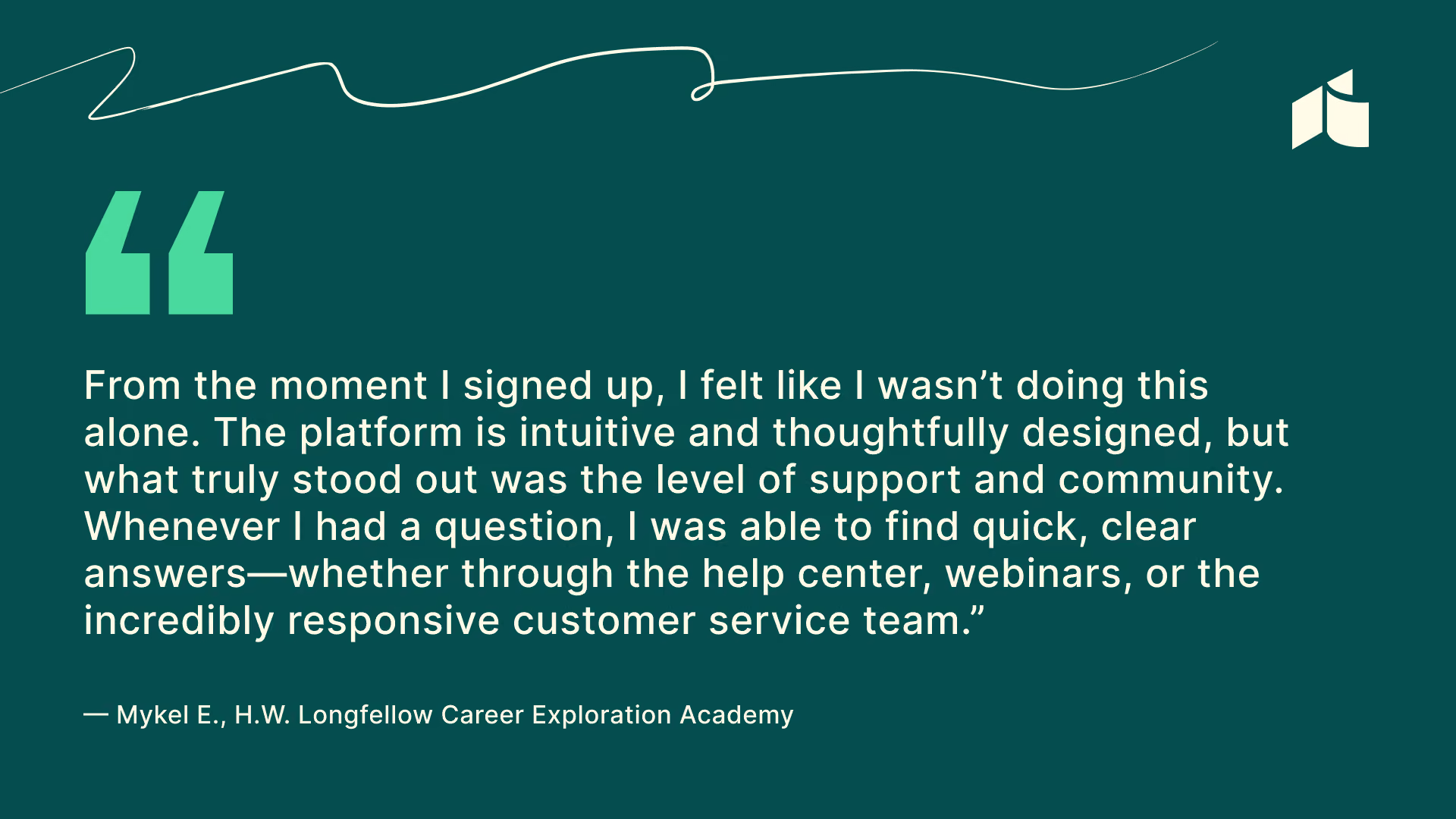
Fundraising continues to be one of the biggest stress points for schools, and Treering schools love receiving a yearbook check instead of a yearbook bill. By choosing their fundraising amount and adding it to the total cost of the book, schools raised $2.9 million in 2025.
Instead of paying a yearbook invoice, schools are putting real dollars back into their budgets, funding what matters most: field trips, clubs, student journalism programs, arts initiatives, athletic equipment, spirit events, classroom resources, and yearbooks for students in need.
A major milestone: Treering’s 10 millionth book
Some milestones call for a moment of awe — and this was one of them.
This winter, we printed Treering’s 10 millionth yearbook. That number represents millions of stories, academic achievements, halftime huddles, first days of school, senior dedications, hallway friendships, and portraits of students who will one day show the book to their own kids.
For us, it also represents innovation: we’re one of the only companies able to produce fully custom books, with custom pages for every student, in under three weeks. When every book is uniquely theirs, yearbooks celebrate students in a way that is meaningful for them.
How we supported editors this year
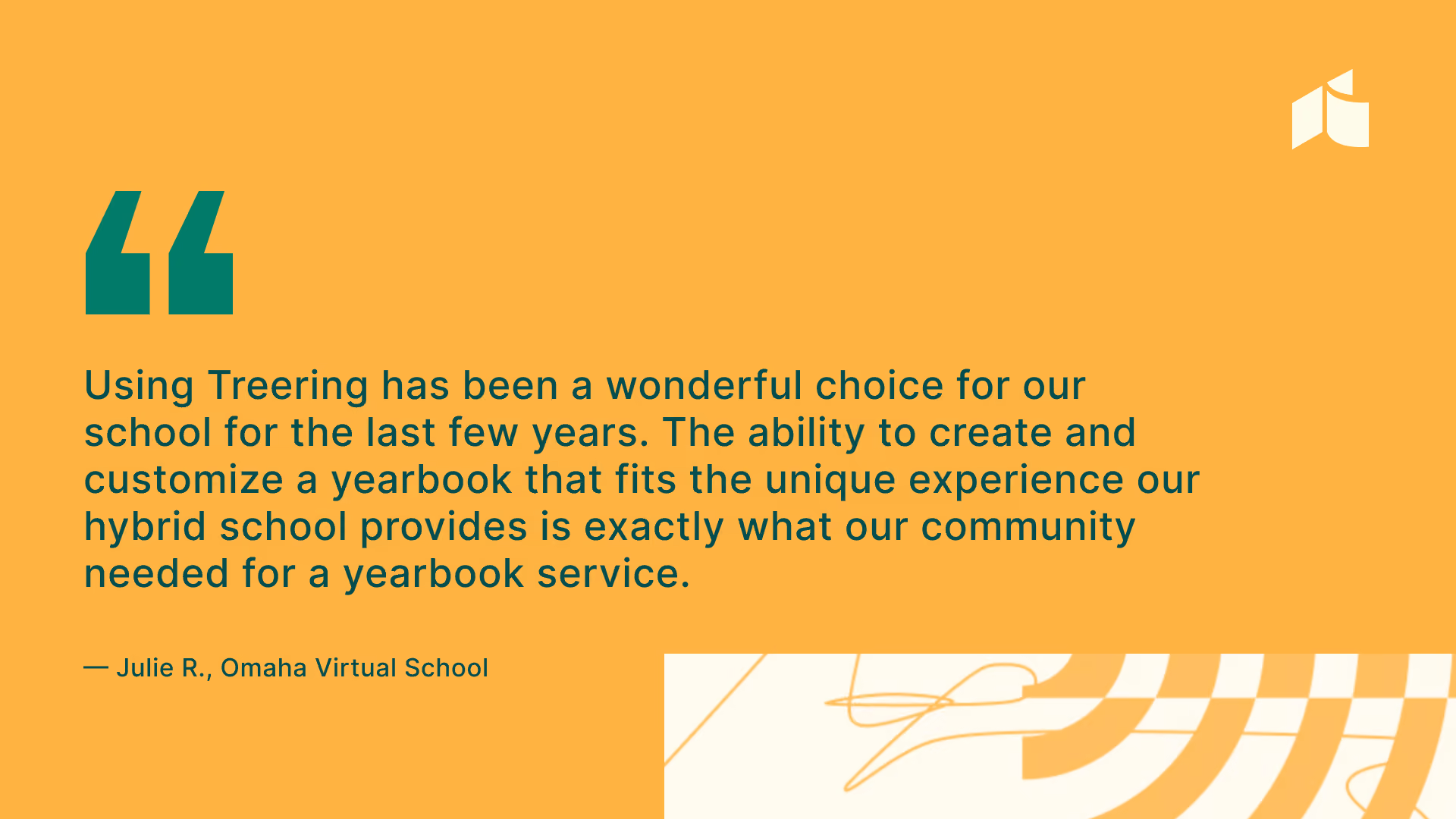
If we had to choose a theme for 2025, it would be editor empowerment. Every enhancement we built this year was designed to support the people who power the book, especially advisers and student editors who juggle deadlines, clubs, homework, coverage gaps, and the joyful yet chaotic reality of school life.
Your feedback, questions, wish lists, and creativity drive every improvement we make.
1. Faster, smoother, more confident onboarding
This year, we expanded the Treering onboarding experience. Whether you were learning the platform for the first time or returning after a few years away, Welcome Walkthrough calls with the Community Advocate Team and communications from L1FT helped create a clear roadmap for setting up the book, customizing pages, inviting editors, collecting photos, and aligning your timeline.
Many schools reported that this shifted their entire experience, turning what once felt intimidating into a confident first step.
2. A bigger, better year of contests
We heard your requests for contests that spotlight page design talent and also inspire creativity during key moments of the production cycle.
This year, Treering contests included:
- Inaugural cover contest
- Instagram photo contests
- Parent and editor design contests
- Seasonal challenges that aligned with design checkpoints via pop-up giveaways on Instagram and Facebook

3. Camp Yearbook: our annual two-day summer conference
Camp Yearbook launched in 2024 as a way to help advisers and editors start strong before school even started. Schools joined us for two days of themed workshops, live design sessions, team-building exercises, and planning challenges.
It quickly became one of our highest-rated programs of the year, and many schools left with their theme locked, their ladder built, and their editors trained before the first bell rang.
4. Updated yearbook curriculum
A team of former classroom teacher-slash-yearbook advisers and a group of current yearbook advisers completed a complete overhaul of Treering’s free yearbook curriculum. The updated curriculum is now grab-and-go. Instead of long, one-size-fits-all sessions that advisers have to divide and support, lessons are now broken into focused segments that can be taught in short class periods, advisory blocks, club meetings, or asynchronous settings.
Each module now includes five lessons with
- A clear objective based on Common Core and/or CTE Career Ready standards
- Bite-sized instruction that fits real bell schedules
- Bell ringers, student-facing slides, activities, and exit tickets
- Practical examples pulled directly from real Treering schools’ books
- Action steps students can apply immediately to their pages
This structure made it easier for advisers to meet students where they are, whether they’re first-time editors learning the basics or experienced leaders ready to push design and storytelling further.

5. More real-life examples shown across our socials
Editors asked for clearer examples of real pages created by real schools. This year, we overhauled our social strategy to prioritize:
- Regular showcases of elementary, middle, and high school spreads and cover ideas
- Behind-the-scenes process videos
- How to use Treering’s complete themes
- “Fix this spread” mini-tutorials on TikTok
- Real portraits and coverage examples to inspire editors
- Creating a private Facebook group for advisers to support and inspire one another
This shift helped new advisers see what’s possible. It also helped experienced teams level up their work.
Looking ahead: what to expect in 2026
As we enter year seventeen, we’re more committed than ever to supporting editors with tools, training, and community spaces that make yearbook creation easier:
Superior support as you design, market, and distribute your best yearbook yet
- Clear how-to guides for marketing your book
- Expanded training calendars
- New resources for student leadership teams and editing workflows
Yearbook Club workshops
Our virtual Yearbook Club is expanding to twice-monthly sessions, including:
- Design labs
- Editor leadership coaching
- Photo submission strategies
- Theme development deep dives
- Marketing walkthroughs
- Distribution planning in real time
Print ready to delivery: still three weeks or less
We remain committed to fast, predictable, high-quality printing.
Templates editors have asked for
Yearbook advisers met with the design team for three focus groups to evaluate this year’s crop of themes and predict design trends for 25-26. Based on early feedback, to support schools that want clean, easy, plug-and-go options, we are releasing ten theme packages in fall.
Treering theme packages will continue to be complete, coordinated yearbook design systems with a customizable cover, matching interior layouts, 100+ coordinating graphics, and a curated color palette. They’re designed to make yearbooking easier and faster.
Thank you for an amazing year
Thank you for another year of creativity, passion, and partnership. Whether you built your first book this year or your eleventh, whether you’re a student editor, a parent volunteer, a journalism adviser, or a school leader, your work matters, and we’re honored to support it.
Sixteen years in, and every new year feels like the most meaningful one yet. The number of books we’ve printed, the awards we’ve received, the millions raised matter. What matters most is the trust you place in us to help you preserve the moments that shape your school communities.
We wish you joy, rest, and inspiration this holiday season. We cannot wait to create with you in 2026.

Yearbook hero Dr. John Finley builds a legacy
Treering Yearbook Heroes is a monthly feature focusing on yearbook adviser tips and tricks.
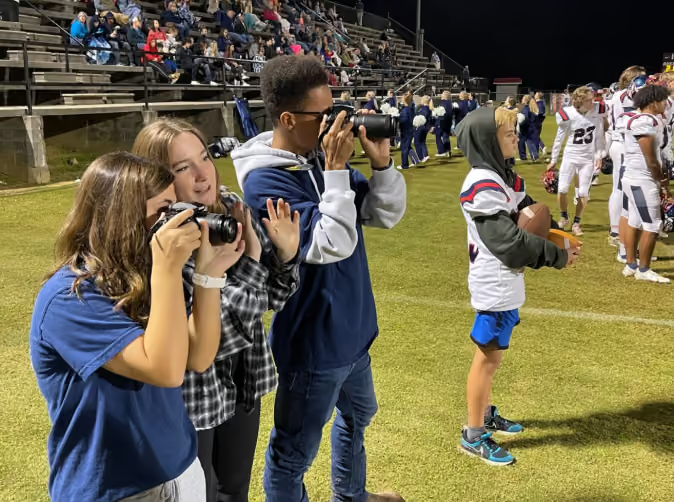
Schools like Kate D Smith DAR High School of Grant, AL, build momentum by gathering motivated teachers and students to gather photos, draft content, and design spreads. Dr. John Finley is a business teacher for grades 9-12 at Kate D Smith DAR High School and also spearheads the creation of the yearbook with the assistance of his students. With his background in videography and photography, he inherited the role of yearbook sponsor and this is his second year leading the development of student journalists.
What’s unique about John’s role within yearbook is that he really lets the students run with creativity and he owns his role of adviser. This allows the students to take near-complete ownership of the book, learn how to utilize the Treering app, and motivates them to be confident in their abilities in the classroom.
John and part of his yearbook team were excited to share how they plan to develop the yearbook this year, which will include KDS DAR School’s 2021 Dedication Day, which occurs every October.
What’s something unique about the school’s yearbook team?
Last year, we started a mentoring program where the seniors who have experience with yearbook get to share their knowledge with junior and sophomore students. We realized that the students who were involved with yearbook were primarily juniors, so when they eventually graduated, we didn’t have students on board who could guide the underclassmen.
So now, all seniors and juniors involved with yearbook choose one younger student to teach everything they know about yearbook. And then when the seniors graduate, the younger students are prepared to take the reins. A lot of the “yearbook” training actually takes place at events when students are taking photos for the yearbook. It’s a great hands-on opportunity for upperclassmen to show and explain their process for securing content for the yearbook.
What stands out to you from last year’s book, which was created during the pandemic?
What stood out to me the most was the theme, A Year Like No Other. This really rang true to everyone at school be it teachers, students or administrative staff. The yearbook team took the approach that they were writing the first history book of the pandemic for our entire community. The book was dedicated to the memory of those we lost and the families that were affected.
What was nice about using the Treering app, especially during this time, was that it gave us the ability to share photos right into the folder in an easy way. Because we weren’t able to be together in person, we were able to get a variety of photos from at-home learning. We’re currently back in the classroom this year, but a lot of lessons were learned last year—some heartbreaking—that were beautifully expressed in the book.
What’s something unique your school adds to the yearbook?
Dedication Day is a two-day event set to take place October 21-22 that only takes place in our community and is something we always take time to cover in the yearbook because of how much it means to all of us at the school. This will be the 97th year the school celebrates the patriotic education made possible by the Daughters of the Revolution (DAR). During the Dedication Day celebration, DAR chapters from across the U.S. travel to Grant, AL, and pledge funds for school projects.
In the yearbook this year, for example, we’ll capture photos of the two-day event highlighting student musical performances, speakers and the overall history of the DAR and how they began their mission in 1922 to build schools in remote areas of the U.S. KDS DAR School, which sits atop Gunter Mountain in Grant, was selected based on the will and dedication of the Daughters of the Revolution to give the people in this area a path to education.

The one layout template you need
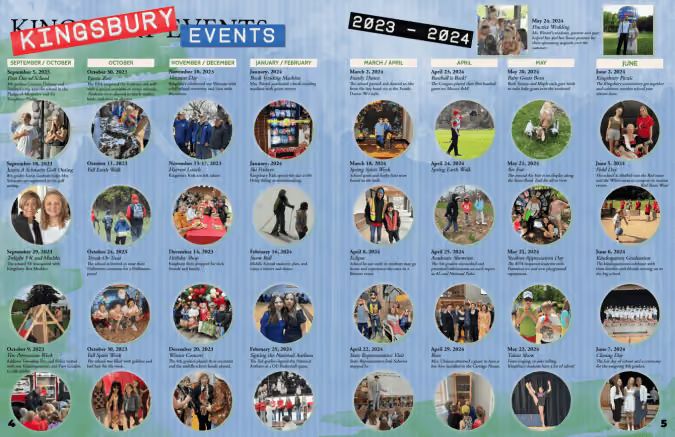
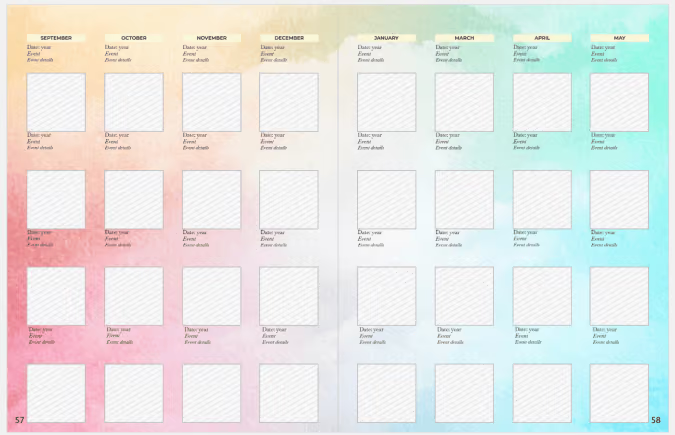
Yearbook coverage ideas might be our favorite topic: brainstorming ways to represent more students, resulting in a more authentic narrative of the school year. It could also mean more photos, interviews, and work for you. After a colleague shared Kingsbury Country Day School’s yearbook, a lightbulb went off. Yearbook coordinator Kara-Jane LaVoisne created the perfect layout that includes over 60 students, highlighting their impact and participation in school events.
Why we love this template
This spread packs a punch because it covers a large span of time in little space. It covers 24% of the school across two pages. It showcases events that would not be covered elsewhere. This template is also well-designed: it’s clean and has multiple reader entry points.
Home for smaller events
Oftentimes, we have several photos that don’t fit on a larger spread. This is especially common in books that do not take advantage of modular design. LaVoisne took advantage of those moments to create a means to include them.
Versatility
While LaVoisne used this template for a school-specific year-in-review, you can use it once per section or season. For example:
- Fall, winter, and spring PTA or ASB events
- An overview of the sports seasons
- Semester rundown of student life
If you’re feeling ambitious and have the content, an hour-by-hour review of a major school event such as the talent show or homecoming weekend could be a showstopper spread for your yearbook.
What’s most important: your yearbook team celebrates the people in your campus community. This layout is just one way to cover more students in your yearbook. For more creative yearbook coverage inspiration, check out:

2025 Treering Memories contest rules
Parents, your 2025 memories deserve the spotlight! Share your funniest, proudest, or sweetest moment and tag @TreeringCorp and use #Treering2025Memories for a chance to win something for you.
Three winners will take home a one spa day, treat box, or a week of coffee on us. Your memory might be featured on our page!
Eligibility
- U.S. parents or legal guardians, 18+
- No purchase necessary
Treering Memories contest entry period
- Starts Monday, December 15, 2025, at 8:00 AM PT
- Ends Thursday, December 18, 2025, at 11:59 PM PT
Steps to enter
- Follow @TreeringCorp on Instagram
- Share a funny, proud, or sweet memory from 2025 on your Feed or Story (must be a public profile to be visible)
- Tag @TreeringCorp
- Use #Treering2025Memories
Winner selection and notification
Treering's social team will select the winners based on creativity and originality. Winners will be announced on Instagram during contest week.
Prizes
Three winners total will receive one of the following:
- Spa / self-care gift card
- Delivered treat box
- Coffee for the week
Release
By sharing your photo, you have verified the approval of the original photographer and anyone pictured, and you approve Treering to use your name, write-up, and school name for any marketing purposes, including but not limited to treering.com, social media, and mass media.
Additional information
- Content must be appropriate for all audiences
Contest not sponsored by Instagram

Essential yearbooking gear
One of the top questions we see in yearbook adviser and yearbook coordinator Facebook groups involves yearbook gear such as cameras and organizational supplies. Using a combination of funds from budget money, yearbook fundraiser proceeds, or a grant, you can build a media room that achieves your goals.
This list is not meant to be comprehensive, rather a smattering of options. Tailor your shopping list to match your program’s goals as well as your population. Do you really want your elementary yearbook club students passing around a $2000 camera? Conversely, should your competitive high school team aim for a Pacemaker with just point and shoot cameras?
Cameras
Camera bodies
The camera body, or box, is where half the magic happens: the shutter release, mirror, viewfinder, and controls live on the box on a digital single-lens reflex (DSLR) camera; see mirrorless camera below if your head is going to explode. Your yearbook photographers will control the settings here.
Purchasing a camera kit from a big box store or online may seem like a great deal. The lenses that accompany those kits usually aren’t “fast” enough to take photographs in the gym or an auditorium when the light tends to be tricky.
A used camera kit from a resale website is always an option for schools looking to buy yearbook equipment with limited funds. Save the money for a fabulous lens that will help you get the sharp images you want. Most bodies built in the last 5-10 years will have the ISO, autofocus, and shutter speed capabilities you need, even for those frustrating low-light gym photographs.
Some great beginning boxes are:
- Canon Rebel
- Nikon D3500
Mirrorless cameras
Being lighter, and a potentially less expensive investment, mirrorless cameras are slowly replacing some DSLRs in yearbook classrooms. Mirrorless cameras will help emerging photographers because there isn’t as much gear to tote and they can look less intimidating.
Highly recommended mirrorless cameras:
- Canon R6
- Nikon Z6
Lenses
In many cases, investing in a lens aka glass will be more critical than a body. If all your school’s sports are outside, then the lenses that come in your kit will be perfect. If you photograph volleyball and basketball in a gym or musicals in a dark auditorium, then you are going to want a lens that can use the full ISO, aperture, and shutter speed range of your box. When buying any lens, make sure it marries your box. There are some off-brand lens brands such as Sigma and Tokina that are less expensive than their Canon and Nikon counterparts.
Two lenses to have
- 35-70mm f/2.8
- 50mm f/1.8 (more on the nifty fifty below)
Nifty fifty
If you add anything to your cart this year, make it a 50mm lens. The depth of field and low-light capabilities you have are what the young people deem clut


Lens cleaning essentials
Each camera bag in your yearbook program should contain a camel hair cleaning brush.
Pro tip: A pencil eraser is a great tool to keep in each camera bag to clean the battery connectors.
Photography essentials
Lens filter
These aren’t the photo-destroying filters your social apps provide, but screw-on glass filters for camera lenses. Use this circular filter for cutting glare and reducing light specifically with outdoor photos. Before setting out on a yearbook assignment with a polarized filter, take some time to play with it. Because it increases color saturation and cuts bright spots, it takes some time to learn.
Reflector
Reflectors, next to the nifty fifty, are one of the best, inexpensive photography items your yearbook program can use. They help you control light for outside portraits (think of fun ways you can take those pull quote pics up a notch) and also maximize limited lighting when doing studio shoots. A fun, and less traditional way to use a reflector is as a background.
Ring light
With mini ring lights being a cell phone staple in the early stages of influencers, pros have used the big ones for years. Ring lights surround your subject and eliminate most shadows over which three-point lighting enthusiasts geek out. (If you play around with your ring light and reflector, you can simulate the three-point look!) They make eyes pop.
The best ring lights are at least 18”, and they come with both warm and cool light settings as well as a dimmer. Some tripods also have cell phone and tablet holders in addition to the traditional quick-release plate.
Studio kit
Studio kits look impressive, but are they essential yearbook gear? Here’s how we’ve seen Treering advisers use studio kits:
- Class favorites, superlatives, or standouts
- Photo illustrations
- Pull quote portraits
- Retakes when your pro photographer won’t come back for a third (or fourth) shoot
- Setting up a photo booth at dances and school-wide events for a fundraiser
Many of the kits you can buy pre-packaged online will suffice for your yearbook program. Soft boxes vs. flashes are something to consider when looking at the rest of your gear.

Memory cards and card readers
Memory cards are temporary storage. They are temporary storage. Memory cards are not permanent storage. Phew! PSA over.
WiFi SD cards are game changers for busy yearbook staffs: they transfer files from your camera to the predetermined storage space without cables and card readers. Some cards even have an app so you can review photos on the spot. These make for effective teaching moments.
If you don’t have the budget or tech capacity, for something like wifi cards, it is nevertheless imperative to buy at least two memory cards per camera bag. Make sure you have a card reader in each bag as well as a card reader on each computer in the yearbook or media room.
Additional Yearbook Gear
- Rain Sleeves: keep your camera dry during outdoor events, such as soccer matches, in inclement weather
- Cell Phone Lenses: clip-on lenses run less than $30 and can add wide-angle, omnidirectional (aka 360), or fish eye capability to most smartphones. We love these for fun runs, homecoming rallies, and school carnivals.
Yearbook/media room
Yearbook gear is not limited to photography equipment. In fact, providing environmental tools is as essential as camera gear.
Cubbies and mailboxes
Magazine holders from the dollar store or cast-offs from the front office make great boxes for your students. Use them to send out important communications, such as emails from teachers regarding upcoming classroom events or new SD cards. Students can also use them for gift exchanges, camera check out, and peer edits.
Notepads
Doodling, brainstorming, and note-taking on paper are healthy parts of the creative process. In the early planning days, practice both digital and paper-based workflows so your team can decide which works best for them.
Mini fridge and snack subscription
An exclusive yearbook fridge in the corner of your classroom becomes a perk of the position. Waters, juices, and the occasional box of popsicles serve dual purposes: appreciation and fuel. Involve parents in keeping it stocked: at back-to-school night, start a signup sheet for yearbook parents to supply your students with snacks each month. Parents may even opt to share the cost of a snack subscription service.
Coffee maker
This is as much for you, Yearbook Adviser, as it is for your team. (And if you’re getting exasperated with us for suggesting you give children coffee, remember, cocoa pods and tea pods exist as well.) The point is to create a warm, hospitable environment for the hardest working people on campus.
Bulletin boards
This is where you brag on your students by sharing a photo of the week and any awards they may have earned. Pin thank you cards and any positive emails you receive regarding the yearbook for all to see.

What is a yearbook theme package?
When I say yearbook, you say theme. Yearbook! Theme! While that's not the actual rallying cry of yerds everywhere, it's pretty close. Yearbook themes dominate our club meetings and search history. Graphics, layouts, and backgrounds comprise the visual aspects of a yearbook theme package. Idiom dictionaries and pun generators comprise the verbal.
The value of a theme package
If you're not ready to create your own style guide from scratch, a theme package will help save you time and simplify the design process by
- Taking the guesswork out of creating a color scheme
- Organizing graphics and text in collections
- Modeling quality design
- Unifying your book with a consistent look
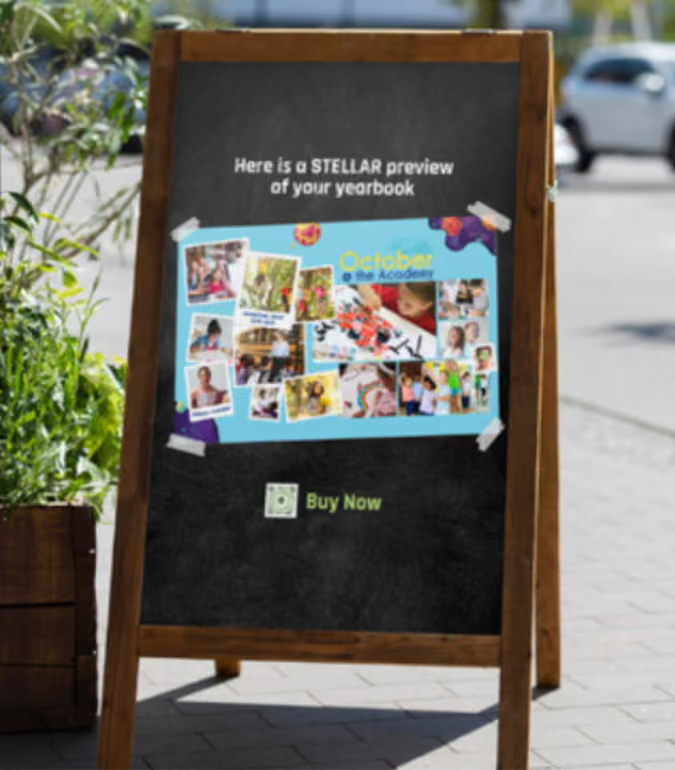
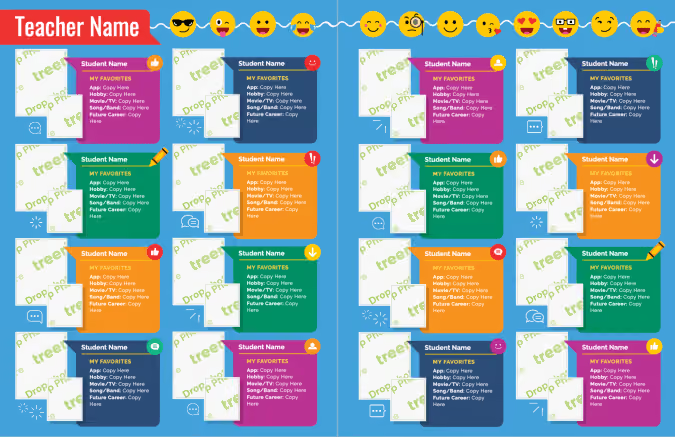
Fully editable layouts complete each yearbook theme package, like the portrait spread below. In addition, your chosen yearbook theme could also become the foundation for the yearbook marketing campaign. Create social posts or share PDF proofs in displays around campus.
Three ways to choose a yearbook theme package
The main purpose of a yearbook theme is to capture the uniqueness of the school year while setting the tone for the story the yearbook will tell.
Without a unifying theme, our yearbook contains only arbitrary events and students. Theme functions as the understated but essential ingredient to make this year’s story meaningful.
Theme 101: visual and verbal elements
When it comes to yearbook themes, many of us stop at the visual. When you have a great theme package, it's easy to do. Combining both visual and verbal theme elements take your design to the proverbial next level.

Visual
This is the easy part: making it pretty. When you have a codified collection of graphics plus a color palette, you can use your visual elements to do more than make your book pretty. Check out the example above: graphic elements are used to draw attention to the pull quotes. Stylized numbers (really an editable shape under a text box) match the photo to the caption.
Verbal
The vocabulary you use in your yearbook further communicates your yearbook theme. These verbal elements can be punny headlines or idiom derivates from your theme. While you don't want to overdo it (think the Coco Chanel rule), take time to add a lexicon to your theme brainstorm.
Here's what it looks like: the yearbook theme is Stay Gold. Students look up idioms for gold and compile lists of how they can be used. For example:
- Golden Age of the Bulldogs (opening)
- Heart of Gold (staff section)
- Gold Feet (soccer)
Whether you’re a Treering user or not, we hope your students' stories are told beautifully and authentically from cover to cover.

90 high school yearbook article ideas
Some yearbook articles practically write themselves (looking at you, sports and activities), but a great yearbook will feature additional articles that give a holistic view of your high school’s student body. Coming up with ideas for these articles is as simple as considering what the students will want to remember. We’ve broken down some potential ideas into categories. Even if you don’t use any of these exact ideas, we’re sure they’ll get your brain kicking into high gear.
School life
Academics are important, but high school is also about socializing, gaining responsibility, and becoming an adult. Some of the most vivid memories are created outside of the classroom.
- Most embarrassing moments
- Hitting the snooze bar: do or don’t?
- Homework style: git ‘er done or procrastinate?
- Worst school-related nightmares
- Locker or backpack?
- Passing time during passing time
- This year I was proud of…
- Backpack must-haves
- Favorite class experience
- Lightbulb moments
- Making time for everything
- School uniforms: love or loathe
- What’s your commute: busing, driving, or walking?
- School rivalries: why we’re the best!
- Morning routines
Coming of age
Throughout high school, students are growing up. Each year brings unique challenges and changes. It’s fun to celebrate these milestones.
- First concert
- Getting your driver’s license
- Rock the vote: politics in school
- First jobs
- Taking the ACT/SATs
- What’s next?
- Summer job earnings: spend or save?
- Have you ever been grounded?
- AP classes or college in the schools
- Too old for toys?
- Childhood foods you’ll never let go
- Curfews
- Doing chores
- Naps: be a kid again
Leisure time
Sometimes school is more about the fun over the fundamentals. Reserve some space to tell the stories that are happening when the students are kicking back and listening to cassettes on their boomboxes (they still do that, right?).
- Gaming
- Fantasy football
- Favorite books
- Obsessions (Taylor Swift, TikTok, binge-worthy shows, etc.)
- Social media
- Hangouts
- Friday night social
- Garage bands
- Non-school sports (skateboarding, snowboarding, figure skating)
- How we shop: in-store or online?
- Constant communication: how many texts do you send in a day?
Current events
One of the most fun aspects of the yearbook is that it is essentially a time capsule. Up the ante by overtly including current events, music, and trends of the year.
- What’s in the news this year?
- Fashion trends
- Style inspiration
- All about hair, makeup, and beauty
- Favorite TV shows
- Music: best bands and favorite concert experiences
- Dance moves of the year (The Git Up)
- Knowing all the words to your favorite song
- Movies and blockbusters
- Seeing it first: midnight showings
- Your go-to memes/gifs
- New technology: wearable tech and hoverboards
Lunchtime
Whether it’s chatting with friends, playing games, or finishing up some late homework, a lot of stuff goes down in the cafeteria. With these ideas, you can focus on the food or the fun.
- Healthy or not?
- Best lunchtime traditions
- Droolworthy school lunches
- Who packs your lunch
- The best playground games
- Cafeteria workers tell all
- What school food will be missed the most?
- Who do you sit with during lunch and why?
- If you were cooking for the school, what would you make?
People
The most interesting part of anything (including high school) is the people. There are loads of fascinating dynamics, talents, and relationships to explore.
- Siblings
- Nicknames
- Unsung heroes: custodians, school nurses, and admin
- Friends since...
- Fresh faces: a spotlight on new teachers
- Who do you look up to?
- Hidden talents
- How did you become friends?
- Your biggest change in the last four years
- Legacies: kids who go to the same school as their parents
Places
Every story needs a setting, but these ideas turn the setting into the story.
- Rumors about the school: secret hallways, ghosts, hidden treasures
- If you could change one thing about the school, what would it be?
- The best restaurants in town
- Regional specialties (growing up near the beach, Texas football, big city living, etc.)
- Fun facts and quirks about the school building
- Spring break locations
- Where do you want to travel?
- Must-see locations in town
- Indoors or outdoors: where’s the fun?
Time of year and events
Over the course of the year, a lot of specific activities take place based on holidays or the season. You can use these triggers as a launch point to look back on the year.
- Homecoming parade
- Halloween: costumes and scares
- Thanksgiving and being thankful
- Seasonal activities: summer, fall, winter, spring
- New Year’s Eve: school resolutions
- Valentine’s day: love or loathe?
- Can we have class outside?
- Field trips
- Science fair
- Graduation
Categories lead to brainstorms
Hopefully some of these ideas will lead to some winning articles for your high school’s yearbook. If not, no biggie (we won’t take offense). You can still use these categories to springboard some new article ideas of your own design. Ask your students what they want to remember, and go from there.

Organic design: yearbook themes with a natural vibe
Thanks to Pantone, earth tones are at the forefront of trending colors. Organic design is being toted as the “new minimalism”—even Martha’s in on the craze. We’ve broken down how to bring the outside in… your yearbook. Using Treering’s pre-designed themes gives you a curated collection of nature-inspired graphics for your elementary or middle school yearbook.
The power of nature in design
Beyond trend appeal, using natural elements in design can be a metaphor for our school communities. It’s why we see so many motivational posters featuring grandiose sights.
Additionally, nature is powerful. It positively affects our physical and mental health. It's timeless. Harnessing the power of nature in your yearbook theme requires creativity to evoke the natural world in print.
Ideas for visual yearbook design
Your whole yearbook doesn’t have to be a path through the woods with milestone markers along the way. (But if it is, would you send us a copy?) Of Treering’s 200+ cover-to-cover yearbook themes, these five have the call of the wild.
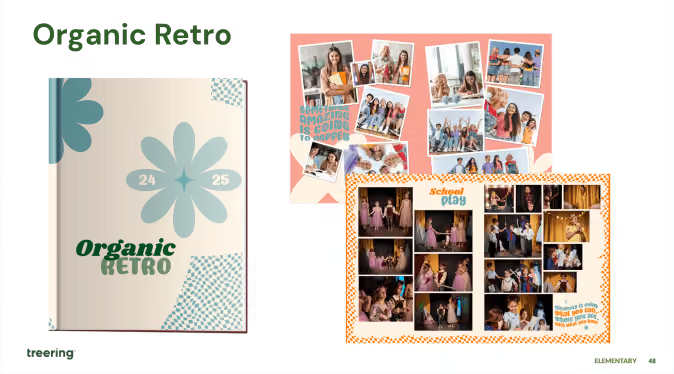
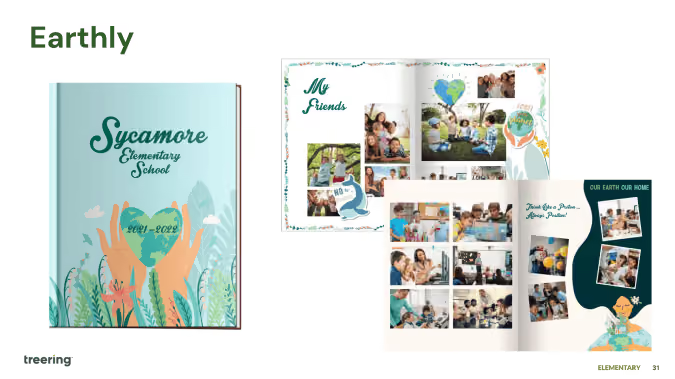
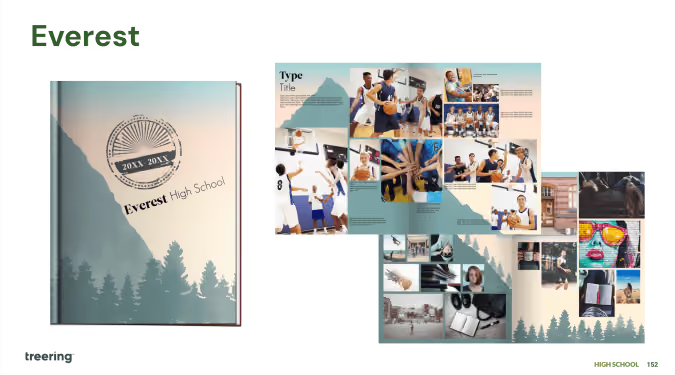
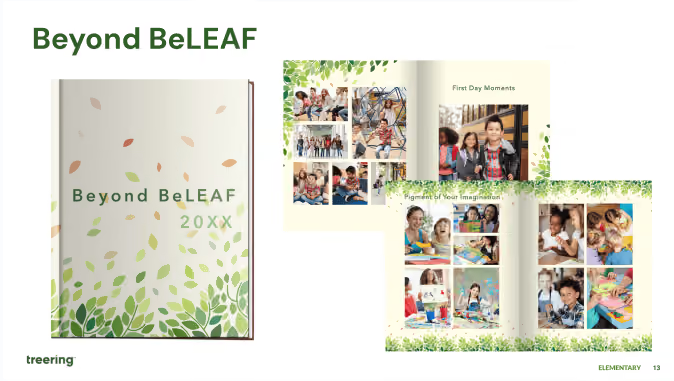
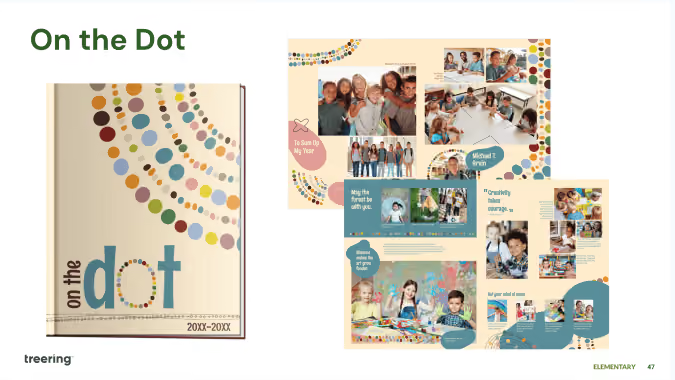
Here’s why they work and how you, if you’re a DIY-er, can create a yearbook design that feels as alive as the real thing:
- Use color to capture nature’s energy (they're called plum, grass green, and seafoam for a reason)
- Add dimension by layering objects
- Emphasize elements using organic shapes and natural patterns
- Create movement with flowy or circular patterns
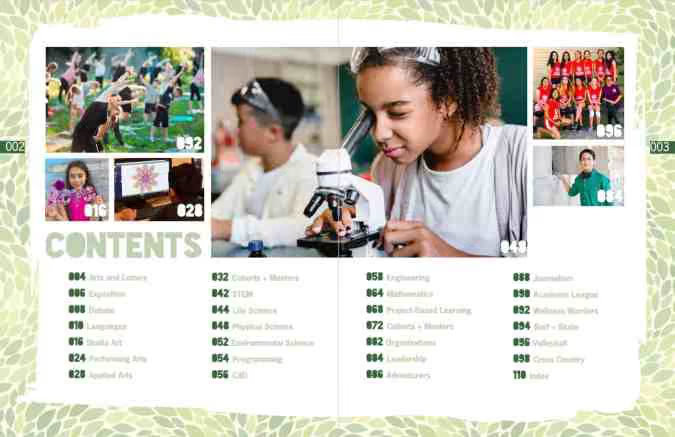
How to build a narrative around nature
Illustrate personal and academic growth with graphics such as the life cycle of plants or the changing seasons. Other visuals such as roots, rivers, or the stars show our interconnectedness.
Elementary nature theme ideas
- In Full Bloom
- Grounded in Greatness
- Pathways of Promise
- Rooted in Growth
- Sky’s the Limit
Middle school theme ideas with an organic vibe
- Branching Out
- Forest of Dreams
- Move Mountains
- Seasons of Change
- Trailblazers
We love seeing student interpretations of these verbal themes with cover art contests. You can also involve the school community by using students’ photos of nature on dividers and theme pages.

Unreliable volunteers: when your yb co-chair goes dark
You planned your year and recruited your team. Roles are set. Parents and teachers are submitting photos. And then, an unreliable volunteer sets back your yearbook exponentially. Take heart: you’re not the first yearbook adviser to experience this!
Volunteer unreliability factor 3/10 - deer in the headlights
Ready, set… nothing. Whether fear of failure or a general spirit of uncertainty are acting as hindrances, it’s time to step in as a coach. Let’s face it, many of our parent volunteers are publishing and journalism amateurs. Take some time with the new recruits to show not tell: design a layout together, photograph an event together, get students' quotes together. Build confidence! Consistent communication, including genuine appreciation, inspires unity and helps volunteer yearbook staffers push on towards your goal.
Volunteer unreliability factor 7/10 - oops… (s)he did it again
Early detection, while uncomfortable, can eliminate problems later on. The first time someone is a no-show, address it (kindly).
When you do get that face-to-face moment, maintain your professionalism:
- Communicate with specifics: instead of “You’re always unreliable,” try “You volunteered to take Fun Run photos and did not have a backup in place when you were a no-show. What is your plan to get pictures?”
- Keep it focused: the conversation should center around yearbook responsibilities and not on personal issues. You’re not meeting to be a relationship counselor, life coach, or even a friend. You’re a project manager looking to complete a job.
- Be proactive: document what will happen next. If your yearbook co-chair wants to remain in the role, write out what it will look like with clear expectations and deadlines. Also include an “out” clause if your volunteer continues to be unreliable.
A word of caution: it’s easy to fire off a text or email, and like we tell our children, easy isn’t always best. As we know, much of communication is non-verbal, so a face-to-face session allows you (and your volunteer) to assess body language and tone.
Volunteer unreliability factor 10/10 - the worst-case scenario
What do you do when a volunteer up and quits in the middle of your yearbook and is unreachable, unresponsive, and, frankly, unrepentant?
- Plan for human error and phone a friend
Within your yearbook staff, build in a group of utility players; this may be a working mom who cannot help at every event or a school secretary that does too much already. Have a few friends you can call to help with one-off tasks. The leader of your parent org may have a list of volunteers to plug in. - Promote from within
Your next yearbook co-chair may just be on your staff already. Once you’ve communicated the need—again using specific, job-focused language—the team may have a solution! (You recruited the best for a reason!) - Flip your lid
Not really. It was just fun to write. - Remember your purpose
As cliche as it is, remember the kids. It’s the students who will open the yearbook you helped create, pour over its pages, and never once reminisce on the unreliable volunteer who temporarily thwarted progress. Why? Because you're a project manager who completed the job.

Portrait perfection for your yearbook
Yearbook portraits comprise up to 40% of your book. Pause and contemplate that for a sec: row after row of awkward head tilts and half smiles with the same speckled background your mom had in the 70s fill the bulk of your pages. If you want to change up your layout and use the space to add additional content and cover even more students, we have a blog for that. This one, however, will help you nail the core of your people section.
Work with your photographer
If you’re not the picture day coordinator (lucky!), meet your school photographer and find out when you can expect to get access to your portraits. The two-to-three weeks between makeup day and when proofs arrive should be a part of your workflow. Spend that time prepping:
- An accurate roster
- Fall event yearbook spreads
- Poll, survey, and academics content you will incorporate in your portrait section
Extra credit: learn the how, what, and why of portrait files in the Treering Help Center.
Portrait pages: faster than a cup of coffee?

Treering’s engineers know we have a diverse group of users, so they included automation—such as portrait autoflow—in the arsenal and DIY features. Absent and new students can be flowed in after the fact, and your portrait pages will automatically re-alphabetize. What a relief!
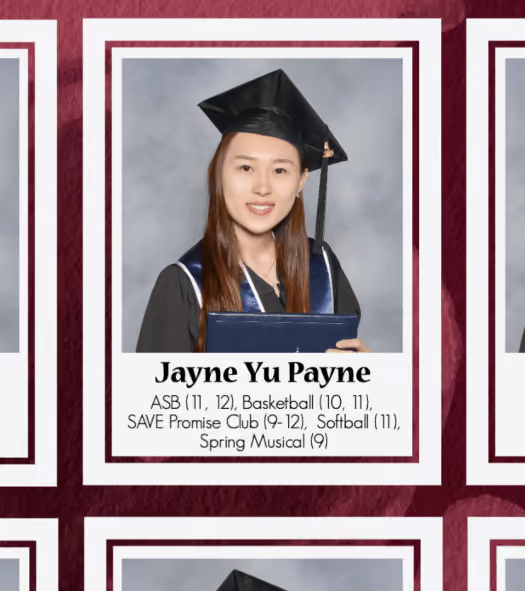
PDF proofs for portrait pages
Editors tell us the secret to an accurate portrait section is utilizing the free PDF proofs in your editor dashboard. Some of the ways schools check names are:
- Distribute proofs to classroom teachers to ensure all their class is pictured
- Post PDF proofs in the lunch room so students can sign off on their names and grades
- Work with school administration to comb through portrait proofs and match them to the school’s database
- Share PDFs proofs at a PTA/PTG/PTO meeting for parents to check (this is also a hot marketing tip)
The more eyes that you have checking the spelling of names and making sure that the photo and name match up correctly the better.

Double your donations 2025
In honor of the season of giving, Treering will match up to thirty yearbook donations per school account. From Tuesday, December 2, 2025 through Tuesday, December 31, 2025, one community book donation equals one Treering book donation. Editors can re-assign these books to teachers, promoting students, the principal, or students in need.
How the donation match works
- Enable the Book Donation option on the dashboard
- Let your campus community know 'tis the season to share the (yearbook) love
- Re-assign the yearbooks so recipients can customize or order non-custom books to hand out

This promotion ends at 11:59 pm PST on December 31, 2025. Matched yearbooks will automatically be added to your account by January 30, 2026.
The Fine Print
- Maximum of 30 donated books will be matched per Treering school
- Promotion ends at 11:59 pm PST on December 31, 2025
- Matched yearbooks will automatically be added to your account by January 30, 2026
- Donations may not be combined with any other promotions
- Donated yearbooks cannot exist on ship-to-home, invoiced, or PO orders; credit card or PayPal orders only
- Ordering donation books will not be available for After Deadline Orders

Over 50 yearbook survey questions for better polls
Yearbook surveys and polls are a great way to get a pulse on your school community for a specific year.
Not just any survey will do that, though. Your yearbook poll results will be way, way better if you ask great questions and help people give great answers.
Inside this post, we’ll show you how to do just that. And, as if teaching you how to fish wasn’t enough, we’ve got Atlantic salmon on deck: over 50 of our most fantastic survey questions to get your gears turning. Read on to get them.
How to write yearbook survey questions
Yearbook survey questions should be low-stakes and, more importantly, fun. They shouldn’t relate to anything that might spark controversy or offend anyone --politics, religion, etc.--
Structurally, you want to create questions that pair obvious inquiry-based words (who, what, where, when, why, how, etc.) with a specific set of responses.
Questions can range from “what was the song of the year” to “best place to buy jeans” to “snacks the cafeteria should start stocking” (though that last one could start a small riot). These are fun questions, great for putting students at ease, and building trust before asking them to share personal opinions and anecdotes.
Recycling the same questions every year isn’t necessarily a bad thing (provided the list you’ve created is full of excellent options). And of course, it goes without saying, you’ll have to change the answers listed to reflect the inevitable cultural changes (hello 20-21 school year changes).
Source Multiple Choice Responses Like a Pro
You’ve got three phenomenal resources at your disposal when it comes to generating the response options for your yearbook survey questions. Let’s take a look at them:
- Last year’s book. As we mentioned earlier, re-using older questions is perfectly fine: using old response-options? Not so much. That being said, they’re a fantastic jumping off point. Maybe Justin Bieber isn’t one of the best male singers this year. Perhaps Chipotle will cede its crown as the go-to pregame dining spot.
- Your staff. You might think you’ve got your finger on the student body’s pulse, but your student staff members are infinitely more plugged in. Grab a couple of pizzas one afternoon and have a brainstorming session to come up with responses. Not only will this help craft great answers, it’ll let you find if your questions actually resonate with students.
- Social media. Simply by paying attention to what’s happening in the student version of the world you can generate oodles of survey response ideas. Look at what’s trending on Twitter or TikTok and start keeping a running list.
When it comes to good multiple choice questions, you want to make sure you limit your responses to no more than 5 choices. Any more than this and students could have a hard time selecting only one. It might also become hard to read when you transfer the results into your yearbook, thereby missing the benefit of capturing this information for your students.
Now, without further adieu, here’s our list of over 50 yearbook survey questions.
Over 50 yearbook survey questions for better polls
Perhaps the easiest way to tackle this big list of questions is to divide them up the way we divide all questions: Who, what, when, where, why, and how.
The biggest reason for doing it this way? Doing so gives you a bunch of options when it comes to laying out your yearbook polls spreads.
Who...
- Is the best male singer/band?
- Is the best female singer/band?
- Would you you like to see speak at graduation?
- Was the most memorable performer (student)?
- Was the best actor (professional)?
- Was the best actress (professional)?
- Had the best athletic performance (student)?
- Was your favorite professional athlete?
- Wrote the best book?
- Made you turn off the TV?
What...
- Were the biggest differences between this year and last?
- Is your favorite professional sport?
- Do you wish the cafeteria had served?
- Was the most difficult class you took?
- Was the most memorable quote?
- Subject do you wish you tried harder in?
- Food did you try for the first time?
- Genre of music was most popular?
- Word did you hear most often when roaming the halls?
- TV show was everybody talking about?
- Jingle gets stuck in your head all the time?
- Accessory can you not live without?
- Is your favorite school outfit?
- Is the weirdest trend of the year?
- Decade would you pick to grow up in?
Where...
- Did you go after prom/school?
- WOuld you like to go this summer?
- Would you most like to take a nap in school?
- Would your team go to celebrate a victory?
- Are you happiest?
- Do you like to shop?
- Is the best pizza in town?
- Should there be a field trip to?
- Would you spend a free period?
- Are the school’s most comfortable chairs?
- Did you spend most of your allowance?
When...
- Did senioritis set in?
- Did you submit college applications?
- Did you start considering what you’d like to do after graduation?
- Do you get to school in the morning?
- Did you stay up the latest?
- Are you most productive?
- Do you do your homework?
- Did you cheer the hardest (school event)?
- Was the student body most excited?
- Is it okay to stop playing Pokemon Go/scrolling TikTok?
Why...
- Should school start 30 minutes later?
- Do you want to go to college?
- Do you prefer books to screen-reading?
- Aren’t there more students on the yearbook staff?
- Did [thing] happen on [show]?
How...
- Many books have you read this year?
- Many social media platforms do you use?
- Often do you send Snaps?
- Can teachers better-use technology in the classroom?
- Should the school go about picking new electives?
Got all that? Good.
Great yearbook survey questions (and great multiple choice answers) will help you elevate any polling coverage you might include in your yearbook. Even better? It’ll help you spot trends that can lead to story ideas.