.svg)

Most popular




Subscribe to our blog
Most recent

Why are yearbooks so expensive?
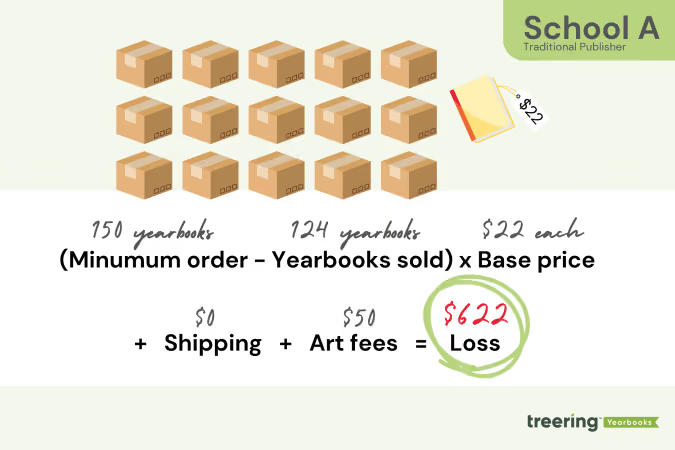
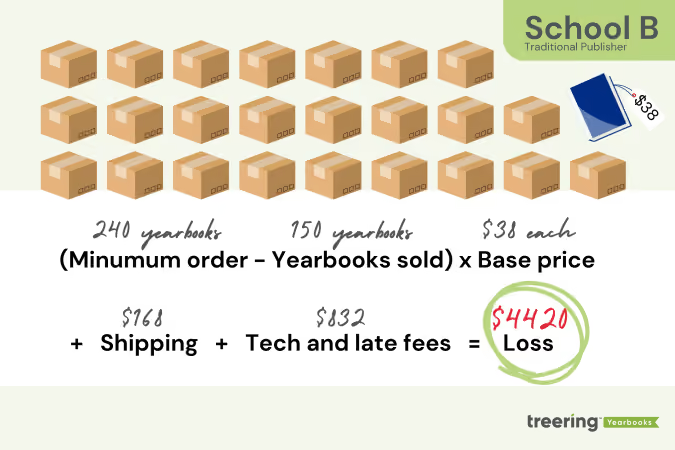
Yearbooks can be a costly investment for schools. Some publishers typically require schools to commit to a specific number of yearbooks at the start of the year, even before they’re sold to parents. If the school cannot sell all the books, it is left with the financial responsibility for the unsold copies.
Not Treering.

Yearbook creators, like John Vogel from Whitesville Elementary School in KY, turned their yearbook bill into a yearbook check when they switched to Treering.
Treering prints what you need using print-on-demand technology, and we make it personal. When yearbook creators enable custom pages, each family has the option to personalize two pages that only print in their yearbook, making every book unique. (More on us later.)
Yearbook pricing explained
Yearbooks are historical. Since Yale published the first one, improvements such as automated presses, desktop publishing software, and digital cameras have made mass-producing yearbooks and collaborating on design easier. Unfortunately, not all of these have translated into the bottom line.
Traditional yearbooks are expensive because the majority of yearbook charges happen in these five main areas:
1. Printing and Production Costs: Usually rolled into the base price, these are the plant charges for producing your core book, including paper, cover stock, and color vs. black-and-white pages.
2. Design and Publishing Software: Big-name design software charges per user, even when integrated into the yearbook publisher’s design application. Publishers sometimes add on charges for professional design support; this is most common when schools want a custom cover.
3. Shipping and Distribution: Since yearbooks are heavy, the cost of delivering large boxes to the school adds up. Some schools must also factor in storage costs or extra distribution efforts, especially if books arrive after the school year ends.
4. Spring Supplements or Inserts: With deadlines as early as February, many schools create and print supplements for spring sports, graduation, or prom. These stick-in pages result in additional printing and shipping costs.
5. Fees: Financial penalties such as art set-up fees, minimums, late fees, proofs, marketing materials, cloud storage, and training and support can add up. Sometimes, advisers don’t see them until the final invoice.
https://blog.treering.com/can-our-school-afford-a-yearbook-program/
No cost yearbooks?
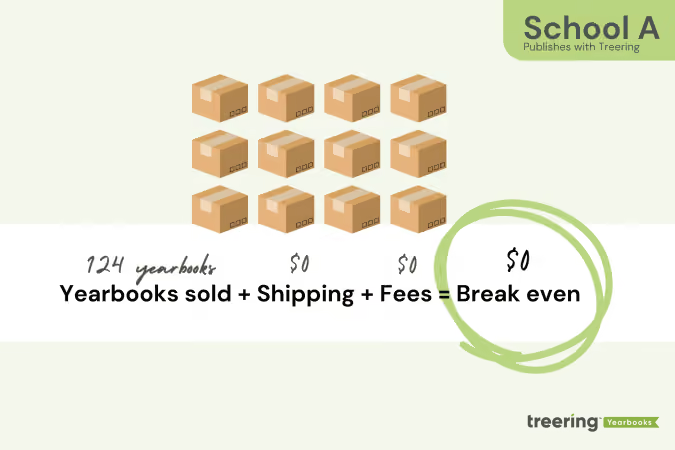
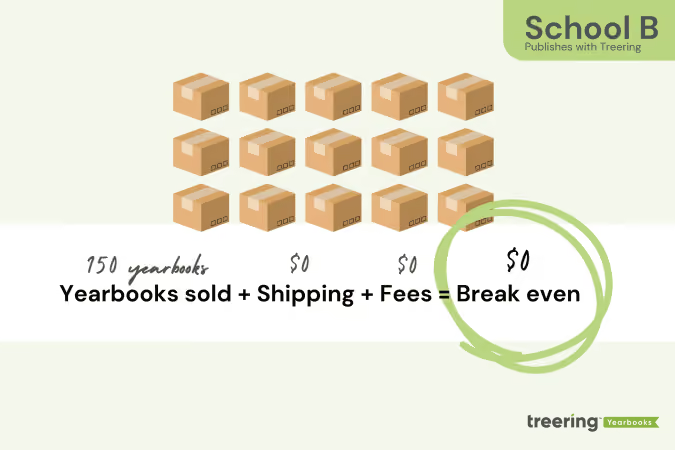
We’re going to toot our own horn for a sec: Treering operates at no cost to schools, with no minimum orders, commitments, or leftover books to manage. Using digital printing, our platform streamlines production, allows for a three-week turnaround, and even accommodates after-deadline orders.
There are no late fees, and you control your deadline.
This flexible approach eliminates inventory management, avoids extra costs, and makes yearbooks more affordable—especially for smaller schools.
Additionally, your per-book price is our only price. It covers everything you may be used to paying for separately, like printing, bulk shipping, e-commerce, marketing, support, custom covers, software, and top quality. It’s based on the number of pages in your yearbook and the cover finish.
Remember School A and School B from above? Here's what happened when they switched to Treerin
When we entered the yearbook space in 2009 touting a print-on-demand, no-contract yearbook solution, schools were wary of this too-good-to-be-true proposition. To learn how other schools gained control over their yearbook finances by partnering with Treering Yearbooks, check out these additional yearbook creator case studies:

Before teaching yearbook writing, read these 7 stories
One of the best ways to get better at writing is to read great writing. Similarly, the only way to teach students how to create exceptional yearbook copy is to absorb and share as much great writing as you possibly can. Here’s why: Good writing serves as a model of excellence for flourishing writers. It has the ability to teach and inspire at the same time. (Talk about powerful stuff.) Encouraging your staff to spend time reading—and imitating—good writing can drastically improve the quality of the yearbook copy they produce for your book. If your goal is to include yearbook stories that capture the minds and hearts of your community even more than the photographs do, reading and discussing great nonfiction is key. Ideally, you’ll be doing that before, during, and after a yearbook writing assignment, but we get that there are other parts of the book to cover, as well.
In any event, we figured we’d give your reading list a jump start by pulling together seven pieces of truly exceptional nonfiction. It’s probably worth noting that none of these pieces appeared in a yearbook. And there’s a reason for that. From saving a local library that has served a downtrodden community’s lone bright spot, to exploring the philosophical underpinnings of cooking live lobsters, these pieces offer young writers a guide to finding their voice and inspiration to chase a great story. They also happen to give you some great teaching material. Besides, we’ll pretty much guarantee you’ll walk away from each piece with beautiful prose flitting about your head, and tears (of joy, laughter or sadness) in your eyes.
7 stories to help teach better yearbook writing
1. “The North West London Blues,” by Zadie Smith
You need to read this because…
Zadie Smith is an excellent writer and one of the most influential writers in Britain (which is pretty much the same as saying she’s one of the most influential writers in the world, because, come on, we all know how much the Brits love to write). “The North West London Blues” is a piece in defense of the Willisden Green Library, a place she frequented as a child and that clearly functioned as a cornerstone of the community. Set to close and make way for commercial endeavours, the story is built around a community’s peaceful protest of the library’s closing.
Smith talks through her own experience with and passion for the library, generally speaking, as a necessary component of any community, and does so with beautiful prose. Her sprawling narrative introduction gives way to highly descriptive writing that weaves personal experience with an argumentative streak yielding a piece of writing your staff will love. Stylistically, Smith deploys parentheticals throughout the piece in an interesting way, using them to insert long swaths of supporting information, as if the speaker grabbed a snippet from a pertinent Wikipedia page.
Share this story with students who might enjoy weaving elements of personal narrative and rich description in a piece shedding light on a serious economic or social problem impacting the school community.
A Brief Snippet of What Makes this Story Great:
“Well-run libraries are filled with people because what a good library offers cannot be easily found elsewhere: an indoor public space in which you do not have to buy anything in order to stay.”
Read “The North West London Blues” here
2. “Taylor Swift Runs the World,” by Chuck Klosterman
You need to read this because…
Since the likelihood of your yearbook including a profile of some sort is rather high, knowing what a great one looks like is imperative. A profile shouldn’t be an all-out fluff piece, an unabashed celebration of an individual. But writing something that allows readers to get a glimpse of the subject without deifying them can be quite difficult. It requires tact, a strong voice, and the ability to sift through facts and quotes, determining what matters most before spinning it into a cohesive story.
“Taylor Swift Runs the World” is an exceptional example of a profile piece. Klosterman’s patented style (gratuitous hair metal references and self deprecation) makes for a great read, and the stark contrast it creates when compared to the version of Swift depicted creates great tension throughout the piece. Chuck Klosterman is a criminally underrated national treasure. The guy’s hilarious, impossibly smart, and writes with a truly unique voice.
A Brief Snippet of What Makes this Story Great:
“There’s simply no antecedent for this kind of career: a cross-genre, youth-oriented, critically acclaimed colossus based entirely on the intuitive songwriting merits of a single female artist. It’s as if mid-period Garth Brooks was also early Liz Phair, minus the hat and the swearing. As a phenomenon, it’s absolutely new.”
Read “Taylor Swift Runs the World” here
3. “Consider the Lobster,” by David Foster Wallace
You need to read this because…
“Consider the Lobster” is probably more of an assignment for an AP English class, where you’d discuss the underlying philosophical argument, and take turns wrestling with the obscure language and the paragraph-length tangential deep dives. You can read the essay’s eight pages over and over and come away with your mind blown every time.
David Foster Wallace is (in)arguably the most prolific essayist of the 90’s/aughts. His footnotes are often more illuminating (and more wonderfully written) than entire volumes produced by his peers. This essay is an interesting, off-kilter entrypoint into existential philosophy and the opulent-ish world of gourmandizing. Share this with your staff as encouragement to find their voice (no matter how “out there” it might be). Just be sure your staff doesn’t try too hard to emulate DFW: it’s impossible!
A Brief Snippet of What Makes this Story Great:
“Is it all right to boil a sentient creature alive just for our gustatory pleasure? A related set of concerns: Is the previous question irksomely PC or sentimental? What does “all right” even mean in this context? Is it all just a matter of individual choice?”
Read “Consider the Lobster” here
4. “The life and times of Strider Wolf,” by Sarah Schweitzer
You need to read this because…
If this one doesn’t make you cry, you’re wrong. Written over the span of months, Boston Globe reporter Sarah Schweitzer’s soul-wrenching story runs the gamut, detailing the life and circumstances of a young boy from rural Maine named Strider Wolf. A victim of horrific abuse, abandoned by his parents, and raised by his grandparents, Strider somehow manages to emit glimpses of optimism and happiness on a daily basis.
This is a phenomenal example of telling an utterly tragic story with tact and beautiful prose, and the perfect way to introduce your staff to emotionally impactful writing that isn’t overdone. An added bonus: the accompanying photography won a Pulitzer, so be sure to share this one with your whole staff.
A Brief Snippet of What Makes this Story Great:
“A few weeks later, shortly before the end of school, Strider sat alone, under a DARE sign, curled into a wall alcove. The lunch ladies in blue smocks had piled his tray with potatoes and carrots and chocolate milk, but he picked only at a package of Pillsbury mini-bagels. It was grab bag day. A dollar bought a brown paper bag of goodies, like pencils and erasers. Two mothers from the PTO were stuffing bags at the table over from him. Lanette had told him that morning she didn’t have a dollar.”
Read “The life and times of Strider Wolf” here
5. “Friday Night Lights,” by Buzz Bissinger
You need to read this because…
It revolutionized the way people write about sports. It’s a sociological study of small-town Texas in the late eighties. You loved the TV show. Football season is over. Need I go on? Bissinger’s essay (and book, if you haven’t read it) chronicle a Texas high school football team and the surrounding community in the late 1980’s. An outsider (from Philadelphia), Bissinger became a part of Odessa, learning the town's racial, social, and economic machinations, and penned his book in a way that tackles (had to) these themes very much head on.
While it’s unlikely your yearbook will feature pieces riddled with racial undertones, Bissinger’s ability to write about stories that didn’t take place on the field—as well as the actual accounts of football being played—in “Friday Night Lights” are excellent examples for your staff to check out.
A Brief Snippet of What Makes this Story Great:
“Crousen was saddened and dismayed. He couldn't help but wonder if Boobie, because of his natural athletic ability, had gotten too used to having everything handed to him.This August, while other college players prepared for the beginning of football practice, Boobie stood in front of his home in the Southside, chatting quietly with members of his family. It was then that his cousin Jodie found out that Boobie wasn't going back to Ranger and would sit out a year. She was shocked and worried."You're just going to rust up, "she said."It ain't gonna happen," replied Boobie, for he knew better. "It's a God-given talent."
Read “Friday Night Lights” here
6. “The Last American Man” by Elizabeth Gilbert
You need to read this because…
Don’t be shocked if you read this piece by Eat, Pray, Love author Elizabeth Gilbert and decide to move to the heart of Appalachia to build yourself a yurt and start clearing trees for fields. “The Last American Man” is another profile, though on the opposite end of the spectrum; instead of the subject being someone of unimaginable fame, Gilbert details the life and philosophy of a man who has chosen to eschew mainstream society, instead preferring the simplicity and joy of self-sufficiency (think Chris McCandless with more know-how and much better luck).
If you have a staff that swears its high school is so boring they’ll never be able to find a unique story inside its four walls, show them this. Gilbert proves that anyone, anywhere can be fascinating. Warning: There are a handful of F-bombs in the introductory paragraphs.
A Brief Snippet of What Makes this Story Great:
“Eustace hated to blow its beautiful head off, so he took his knife from his belt and stabbed into the jugular vein. Up came the buck, very much alive, whipping its rack of antlers. Eustace clung to the antlers, still holding his knife, and the two began a wrestling match, thrashing through the brush, rolling down the hill, the buck lunging, Eustace trying to deflect its heavy antlers into trees and rocks. Finally, he let go with one hand and sliced his knife completely across the buck's neck, gashing open veins, arteries and windpipe. But the buck kept fighting, until Eustace ground its face into the dirt, kneeling on its head and suffocating the dying creature.That's what living in the woods means.”
Read “The Last American Man” here
7. “Death of an Innocent,” by Jon Krakauer
You need to read this because…
A lot of high school students read Jon Krakauer’s Into the Wild. It’s a classroom classic; why not show your staff the essay from which it spawned? “Death of an Innocent” manages to combine a series of interviews, passages from McCandless’ own journal, scientific research, and even snippets of Krakauer’s own time spent wandering after college, to create a fascinating piece. Pay particularly close attention to the way Chris McCandless is characterized. Is his rugged individualism heralded, or is he painted as a brash young man woefully under-equipped for the circumstances he sought out? Is there even a definitive answer to this question?
A Brief Snippet of What Makes this Story Great:
“His education had been paid for by a college fund established by his parents; there was some dollars 20,000 in this account at the time of his graduation, money his parents thought he intended to use for law school. Instead, he donated the entire sum to Oxfam. Then, without notifying any friends or family members, he loaded all his belongings into a decrepit yellow Datsun and headed west, without an itinerary. Chris McCandless intended to invent a new life for himself, one in which he would be free to wallow in unfiltered experience.”
Read “Death of an Innocent” here
Read them. Learn from them. Teach with them. Talk through style and technique, pointing out the rhetorical devices and artistic flourishes that your young writers might incorporate into their yearbook writing. Most importantly, though: enjoy.

How to write yearbook headlines
Not only is it a part of the dominant element of your spread’s hierarchy, but headlines also help organize the yearbook by providing a visual cue and structure for the content. An effective headline can help a reader quickly understand the content of a page and decide if they want to read more. (They should!) When writing headlines for your yearbook, follow these five guidelines.
1. Set the tone
The tone of your headlines should match the tone of the yearbook, whether it is lighthearted, serious, or something in between.
Many advisers begin the theme development process with an idiom dictionary nearby to create a lexicon for the year. By incorporating keywords and phrases from the yearbook theme into the headlines, designers create a consistent and cohesive story, which ultimately strengthens your theme.
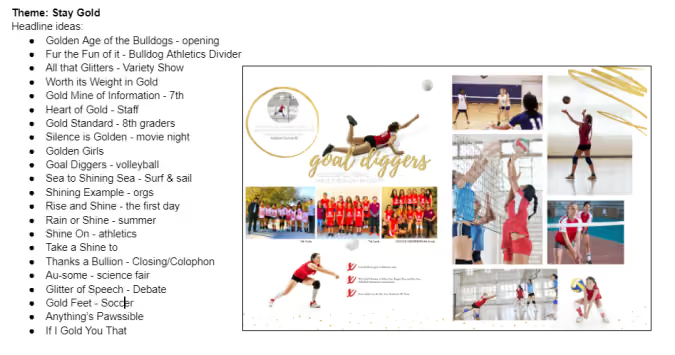
Take a look at this example: with the Treering Theme Stay Gold in mind, the editorial staff looked at all the phrases using gold and built out a list. They then assigned potentials to spreads. Notice how gold is frequently used, as are synonyms such as shine and glitter.
Considerations for theme copy in yearbook headlines
- Resist the urge to make every headline the same. In a book titled “Then & Now,” you can only have so many headlines with an ampersand. (Trust me, it was a first-year yearbook fail.)
- Use spin-offs to highlight the main concepts of the theme. Your headlines and subheadlines exist to bring the yearbook theme to life and make it an integral part of each story and spread.
2. Maximize your space
Focus your yearbook headlines and limit them to no more than a few words which accurately reflect the content of the story they introduce.
Advisers, here are some exercises that can help students produce stronger headlines:
Headline critique
Have students work in groups to critique headlines written by their peers. Collaboratively, students learn to identify strong and weak yearbook headlines and develop a critical eye for headline writing.
News scavenger hunt
Collect headlines from various sources (some ideas are below in section five) and analyze them for clarity, conciseness, and relevance to the content. This exercise can help students understand the importance of writing headlines that accurately reflect the content and grab the reader's attention.
Headline revision
To help students learn to refine their headline-writing skills and make their headlines more effective, have students write several headlines for a given story or event and then revise them to make them more concise, clear, and attention-grabbing.
3. Follow AP Style guidelines:
When it comes to all things style, the Associated Press Stylebook sets the rules for copy, abbreviations, and formatting.
- Capitalization: Capitalize the first word and all subsequent important words in the headline, including prepositions and conjunctions of four letters or more.
- Active voice: Use active voice in your headlines, as it makes them more dynamic and engaging.
- Punctuation: Limit the use of punctuation in headlines, typically using only a single exclamation point or a question mark, if necessary. (Personal anecdote: My undergrad journalism professor told me I get three exclamation points in my career, and to use them wisely.)
- Conciseness: Keep headlines concise and to the point, typically no more than a few words.
- Spelling and grammar: Make sure to check the spelling and grammar of each headline to ensure that it is error-free and professional-looking.
4. Wordplay works
Make your English department swoon with literary techniques such as puns or alliteration if appropriate.
While "Football" is a straightforward and accurate way to describe the subject matter, using it as a headline for a story about the football team in a yearbook may not be the most engaging option. To make the headline stand out and capture the reader's attention, it's often better to use wordplay or a more descriptive phrase that goes beyond just the basic name of the subject.
For example, instead of simply using "Football" as the headline, you could use an alliteration that showcases your mascot such as “Lions on the Line” or "Touchdown Titans."
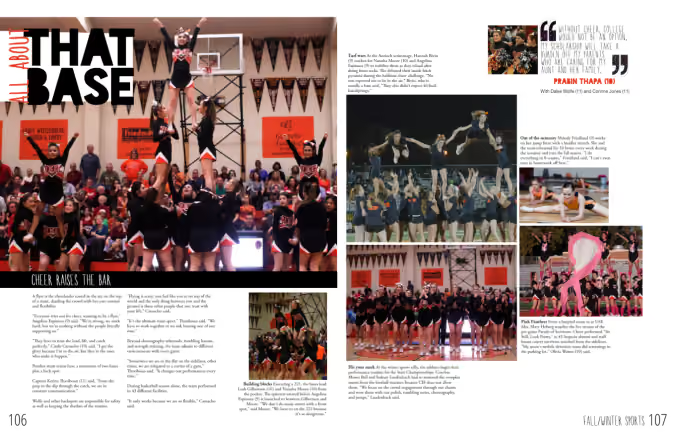
You could even use something from the story copy to tie the spread together: below this cheer spread's feature story is about the relationship between cheer flyers and bases.
5. Keep headlines timely
Consider the current events and trends that are relevant to the yearbook and include them in your headlines. From Homecoming (Game of Thrones) to personality profiles of faculty (How I Met Your Teacher), you can get creative in the Heartland (any location on campus, such as the quad, where the whole school gathers). See what we did there?
Find inspiration by looking at:
- News websites and magazines
- Social media platforms
- Advertisements
- Books and novels
- Popular songs, TV shows, and movie titles
- Quotes and (appropriate) jokes
- Previous yearbooks
Following these tips and finding your headline groove will strengthen your yearbook theme and tell the story of your year. For additional writing tips, check out these blogs:

Yearbook in 60 days - part 1: yearbook quickstart
Two types of people start a yearbook towards the end of the school year: those handed the crown minutes ago, and those with hundreds of other tasks for the school and now have “free” time to begin one more. Creating a yearbook in 60 days is doable. Promise. We’re breaking it down for you in four parts, each with two weeks' worth of tasks and inspiration. Consider this your yearbook easy button.
Throughout the series, there will be resources for inspiration and help.
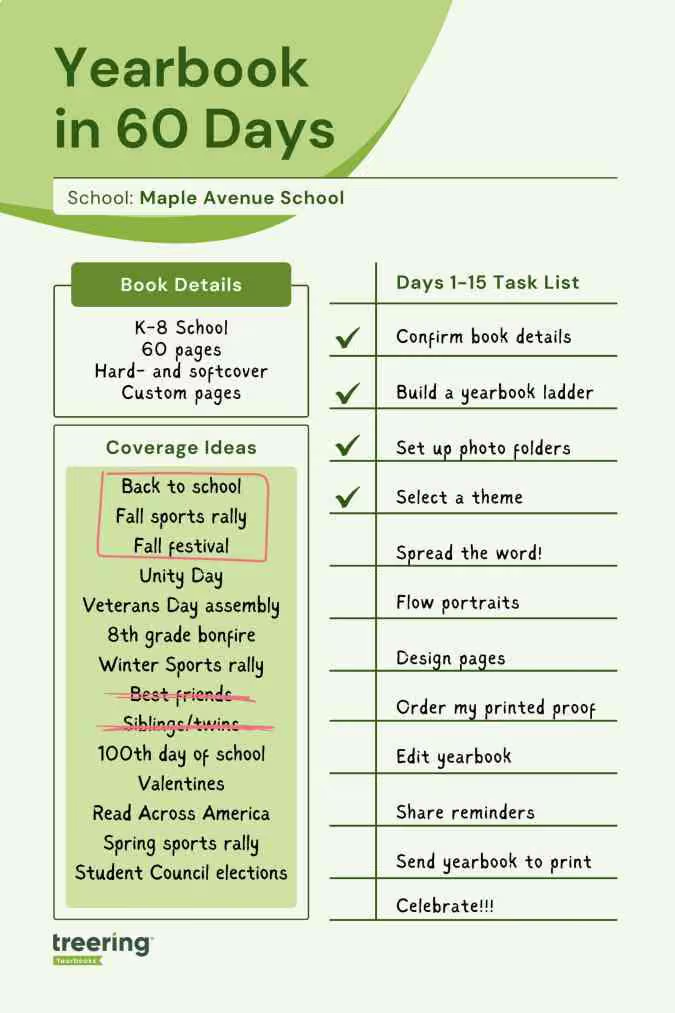
1. Confirm your book details
It’s tempting to jump into the glamorous yearbook tasks such as theme and design. There’s a little back-end work you need to do first for two reasons:
- Your dates will direct your workflow
- Your yearbook details determine the price of your yearbook
Dates
With Treering, you can change your dates at any time. Remember, your three-week turnaround begins once you hit Print Ready, and send your book to the printers.
For parents: custom pages deadline
Parents will see this date on their account, indicating when they should purchase the book or complete any customized pages. It doesn't impact the printing schedule.
Some parents {raises hand} need a little extra time and reminders to complete theirs. Treering recommends a cushion of about two weeks.
For editors: finish editing yearbook deadline and estimated delivery date
This is your one and only deadline for editing the book—and you set it! Select a date three weeks from when you want to distribute it.
You won’t be able to edit the delivery date directly. Treering automatically populates it by the date you choose for your deadline. If you need additional time to capture year-end events, no problem. Your three-week turnaround will align with your new deadline.
In part four, you’ll learn how to send your yearbook to print.
Pricing
The yearbook price will change in real time when you adjust the page count and cover finish. The best way to firm up your page count is to create a ladder (more on this below).

Shipping and index
Bulk shipping to the school is free. If you select this option, you choose how to receive your yearbooks:
- Sorted alphabetically
- Sorted by grade and then alphabetically
- Sorted by teacher and then alphabetically
Alternatively, many online or hybrid academies and schools electing to do a fall delivery choose the ship-to-home option. When parents order yearbooks, they also pay a flat rate shipping fee.
Book details resources
- Video: Chief editor dashboard
- Free Live Webinars: Treering’s Yearbook Club
2. Build a ladder
A ladder is a chart that represents the pages in a yearbook. It’s the industry-standard tool to help you stay organized. On it, you allocate a topic to each yearbook spread (that’s yearbook-ese for two facing pages).
Because yearbooks tell the story of the year, there isn’t a codified order to how things go. Typically, they include
- Academics: school distinctives, achievements, and activities
- Events: fundraisers, activities, performances, before- and after-school activities
- Organizations: clubs and teams
- People: student, staff, and faculty portraits
- Thematic content: larger books employ divider pages to separate sections
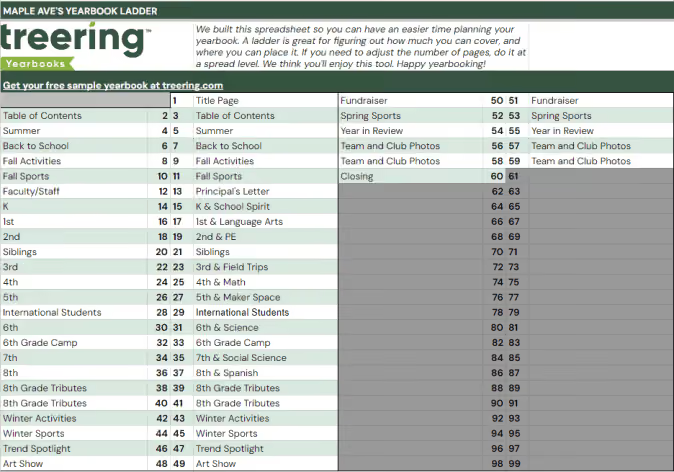
To build your ladder, look at the last few yearbooks and the latest school calendar.
- Brainstorm the non-negotiable events, sections (people, arts, sports), and yearbook traditions
- Brainstorm features, specials, and theme-related content
- Decide how you will organize the book
- Allocate spreads
We love doing this digitally because it can be fluid. If your page count is looking overwhelming because of time or budget, combine some topics. Remember to update your page count on your book details so it matches your plan.
Yearbook ladder resources
- Google Sheet: Yearbook ladder template
- Google Sheet: Example ladders (there’s a separate tab for elementary, middle, K-8, and high school examples)
3. Set up photo folders
The best photo organization tip I can give came from Yearbook Hero Katie Parish. She said to create folders to mirror your ladder. This way, you know you are collecting content for every single spread you planned. And spoiler alert, your design process will look like this.
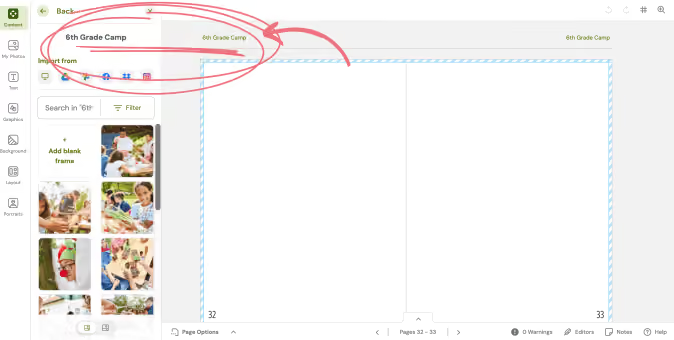
By investing the time to set up folders this way, you can simplify your workflow. Just open the corresponding folder and click, drag, drop, and done!
In the video below, you’ll see how to add folders and set up crowdsourcing features. Notice the Art Show folder is Editor Only. This means only you, the editor, can place photos in this folder. After activating their accounts, parents will see the yellow “public” folders and be able to share. At any time, you can make a folder Editor Only and vice versa.
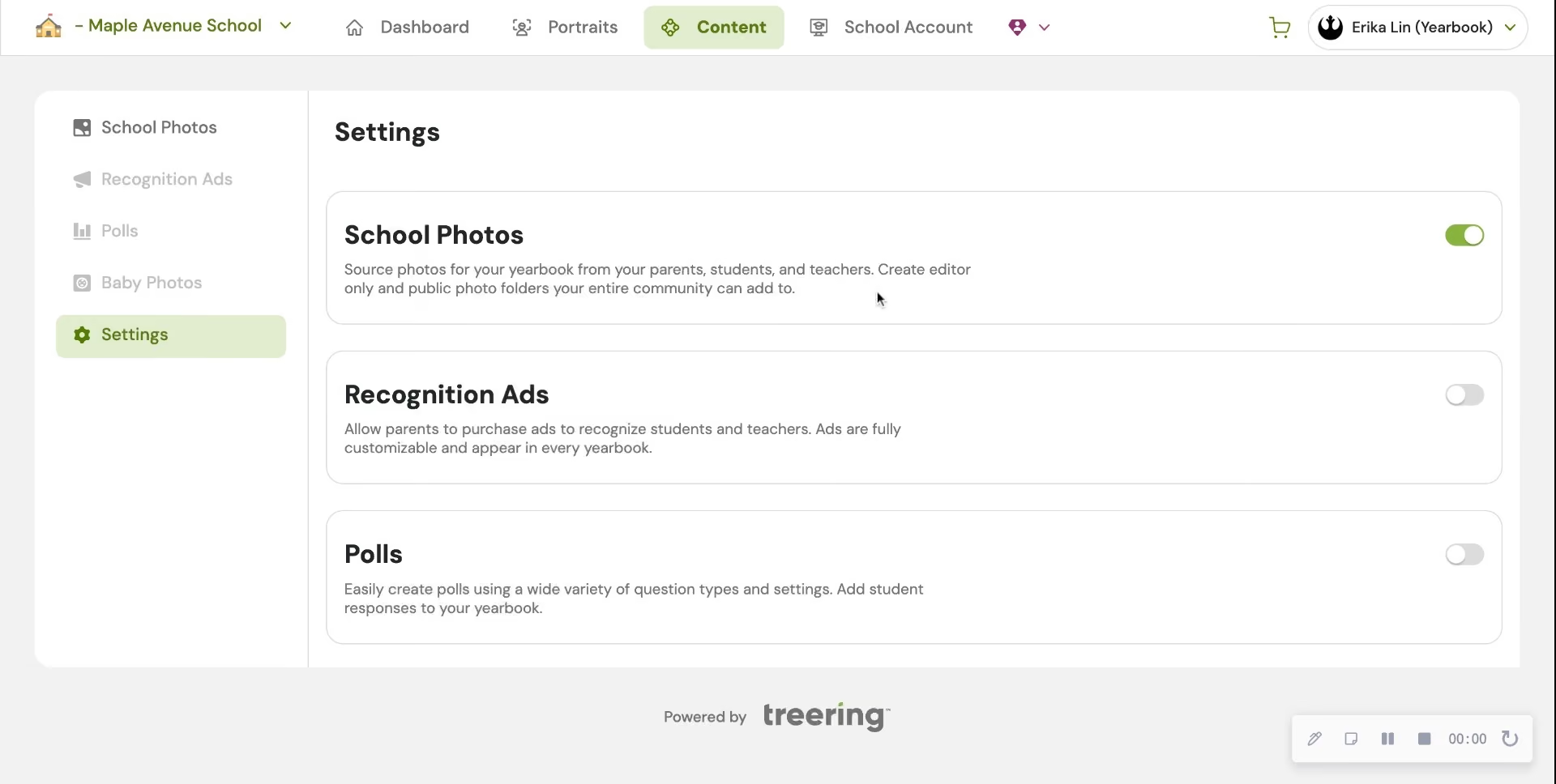
In Part Two, we will give you five strategies to fill those shared folders with content so you can build your pages.
4. Choose a whole-book look
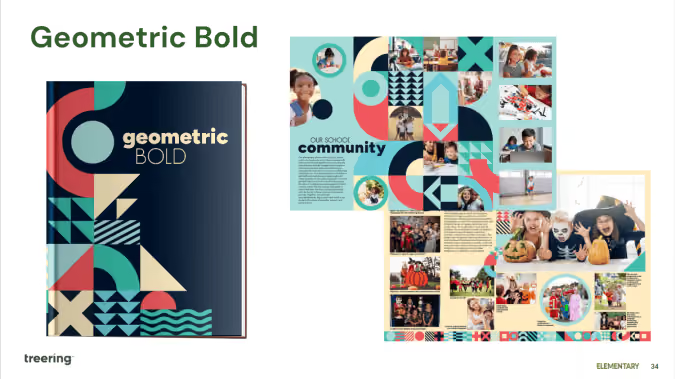
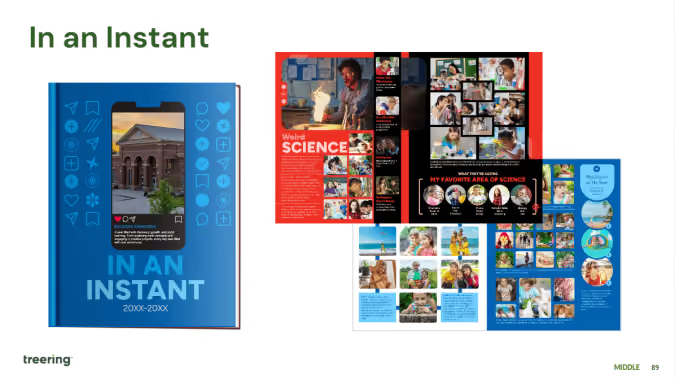
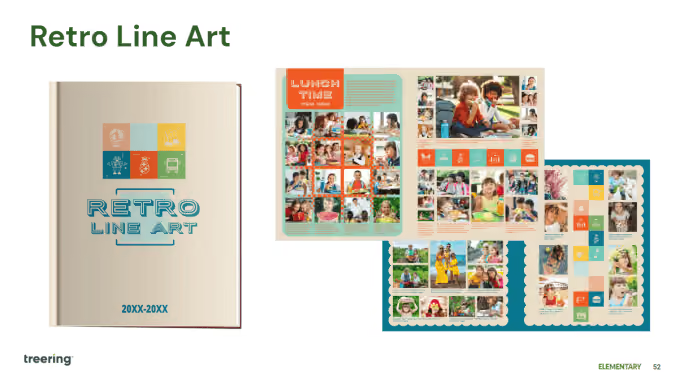
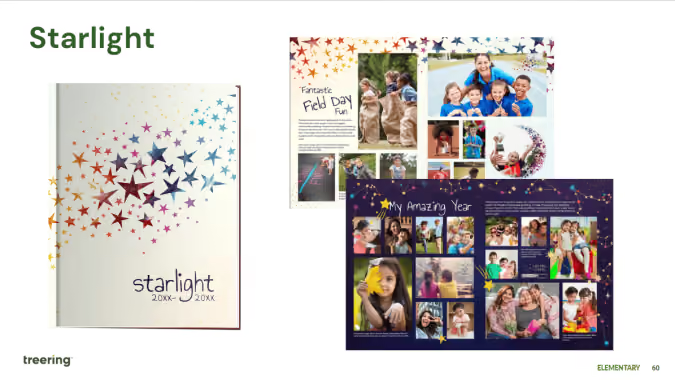
The Styles menu is where it’s at: you can create font and photo presets, adjust your margins (#TeamMarginsOff), and select the theme for your yearbook. Because I have 60 days to create a yearbook, I am skipping all the customization options and selecting a pre-designed theme to give my yearbook a unified look.
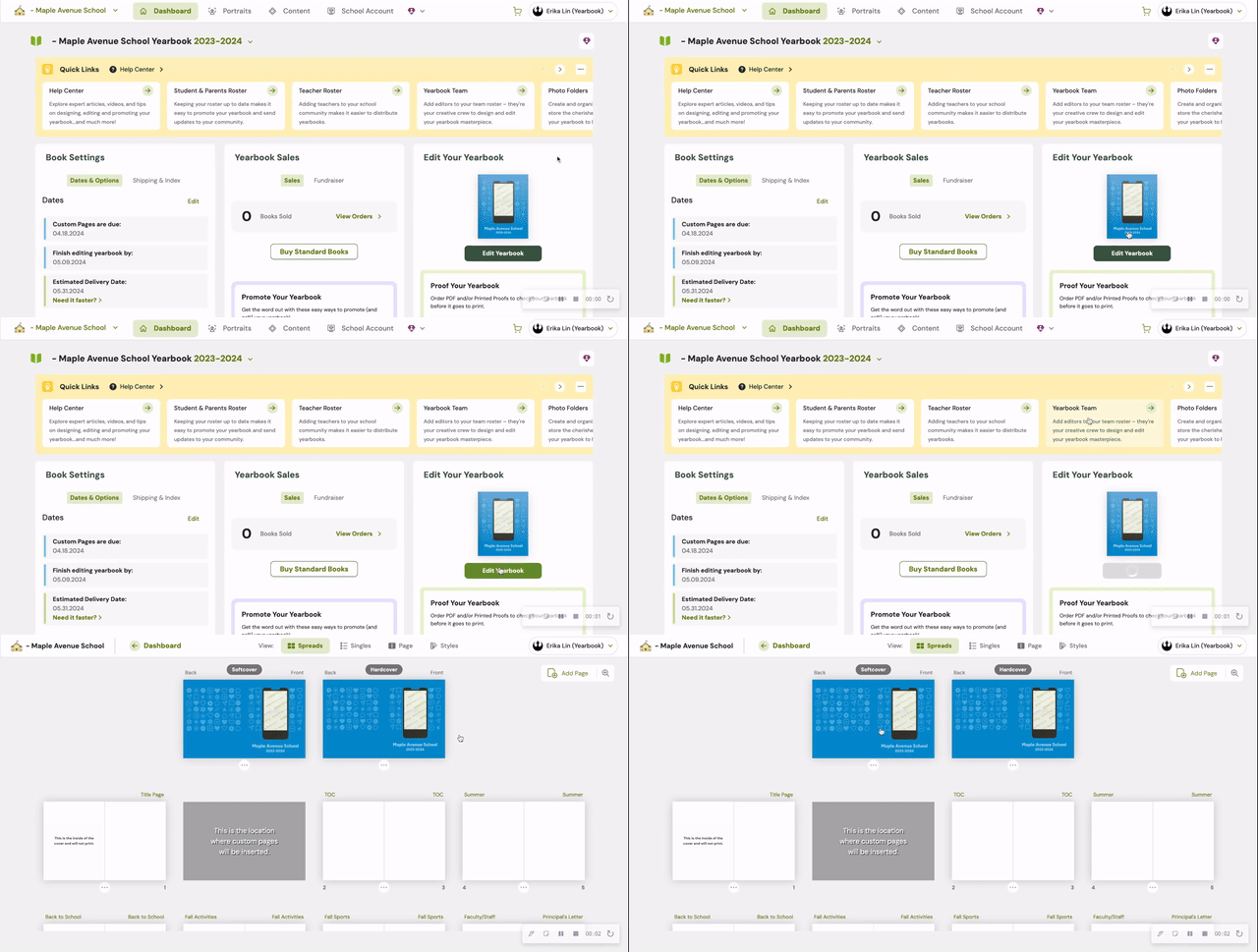
For a cover-to-cover drag-and-drop experience, the design team recommends the following Treering themes:
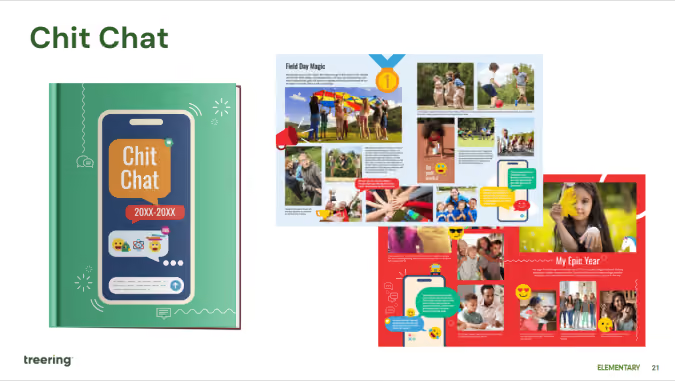
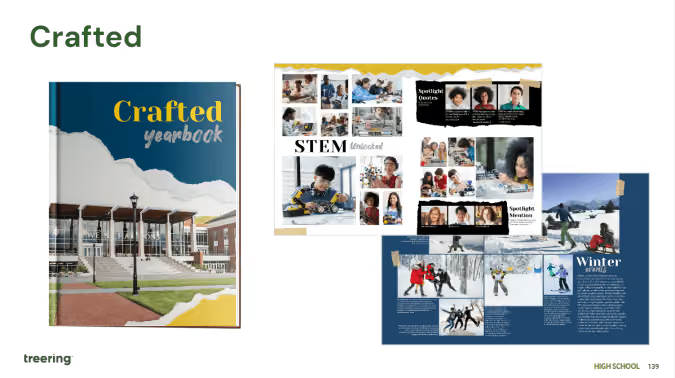
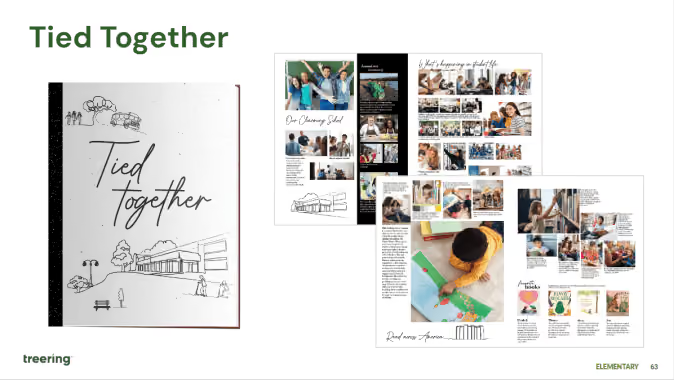
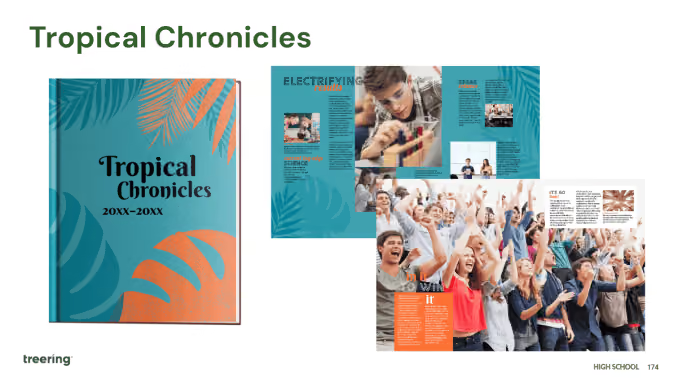
Theme resources
- Google Slides: All Treering’s yearbook theme kits
- Blog Category: Theme ideas and inspiration
Remember, get to know your dashboard; it’s the first thing you see each time you log in. Part two of this series will outline the promotion tools built in the yearbook builder and start the design process.
Yearbook with a friend
You can also recruit team members to help you build and market the yearbook. With Treering, you can set permissions and assign pages to help delegate your workload. Additionally, parents, teachers, and students can help gather content and promote book sales.
Organization resources for yearbook teams

Adviser advice: 10 tips for candid photos
There’s something profoundly satisfying about capturing that one perfect image—when the light and laughter align so magically, freezing time in a way that feels effortless. According to Yearbook Hero Emily Wilson, those moments are rare, fleeting, and almost impossible to predict. To help, she shared her top tips for capturing authentic moments in candid photos.
Get to know Wilson and her developing passion for photography in her own words. (See what we did there?)
After my second child was born, my husband gifted me my first “real” camera. It was a Nikon D5000, and it felt cumbersome and clumsy in my hands at first. I’ve never thought of myself as particularly "techie"—just the word exposure makes me break out in a mild panic. But what I do know is how to tell a story, and that’s always been my default. Photography, for me, has never been about mastering every setting and toggle on a camera. It’s been about capturing moments that matter.
“Life isn’t about how many breaths you take, but about the moments that take your breath away.” Few movie quotes have stuck with me over the years, but this one has (thank you, Will Smith in Hitch). I think of it often, especially when I’m scanning the world through my camera lens, searching for those breathtaking moments.
Over time, I’ve learned that no amount of technical knowledge can replace an innate understanding of people—their emotions, connections, and desires.
Emily Wilson
10 tips for authentic yearbook photography
For the past five years, I’ve served as the yearbook advisor for a high school. It wasn’t something I ever planned—I had envisioned teaching only English, not journalism. I’d never written formal journalist pieces or worked on a yearbook before. The closest I’d come to anything remotely similar was scrapbooking and journaling. But armed with limited technical knowledge and an abundance of creative confidence, I decided to embrace the challenge.
While my student staff and I still have plenty of room to grow and refine our journalistic techniques, we’ve made significant strides. Here are ten tips that have propelled our yearbook forward, helping us create something we’re genuinely proud of.
1. Capture candid moments
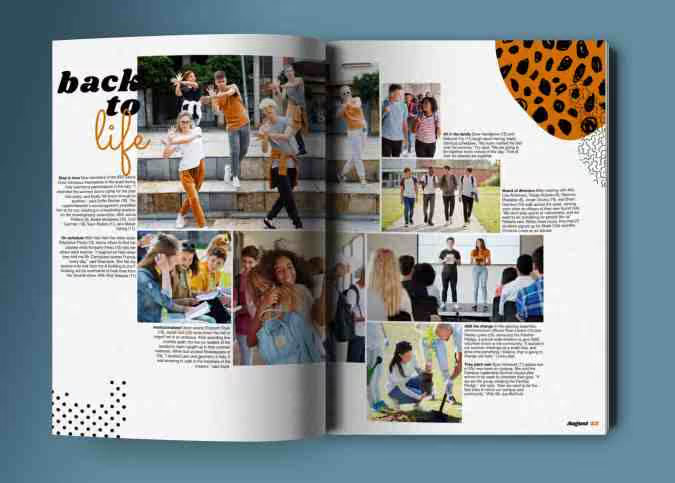
Yearbooks are about documenting real life, not just posed portraits. Be a quiet observer during events, in classrooms, and on the sidelines. Look for laughter, concentration, or spontaneous gestures that tell a story.
2. Get to know your subjects
Whether you’re photographing a pep rally or the chess club, take a moment to connect with your subjects. A quick chat can help them feel more comfortable and natural, translating to more authentic images.
3. Tell the story of the year
Think of each photo as part of a larger narrative. The yearbook isn’t just a collection of faces; it’s a snapshot of a school’s unique culture, achievements, and challenges. Seek out moments that capture the spirit of the year.
4. Vary your perspectives
Avoid taking all your photos from eye level. Get low for a dramatic shot of the basketball team huddled on the court, or climb up for a wide-angle view of a school assembly. Changing your perspective can make ordinary scenes more dynamic.
5. Be mindful of backgrounds
A messy or distracting background can take the focus away from your subject. Frame your shots intentionally, and if needed, move slightly to avoid clutter like trash cans, backpacks, or bright exit signs that draw attention away from the action.
6. Use natural light when possible
School settings can have harsh or dim artificial lighting, so position your subjects near windows or use outdoor spaces when you can. If shooting indoors, experiment with angles and settings to avoid heavy shadows or overexposed areas.
7. Focus on emotion and interaction
The best yearbook photos highlight relationships and emotions. Capture the high-fives after a touchdown, the quiet focus during a test, or the joyous chaos of a classroom celebration. Emotion adds depth and meaning to your images.
8. Photograph the unexpected
Some of the most memorable yearbook images come from overlooked moments—like a student tying a friend’s shoe, a teacher’s reaction during a surprise assembly, or a band member backstage adjusting their uniform. Look for the stories others might miss.
9. Keep it balanced: action and detail
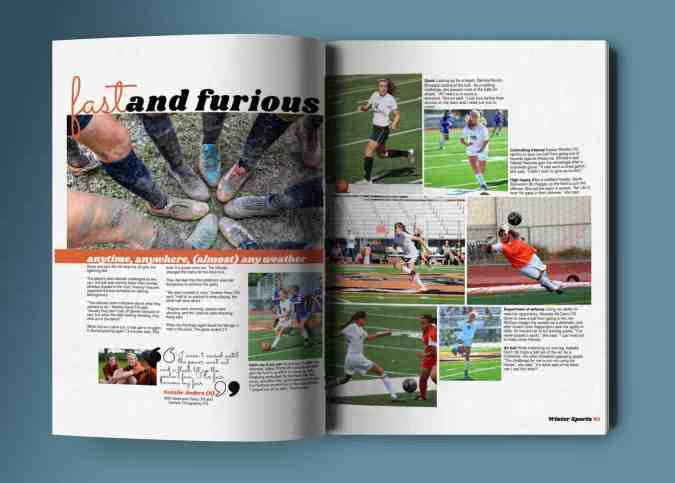
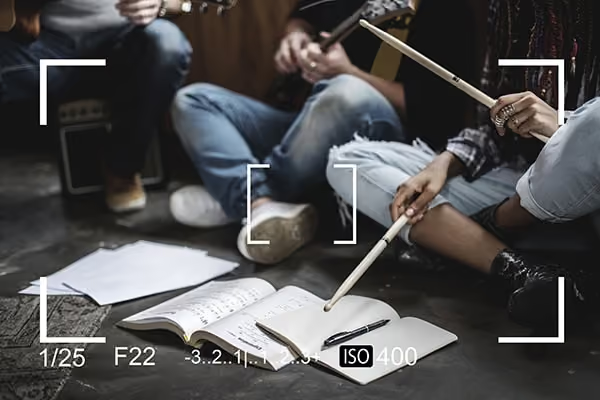
Yearbooks benefit from a mix of sweeping action shots and small, intimate details. Pair a mid-game photo of the soccer team with a close-up of their muddy cleats or a teammate’s hands clapping after a goal. These contrasts add richness to the narrative.
10. Involve the whole school community
Yearbooks celebrate everyone in the school. Don’t just focus on the obvious highlights, like sports and performances. Include the quiet moments in the library, the budding friendships in the lunchroom, and even the behind-the-scenes work of staff and volunteers.
Beyond the lens
Photography is about more than just pointing a lens at a subject. It’s about anticipation. You have to almost feel what’s coming before it happens, predicting not just the movements of your subject but also the reactions of those on the fringes of the frame. Sometimes, the most compelling images come not from the people you’re focused on but from those nearby—the onlookers. These unexpected participants bring depth and richness to the story unfolding in your viewfinder.
Take, for example, a family portrait session. You might be working to capture the perfect posed shot, but suddenly, one of the kids is overtaken by a fit of giggles. Naturally, you’ll want to pivot and catch those big, toothy grins and wild, waving arms. But as a parent and a storyteller, I’ll instinctively glance at Mom, too—her expression in response to her child’s laughter. Those are the authentic moments.
Those are the moments that matter. They’re the ones that, years from now, will make you pause, smile, and maybe even tear up as you reflect on how quickly life moves. It’s these moments that take your breath away.
Learn more about Wilson’s yearbook journey here.

3 (but really 7) design elements to up your yearbook's visual appeal
Personal anecdote: In 1996, I joined my first yearbook staff. Shout out to Mr. Wayne Weightman who took a chance on a loud introvert and turned her into a creator. Fast forward a quarter-century (sheesh) and his yearbook design lessons are still impacting students—some of whom are now educators—and scores of creators.
The easiest element: spacing
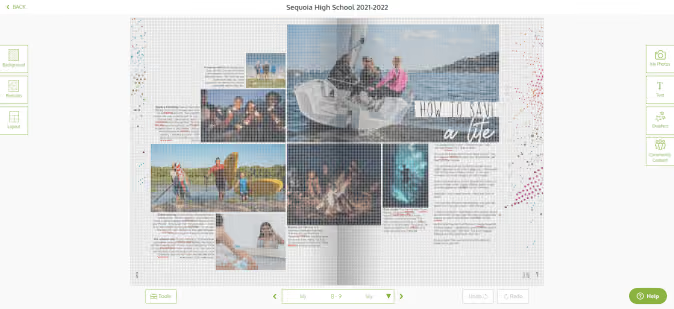
One pica was the standard back in the day when orange wax pencils and cropping squares were the norms. Each spread was designed on grid paper measured in picas. Below is an example of one pica standard yearbook spacing. It's clean. It's traditional. It's fin
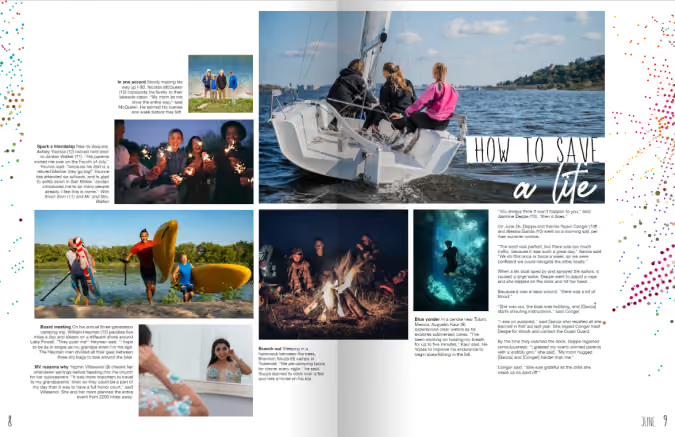
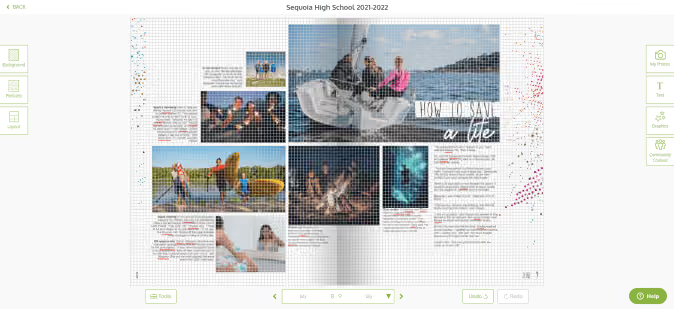
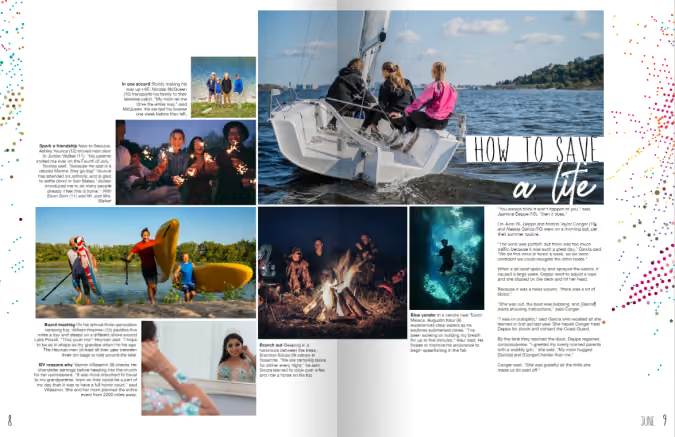
Contrast that with tight spacing. This is one-half pica (the design equivalent of red stilettos). Your spread just had a glow up.
The dominant element: hierarchy in yearbook design
Hierarchy tells our buyers what’s important, and for all you ELA teachers, it’s the outline of the spread. Spoiler alert: size matters.
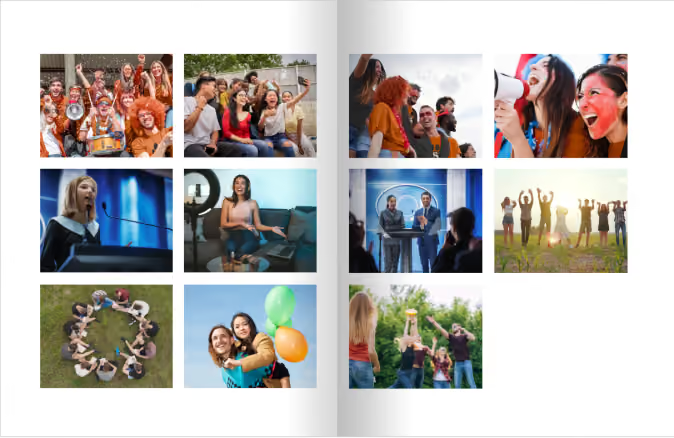
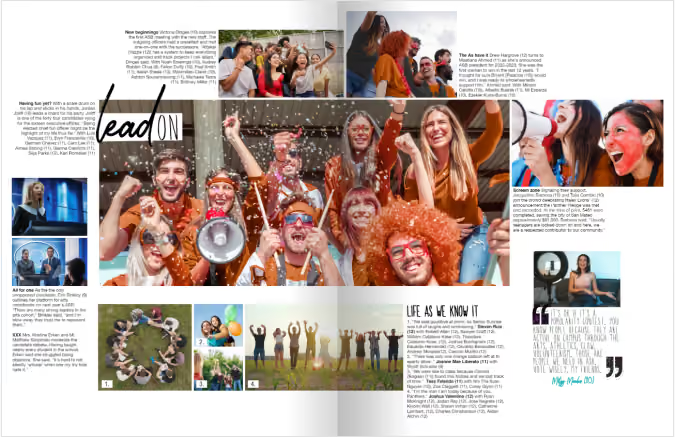
The yearbook design lesson here is to immediately attract your reader’s attention with a dominant image or module. Use the golden spiral to build off your dominant. Use this ready-made yearbook design lesson to help launch your discussion with your students.
1. Photographs
The most interesting, story-telling, awe-inspiring photo should be dominant on your spread. Connect your headline to this image. You can build off your dominant photograph to fill your spread.
2. Headline
Advertising genius David Ogilvy said, “On the average, five times as many people read the headline as read the body copy. When you have written your headline, you have spent eighty cents out of your dollar.”
Since a headline is our entry point, it should connect yearbook buyers with the focus of the spread. Avoid “Football” when every photo pictures football–your buyers are smarter than that. If you must spell it out, use the folio. Appropriate puns, alliteration, and rhymes are literary techniques to use.
3. Body copy
My yearbook students once tried to 86 captions because “no one reads them.” Another Mr. Weightman yearbook lesson: “If they were worth reading, people would.” Ouch. (And true.)
Lessons centered around the art of open-ended questions made interviewing more of a conversation. Students would develop 10 questions and always end the interview with “Is there anything else I could have asked?”
Oh, and in case you’re wondering, people did read those captions.
If you’re just getting started, practice using anecdotal quotes to fill in captions and add detail. Captions should include facts and sensory details while identifying the subject of the photograph and their grade. More writing lessons abound in the Treering Yearbooks’ free curriculum.
The fun elements: the acronym you and your students will never forget
Shout out to another design influencer: Robin Williams (not the genie). She’s a proponent of contrast, repetition, alignment, and proximity—master these four things, and everything you touch will be design gold. (I’ll give you one second more to figure out the acronym.) Teach these design elements individually, then combine them for the ultimate yearbook design lesson.
Contrast
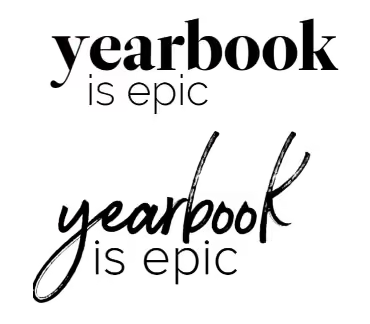
Pair a bold font with a condensed one. Use opposite sides of the color wheel. Get crazy with font size (within reason). These design elements teach your reader where to look, and when used in concert with hierarchy, tell your students’ stories in an easy-to-follow manner.
Other ways to create contrast include shape (horizontal vs. vertical) and weight (thick vs. thin).
Repetition
From cover to cover, your book should look cohesive. Every layout will not be the same. I repeat, every layout does not have to be the same! Colors, fonts, sizes, and design elements should be consistent throughout your book. Remember, your theme is the brand, and your book is the platform by which you will develop it.
Alignment
Design is intentional. On your yearbook spreads, align:
- Copy
- Photographs
- Quote packages
Proximity
Put the things that go together, together. This seems like a no-brainer, and yet, it’s a yearbook design lesson worth refreshing year after year.
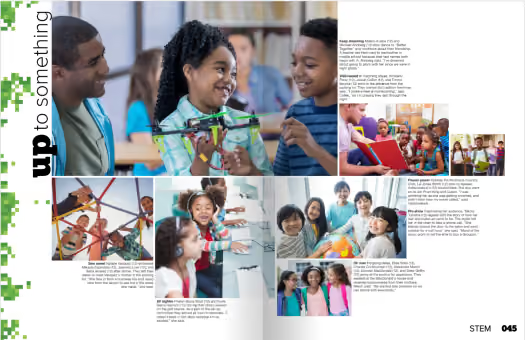
Yearbook design lessons are something you can teach throughout the year. Pin your favorite ideas (or steal some of ours).

Six ideas to fill pages
Page count can be a dirty word in the yearbook industry. It’s how we compare programs or evaluate pricing. It's also how we wow our readers. Peppering in showstopper spreads breaks up the monotony of photo collages, portraits, and team photos. These pages also fill your yearbook with even more personal stories and unique-to-this-year happenings. (And if we're being honest, these last-minute ideas can help you increase coverage with ease.)
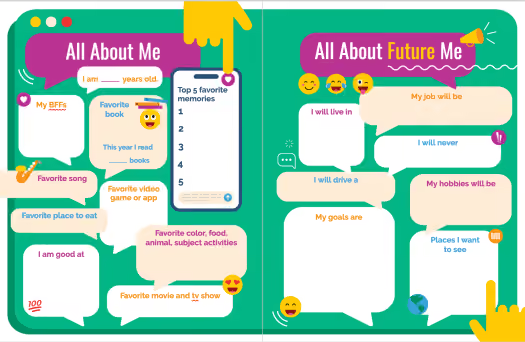
1. Interactive pages
Drop-in yearbook spreads, such as about me pages make it effortless to complete the year's story. You can customize the questions and prompts on these fully editable yearbook templates and give students even more space to share their POV on the year. If you don't have a spread to fill, consider adding a sidebar so students can react to campus happenings.
2. Spirit quiz
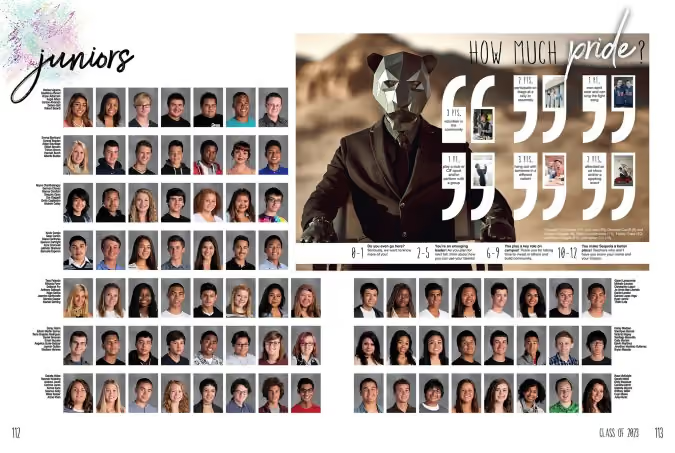
When Sequoia High School had over half a page to fill in their junior section, they added a teen magazine-style quiz. This spirit self-assessment featured eight additional students plus the school mascot while showing off what is uniquely Panther programming.
Make it your own
For your spirit quiz, determine which activities and behaviors define your student body and assign a point value. For example:
- Owning spirit wear +1
- Participating in a club +2
- Attending a musical or a sporting event +3
- Knowing the lyrics to the fight song or alma mater +3
- Serving the community+3
Use the scoring to affirm your community, even if it's a one or two. A simple "we want to know you more" will go far for students trying to find their way.
3. Then and now
We’ll save the yearbook-as-public-record soapbox for another blog. Know this: anniversary years are a great time to reflect on where your school community has been and where you are headed. Schools also use building projects, campus splits, and expansion projects to add reflective photos and copy to their yearbook pages. Does this sound overwhelming? A show-stopper spread in your theme copy or your people section is all you need.
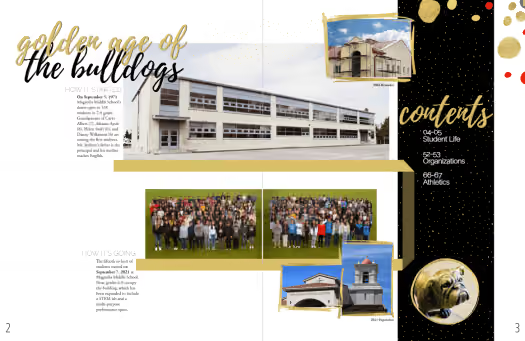
In addition to featuring changes in the building, you can write about or share photographs from:
- Teachers and coaches who are alumni
- Current students of alumni
- Famous alumni (ICYMI: alumni are a huge resource)
- The local historical society
- Past yearbooks
- Blueprints
4. Pet spread
If you’re new to crowdsourcing, or in need of additional coverage, start with a pet spread. If we’ve learned anything from #caturday and #dogsofinstagram, it’s that sharing pet photos brings us joy and is a natural part of our culture. Case in point, when our design team asked the Treering staff to submit photos of their children and pets to use in sample spreads, the latter had nearly twice the submissions.
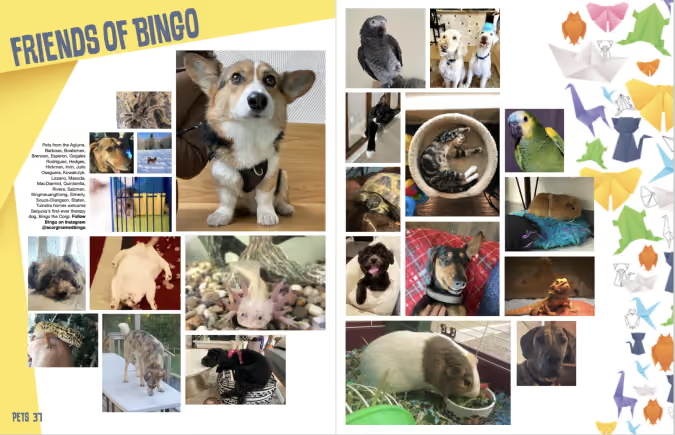
When your students crack their yearbooks open in five or 15 years, the sight of their furry, feathered, or scaly friend beside their artwork and activities truly captures a moment in time.
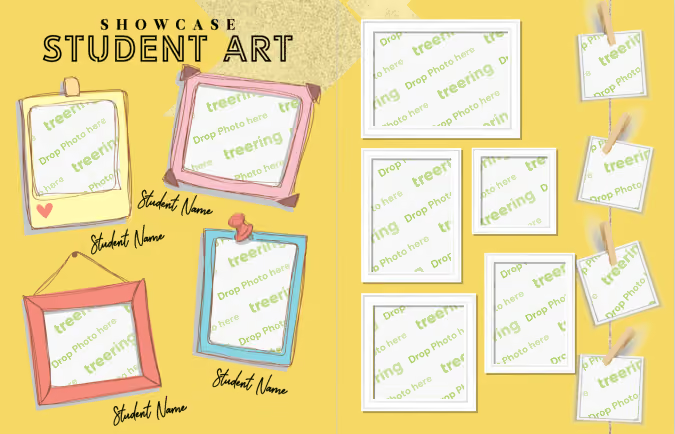
5. Art showcase pages
Student contributions extend beyond the field, club meetings, and stage. Those creative moments in the studio or during classroom art time belong on your yearbook pages. Also, like a pet spread, an art spread is a way to include those camera-shy students.
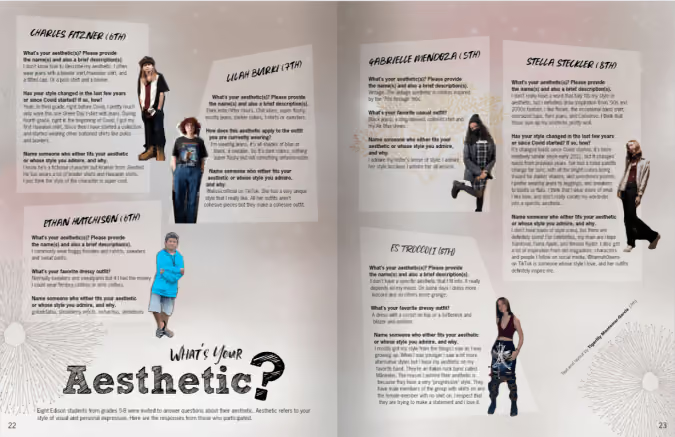
6. Fashion page
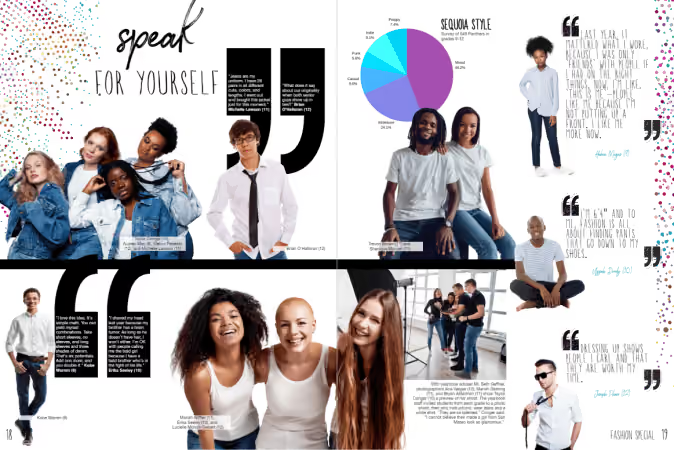
Expression isn’t limited to canvas and ink: Yearbook Hero Grace Montemar said her school included a fashion spread because it “allowed Yearbook Club to spotlight classmates from various grades whose fashion sense stood out from the crowd.” Featured students expressed their style and their inspiration with interviews.
We love how this school asked students from each grade level to come to the photoshoot in a white shirt and jeans.
Do you have more easy ideas to fill pages? Share them via social and tag us!
Yearbook Hero Allyson David
Treering Yearbook Heroes is a monthly feature focusing on yearbook tips and tricks.
While at her desk in the library, media specialist Allyson David overheard the yearbook planning among the voluntold team. She asked to help. At the time, excess yearbooks filled a storage room at Lanier School for Inquiry, Investigation, and Innovation, and the school was losing money.
How did you turn things around?
My sister is a high school yearbook adviser, and she told me to look into Treering. After I received my sample, I took all the selling points to my admin. I told him we won't have boxes of leftover books, families can customize a couple of pages in there, and we can even integrate a fundraiser. It was a no-brainer: we went from losing money to making a profit.
You went from being on a yearbook team to managing the project solo.
As a media specialist, it naturally works; this is what we do. Since we are a Google school, teachers put pictures in a shared folder on Drive, which seamlessly integrates with Treering’s software. We have pictures throughout the year that I pull from to put in the yearbook.
I start designing with our fifth-grade ads. We sell quarter-page recognition ads to parents, grandparents, and extended families. Then I flow the portraits. The remaining pages go to school events.
Tell me how you come up with your yearbook theme.
The yearbook theme is based on the teacher of the year. This year, it’s cactuses. The teacher of the year this year is a SPED teacher whose classroom is decorated with cactuses. When I asked her why, she said, “Cactuses are resilient, and my kids are resilient. Both have to show up and be determined to thrive.”
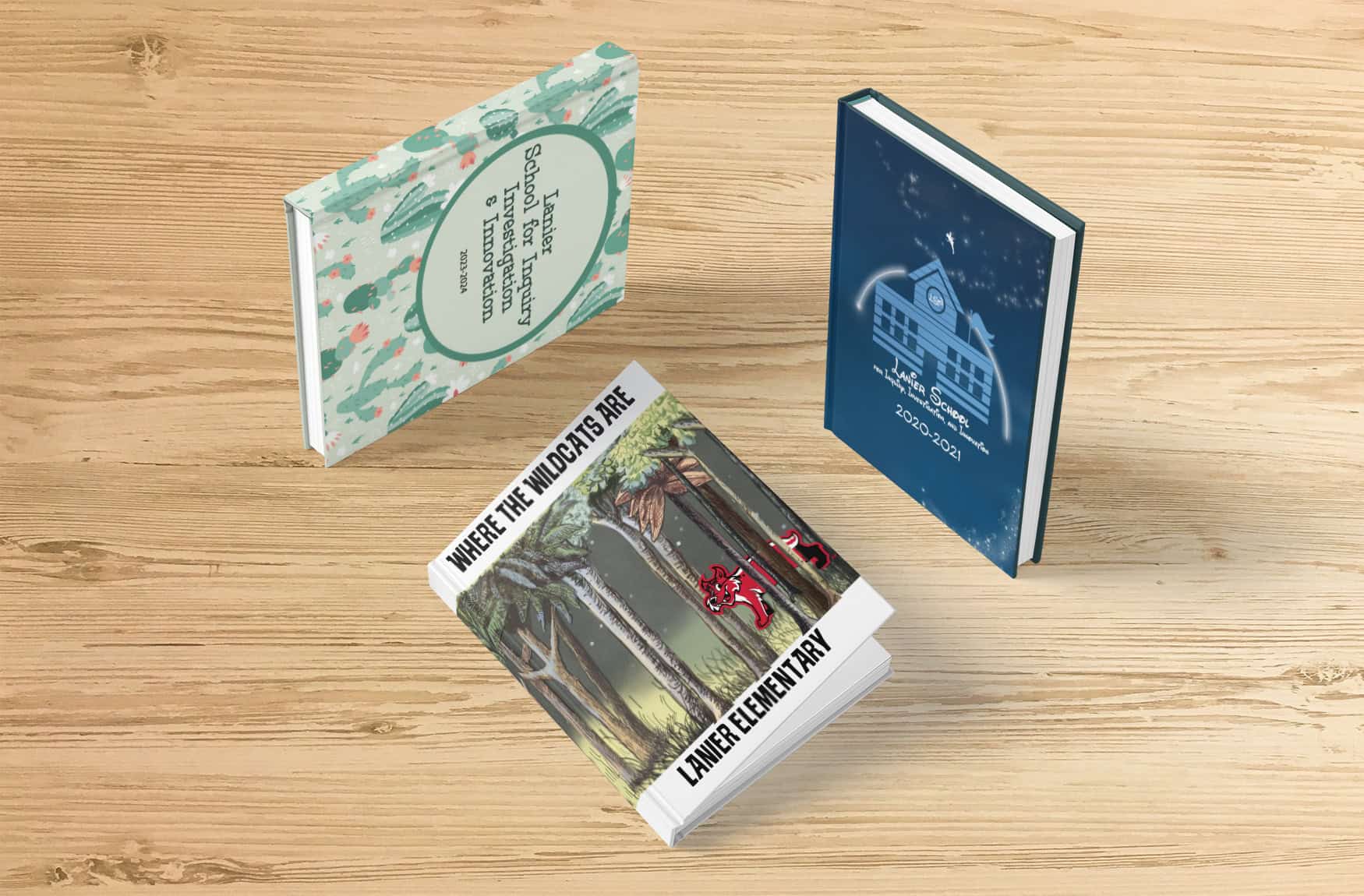
I reveal the theme at the beginning of the year and put the cover on all the flyers and promo materials. It helps with sales: after the reveal, I get a surge. Now, we don't reveal anything else that's in it; they'll just see the cover, but they don't see any of the spreads or anything until it comes out.
You love the Treering themes!
My favorite one was when I made “Where the Wildcats Are.”
When we were using the other company, I would get frustrated every time I opened their design program, and I didn't look forward to working on the yearbook. With Treering, I see a theme I really like, and I envision this spread is going to look this way. It's exciting to go in there and actually see it come together. Treering is so much easier to use to resize pictures and change the shapes of graphics.
Something else I love about Treering is I have until April to get it together. Before, with our other company, I had to finish the yearbook in January. We have a signing day in May after lunch, so I get to hear what the students say about the book. Most of them don’t know I‘m the one who puts it together.
You’re the unsung yearbook hero.
I'm proud of that book; it doesn't bother me that they don't realize that I do it.
Yearbook Hero James Costa masters middle school
Treering Yearbook Heroes is a monthly feature focusing on yearbook tips and tricks.
Yearbook Hero James Costa moved from the Boston newsroom to the middle school classroom. Taking his skillset in graphic design and desktop publishing to yearbook production, Costa started as the yearbook adviser in November of 2023. Already months behind, he worked to collect photos, design pages, and create a visual look by himself. (Wait until you see the cover below.)
Now in his second year as a yearbook creator, he has moved from the campus’ Digital Learning Specialist to teaching five preps as a Tech Ed instructor. Combining his ten years of scaffolding instruction plus the experience of creating the book solo, Costa developed a team structure and workflow so students could help. Under Costa’s leadership, the members of Merrimack Middle School’s first-ever yearbook club are learning design, marketing, and the business of yearbooking.
There are no grades when you do a club. How do you keep students on task?
I understand certain students' strengths and try to encourage and empower them for that. They all have specific jobs. For example, I have a student editor who is detail-oriented. After a big photo dump in our Google Drive, she’ll organize all the photos into folders and delete duplicates. She has an assistant editor to help.
There’s also a yearbook club secretary, treasurer, and communications and outreach director.

Starting in January, Costa and the street team released a monthly yearbook spotlight. They tease the theme, provide ordering info, and hype custom pages.
My superlatives coordinator is in charge of all things superlatives: making the voting form, taking pictures of the winners, and designing the spread. This is the first time we’ve done superlatives.
Some students are more into design and are on the design team creating spreads. We also have a street team that checks out cameras and photographs events.
I instruct them as much as I can in a whole-group setting, and they also need a lot of one-on-one attention. We have about eight consistent kids.
That sounds incredibly organized. What tasks are currently on your team’s to-do list?
This year is inspired by music. We’re using “Wrapped” and working out how to incorporate elements such as “This or That?” (Olivia Rodrigo vs. Sabrina Carpenter, pop vs. rap). Right now, we're in the stages of just kind of building the ladder and collecting a ton of pictures.
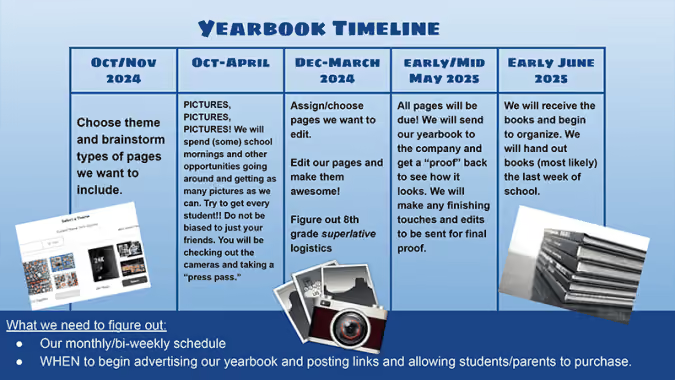
We're just seeing how it evolves and seeing what the layouts give us. I think it's going to be much different from last year's from a design perspective, hopefully, a little cleaner. I had a lot of collages that were kind of just pictures thrown together, but I know the kids like the layouts a little bit more.
Many of us on staff are in love with the “8-Bit” book you created last year. How did you carry it out?
The funny thing about 8-Bit is that I'll show teachers, and they respond, “It's like Mario,” and the kids see it and say, “It's like Minecraft.” So you see that big division in the generations.
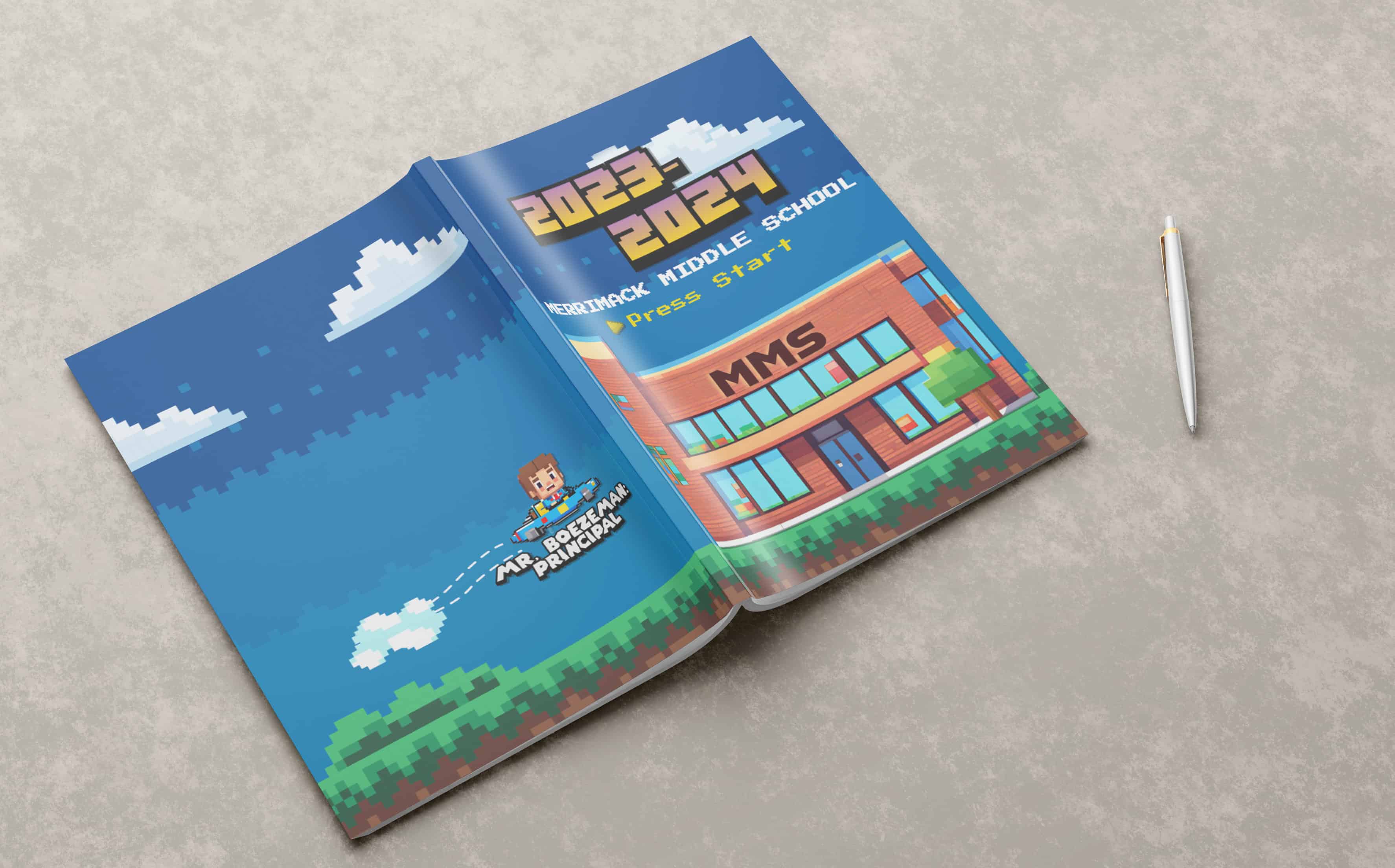
I started with the Treering theme backgrounds as inspiration. On each spread, you see an 8-bit avatar of a teacher. I made those with AI; it was a lot of work word-smithing the prompts to get them to look exactly like the teachers, but that was a lot of fun.
It sounds like fun is a core value of the Merrimack team.
I'm going to give the kids a big shout-out. If I have a tough week, and our yearbook meetings are Friday afternoons, I leave feeling like I had a great day.

Yearbook proofing tools
Raise your hand if you do your best proofing after the yearbook goes to print. We've all had that cringe moment when you notice two baseball players' names interchanged in the sports section or the student who joined the second semester flowed with the wrong class. We can all agree: proofing is critical for the yearbook creation process. Consistency and the proper tools will help you ensure no mistakes slip through the cracks.
One-time: printed proof
Would you like a copy of your yearbook before distribution day to check your fonts, colors, layout, cover texture, and photo quality? We've got you.
Once your yearbook is approximately 70% complete, order a printed proof of your yearbook to review the following:
- Cover alignment and bleed
- Portraits (accuracy, name size, and font)
- Gutter
- Bleed and margins
- Font choices, sizes, and colors
- Background contrast
- Spelling and attribution
- Photo clarity and color
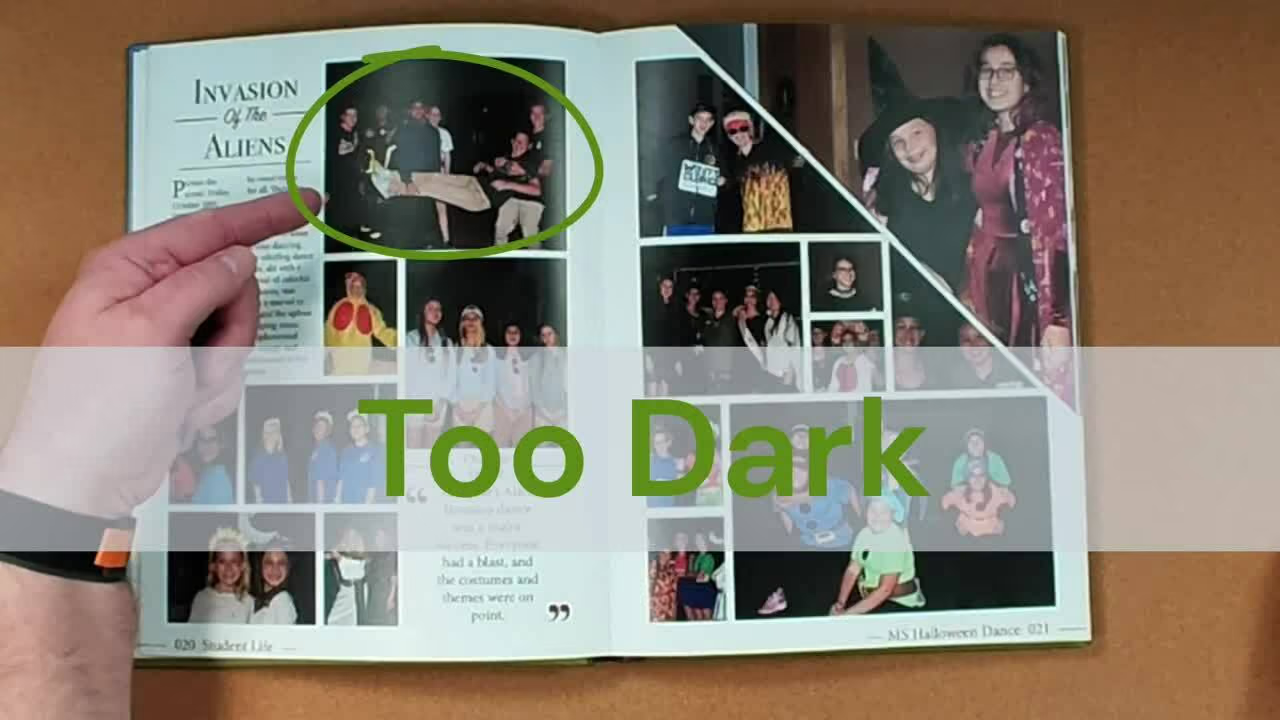
Monthly: use PDF proofs
Print out a hard copy. Errors that are missed on the screen often jump out on paper. Create PDF proofs of class, event, club, and athletic pages to provide to the appropriate stakeholders for their review. Ask them:
- Is the content accurate? Is anything missing?
- Are names spelled correctly and referencing the correct person?
- Do these photos accurately represent the page's content and our student body?
Remember they need some time to review it, and should it require changes, you will need time to incorporate them.
Text proofreading tips
Read all captions, pull quotes, and headlines out loud. It may feel silly, and once you do it, you will see and hear the value:
- Tone, word choice, and sentence structure pop when you read them out loud
- If all your writing sounds the same, you may want to mix up sentence structure or type
Proofing yearbook quotes
Proofing is essential if your school uses expanded captions, pull quotes, or <gasp> senior quotes. A transcription tool for interviews, such as Otter.ai, which integrates with Google Docs, is handy for recording conversations.
Quotes must not be taken out of context. We do not alter quotations, even to correct grammatical errors or word usage. If a quotation is flawed because of grammar or lack of clarity, it may be paraphrased in a way that is completely true to the original quote. If a quote's meaning is too murky to be paraphrased accurately, it should not be used. Ellipses should be used rarely and must not alter the speaker’s meaning.
AP Style Guide
(Here's an article from CBS News and one from Slate that addresses language learners to review with your students.)
Sharing is caring: use printed proofs to tease the book
This isn't the first time we’ll make this suggestion, and it won't be the last.
Ongoing: rubrics and checklists
The best time to begin proofing yearbook spreads is after you’ve finished each page and well before you need to go to print. Informal editing can happen on screen with an editor or adviser. We also highly recommend peer editing on a projector with the whole team. Use a rubric to help guide the conversation.

Proofing and editing aren't a one-and-done thing. (Sorry not sorry!) It takes time to craft the perfect story and to create a solid layout from scratch. And if DIY is not your thing, the thousands of layout templates in the Treering library are at your disposal.
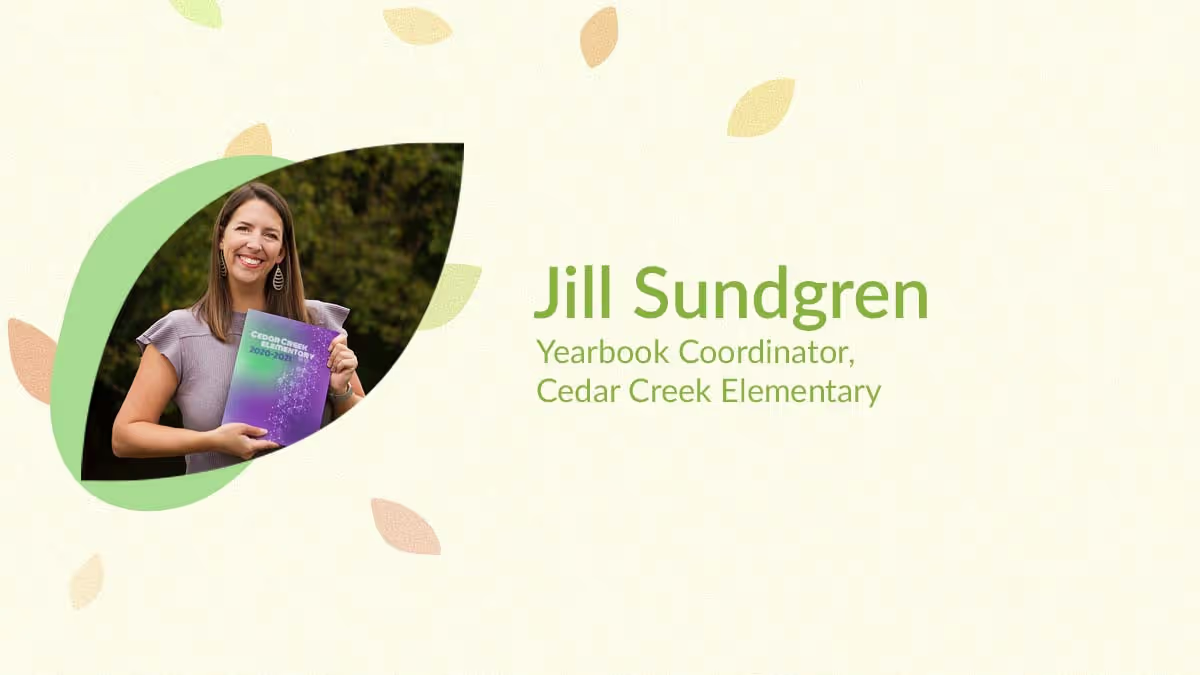
Yearbook hero Jill Sundgren crowdsources a yearbook
Treering Yearbook Heroes is a monthly feature focusing on yearbook adviser tips and tricks.
This year we at Treering called on all our schools’ parents, teachers and students to nominate yearbook heroes in a first-ever peoples’ contest: #YearbookHero. The yearbook callout contest was prompted by our empathy and true appreciation for our yearbook editors.
Jill Sundgren of Cedar Creek Elementary School, located in Olathe, Kansas won first place in the elementary division for the nationwide contest; she was nominated by parent and PTO president, Barb Hendricks, for spearheading the school’s yearbook and inspiring a yearbook committee to work collectively and creatively to capture and preserve the important stories of the year—even when parents weren’t allowed to be on campus!
What does it mean to you to be Cedar Creek Elementary's Yearbook Hero?
I am so honored (and a little shocked) to be named Cedar Creek's Yearbook Hero. But I do feel like this honor really should be extended to my entire committee. This yearbook was definitely a team effort from the design to the brainstorming of pages to layouts to photo gathering. It's so sweet that I am being recognized, but as I'm sure you all know, a yearbook is a huge undertaking and I don't do it alone! I think it's amazing that Cedar Creek is getting recognized for our efforts and creativity because we really do have such an awesome community of parents who make this all possible.
I especially want to thank Barb Hendricks for nominating me and getting me involved in the yearbook in the first place. I absolutely love being involved in the yearbook committee and can't wait to see what this year has in store for us. I think we learned a lot creating the yearbook last year and we are going to try and incorporate some of the ideas that came out of it into future books. I'm hoping to keep up the momentum and produce an even better product this year!
How have you been getting photos when parents aren’t permitted on campus?
Being unable to set foot on campus last year was certainly an obstacle, but with the help of our amazing PTO members, school staff, yearbook committee and community of parents, we were able to still capture the year in a holistic way.
First, we had to get creative on the types of pages we wanted to showcase. A lot of the programs and activities that we normally feature weren't happening last year, so we had to look at some things that happened outside of the school walls to fill the yearbook. We featured seasonal pages (summer, fall, winter and spring activities), sports teams and remote learning, among other activities. Our PTO has a private Facebook page where we solicited photos for some of these activities from parents - and our parents sure did deliver!
Our school still tried to make the year fun by continuing spirit weeks, outdoor photo ops and off-campus activities (for instance, our father/daughter activity was an in-home movie night); so again, we asked parents to snap photos prior to school of their kids dressed up and share with our team. Our principal also let us take photos (outside and masked) as kids arrived at school so we could fill in some holes for our dress-up spirit days. And, of course, we enlisted the help of the teachers to try and capture some photos inside the classroom as well. This all resulted in showcasing our year in and outside of school.
Our ultimate goal was to show that while the pandemic may have changed our way of living, it didn't damper our spirits or ability to have some fun!
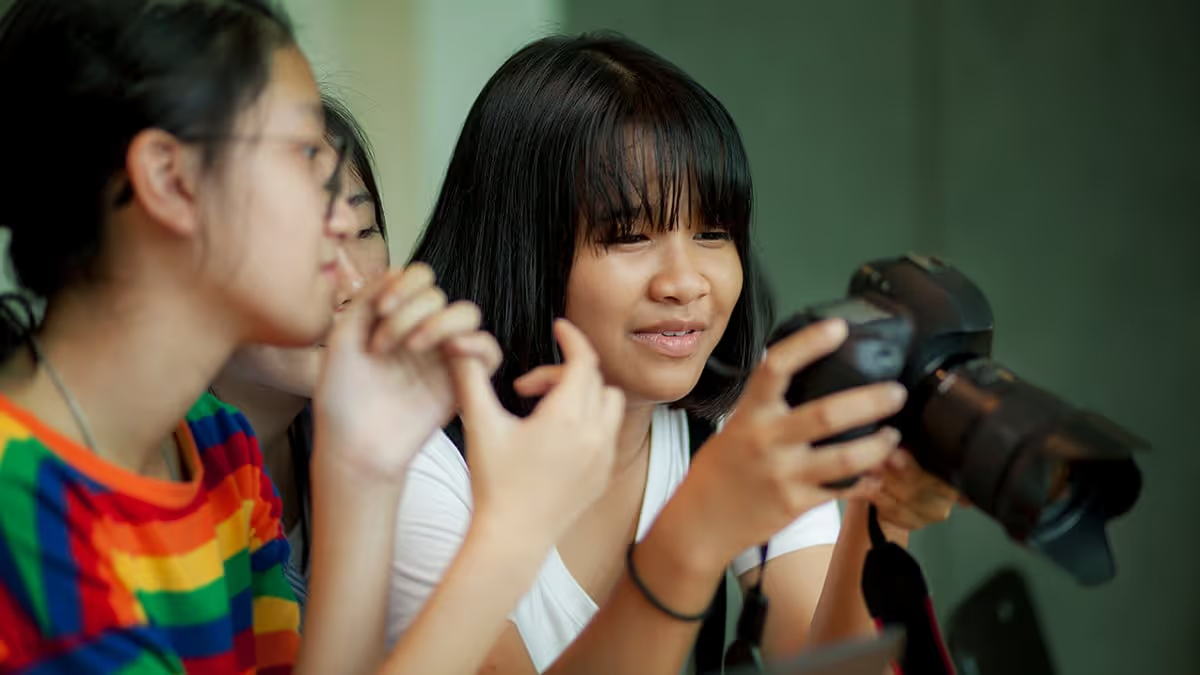
Teaching yearbook: 5 photography mini lessons
Improving yearbooking skill sets is an ongoing process, and we sometimes forgo instructional time as deadline season creeps in. Using these five mini-yearbook lessons, you'll be able to improve your photography skills with a DSLR, mirrorless, or cell phone camera while still having plenty of time for yearbook production.
Lesson 1: rule of thirds
Imagine your photo divided into a tic-tac-toe grid, with two horizontal and two vertical lines, creating nine parts. Instead of placing your subject dead center, try aligning them along these gridlines. The asymmetry adds interest to your composition.

Action should flow across your photo, not off it. The same goes for eyes: you want your subject looking in.
Try it!
Head out to the school courtyard and practice the rule of thirds with your classmates. Practice taking both vertical (portrait) and horizontal (landscape) portraits, ensuring your subjects are placed along the gridlines for a visually pleasing result.
Lesson 2: angles in composition
By experimenting with these angles, photographers convey different emotions, perspectives, and stories in their images.

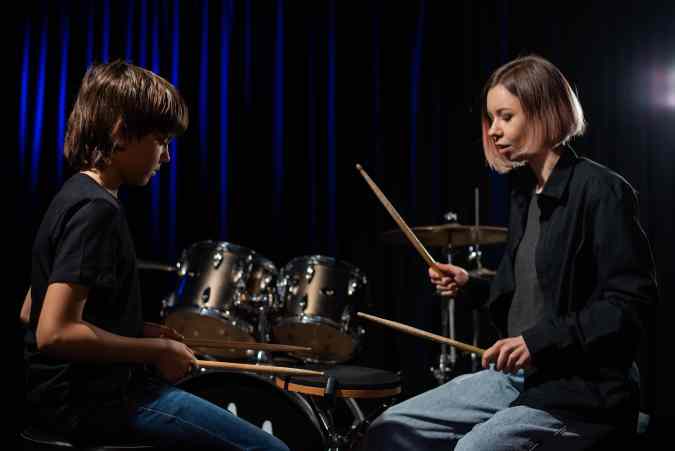
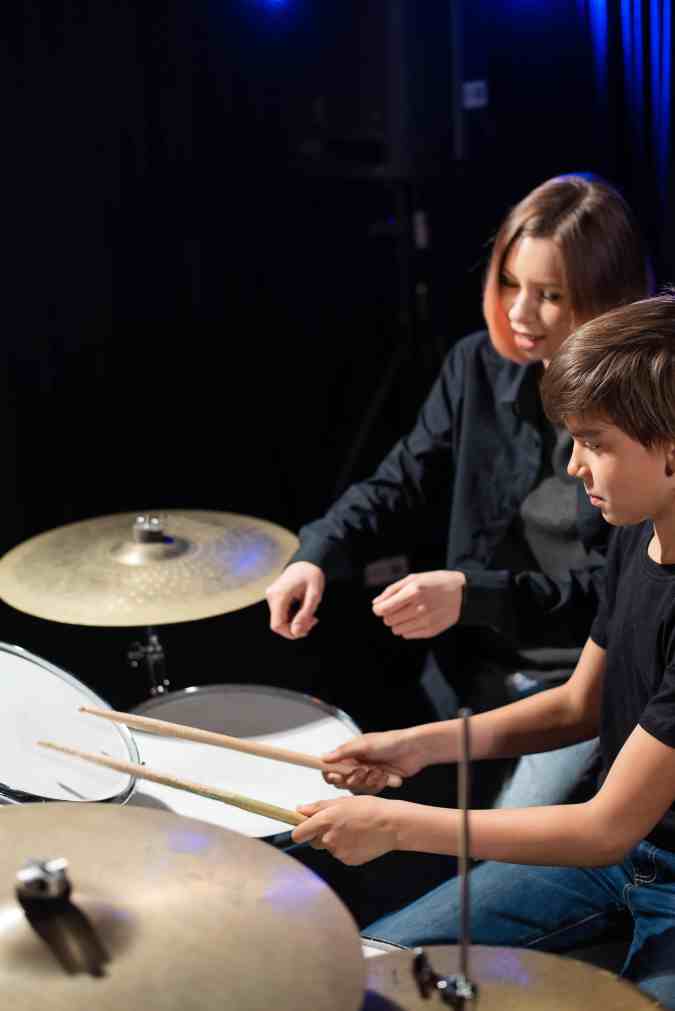
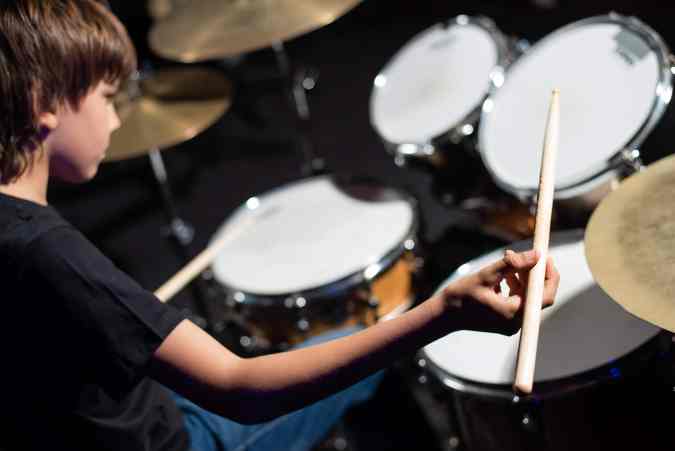
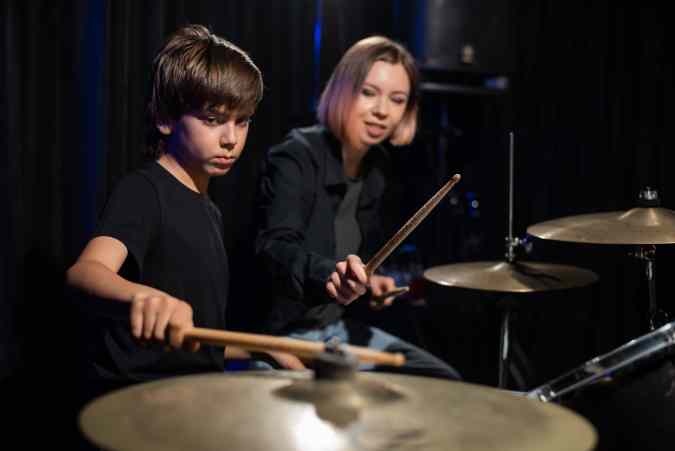
While these photos have the same subject, the variety of angles tells a different moment in the story.
Practice each of these photo angles during your lessons.
- Eye level: This is most common because the photographer captures subjects at the same height as the camera.
- Worm’s eye view: This varies between dramatic and unflattering, so use with caution. By lowering the camera, the subject appears larger.
- Bird's eye view: A great view to use when students are collaborating on a project, this captures scenes from above.
- Close-up (Macro): Cameras and their phone counterparts usually have a setting to help focus on small details or subjects up close. This is great for art class or some science labs (not dissections) when you need to reveal intricate textures and patterns.
- Wide-angle: Oh, the 0.5 that is trending! A traditional wide-angle shot captures a broader view and exaggerates perspective.
- Over the shoulder: Sometimes, the story is in the work, not the student. (This also helps with camera-shy students.)
- Overhead angle: For flat lays (e.g., what’s in my backpack modules), shoot downward from an overhead position.
Try it!
Stage a student at work in the classroom. Taking turns, yearbook photographers should circle and move around the subject, snapping photos using the above angles. For more application, one student can “direct” the photoshoot, explaining which angle to practice and how to achieve it.
Lesson 3: cell phone photography
Cell phone cameras make yearbook photography more convenient for students–it’s a familiar and comfortable way to document the day. While DSLR and mirrorless cameras give more control over light, cell phones are lightweight and on your person nearly 24/7.
As with a traditional camera, you want to hold the phone steady with both hands, elbows in. This adds stability and reduces blur, especially in low-light situations.
Additionally, remember to zoom with your feet. My yearbook adviser gave me this photography lesson back in the 90s, and it still holds. This means photographers move to the subject and avoid a single, stationary vantage point. Ultimately, the composition and photo quality will be better.
By pinching and zooming, you reduce the pixels in the photo, thus destroying its quality. It’s better to zoom and crop once the photo is on your spread.
Try it!
Turn the grid on your phone cameras (Android, iPhone) and repeat the previous exercises on the rule of thirds and angles. Remember, the principles of photography are universal.
Yearbook PSA
With a camera in most teachers’ and parents’ pockets, you have an additional photography crew on campus. Creating shared photo folders and communicating how to get pics in them allows more stories and POVs to be told.
Lesson 4: depth of field (portrait mode)
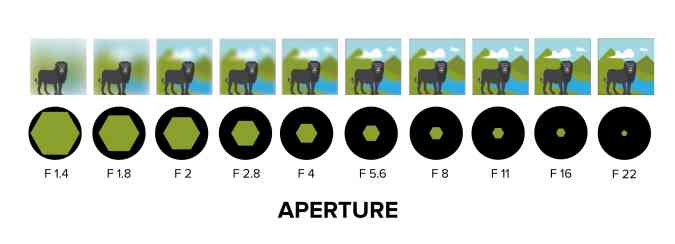
Depth of field is a crucial aspect of photography, influenced by the aperture setting on a camera. The aperture is the physical opening in the lens that controls the amount of light entering the camera. The wider the aperture opens, the more light passes through.
Portrait mode on a cell phone mimics depth of field by using depth mapping, selective focus, and, sometimes, multiple lenses to create a shallow depth of field, similar to what is achieved with a wide aperture on a traditional camera. (Click here for the full technical read.)
Try it!
Using both a camera and a cell phone, take headshots of your yearbook staff. Try f/22, f/8, and f/1.4. Repeat, focusing on objects, such as a baseball or pointe shoes, in the hands of a student.
Lesson 5: assessment
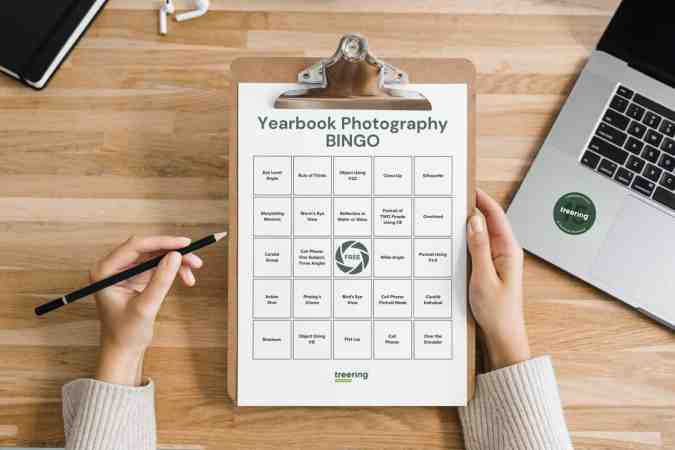
Every unit needs a culminating activity. And since we love gamifying yearbook class, here is a photography Bingo card. You can use this in a few ways:
- Coverall: assign students the card to complete
- Traditional: make it a race to get five in a row
- Collaborative: as a group, work through the card; you may assign teams a row or column
- Minute-to-win-it: Give students a time limit (more than a minute) to achieve as many tasks as possible
What makes a great yearbook photo?
The short answer: storytelling photos.
A yearbook narrative of the entire school year. Candid moments, such as in-class discussions, reactions at a game or awards ceremony, or spontaneous interactions between friends, are emotive. While posed pictures have their place–the portrait section is full of them–action shots bring a sense of vitality and excitement to your yearbook.

By applying the composition tips above, your yearbook photography is already diversified. The variety of angles and depth of field alone will increase the visual appeal of each layout.
Taking multiple shots of your subject is a great way to ensure you get the best pose, reaction, and composite. Deleting unwanted images only takes seconds and not getting the most effective image in the first place is a missed opportunity that can’t be duplicated.
Additional photography resources for yearbook classes and clubs: